Send your first trace
Connect your agent
Open Lens > Traces > Set up tracing, generate a tracing key, and copy the ingestion URL. Point your agent's OpenTelemetry OTLP/HTTP exporter to that URL:
| Setting | Value |
|---|---|
| Trace endpoint | https://<your-lens-ingestion-host>/v1/traces |
| HTTP header | Authorization: Bearer <your-lens-tracing-key> |
Use the dedicated tracing key to authenticate. It cannot call models or read trace contents. If the copied URL ends in /lens-ingest, keep that prefix before /v1/traces. Record the agent's task, steps, tool calls, inputs, and final answer. Lens uses this content to check what happened.
For a working example, use DeepLite. Set LITELLM_DEV_BASE=https://<your-lens-ingestion-host>/v1/traces and LITELLM_DEV_KEY=<your-lens-tracing-key> in its .env file, then run the agent.
Configure the exporter
Use your existing model configuration. Set the trace destination once, then choose an integration from the sidebar. Replace research_agent with your agent's name.
export OTEL_EXPORTER_OTLP_TRACES_ENDPOINT="https://<your-lens-ingestion-host>/v1/traces"
export OTEL_EXPORTER_OTLP_TRACES_HEADERS="Authorization=Bearer <your-lens-tracing-key>"
export OTEL_EXPORTER_OTLP_PROTOCOL="http/protobuf"
export OTEL_METRICS_EXPORTER="none"
export OTEL_LOGS_EXPORTER="none"
Open an integration guide from the sidebar for dependencies, configuration, and runnable simple-agent and swarm examples. The examples send model calls to LiteLLM and traces directly to Lens. Set LITELLM_GATEWAY_URL and LITELLM_API_KEY for models, and LENS_URL and LENS_TRACING_KEY for tracing. If your app already configures a tracer provider, keep it and point its exporter at the destination above.
To record personal coding sessions, follow the Claude Code and Codex setup.
View your first trace
Open Lens > Traces. Select a time range that includes your run, then open it. For the examples above, look for research_agent. The same name is available under Agent when creating an investigation. Select a step to read its input, output, and attributes.
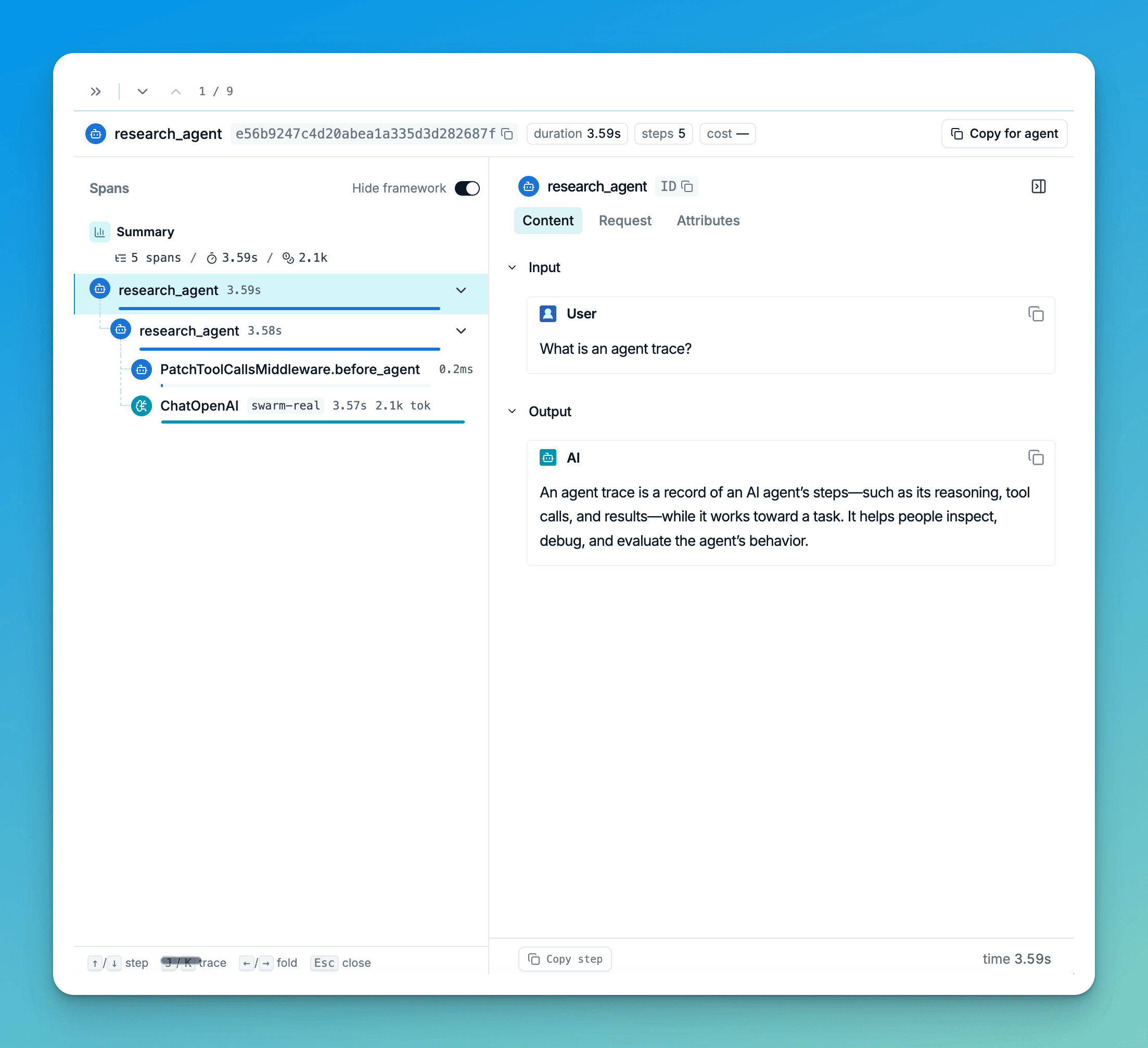
Check that you can see the task, tool results, and final answer. If these are missing, update your agent's instrumentation before running an investigation.
Link a run to its conversation
When a run starts from a conversation, such as a Slack thread, a Teams chat, or your own bot, set these attributes on the run's root agent span. Lens adds a Source field to the top of the trace with the app's logo, and hovering it shows the title.
| Attribute | Value |
|---|---|
agent.source.type | Where the conversation lives: slack, teams, discord, linear, github, jira, or custom. A missing or unknown value is treated as custom |
agent.source.url | An https:// link to the conversation, such as a Slack thread permalink. Other schemes are ignored |
agent.source.title | Short text shown when hovering the link, such as the thread's first message. Optional |
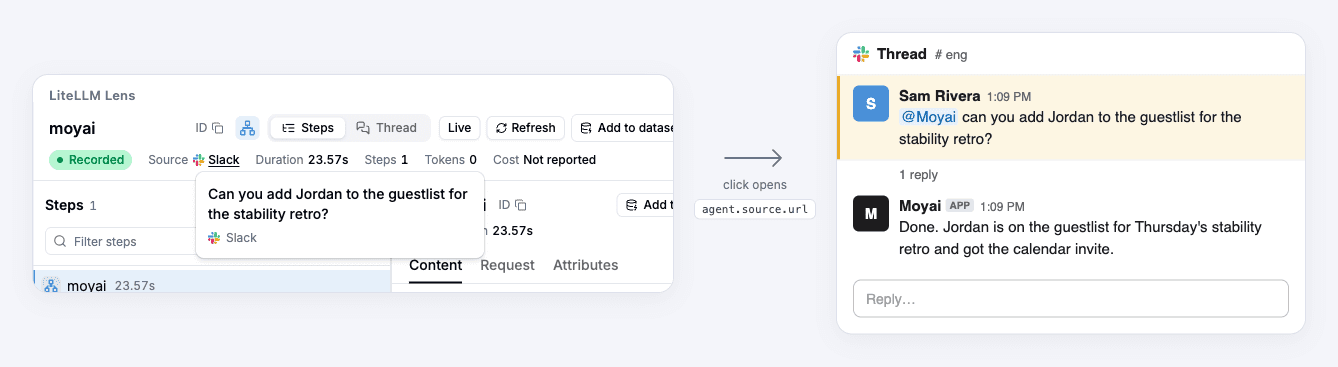
The type picks the logo and name, so slack shows the Slack logo and Slack. Use custom for your own bot or anything not listed. If the root span doesn't carry the attributes, Lens uses the earliest span that does.
with tracer.start_as_current_span("research_agent") as span:
    span.set_attribute("agent.source.type", "slack")
    span.set_attribute("agent.source.url", "https://acme.slack.com/archives/C0123ABCD/p1759869540000100")
    span.set_attribute("agent.source.title", "Can you add me to the guestlist for the retro?")
    run_agent(task)
The source is returned as summary.source, with type, url, and title, from the trace API.