<?xml version="1.0" encoding="utf-8"?>
<feed xmlns="http://www.w3.org/2005/Atom">
    <id>https://docs.litellm.ai/blog</id>
    <title>liteLLM Blog</title>
    <updated>2026-10-07T10:00:00.000Z</updated>
    <generator>https://github.com/jpmonette/feed</generator>
    <link rel="alternate" href="https://docs.litellm.ai/blog"/>
    <subtitle>liteLLM Blog</subtitle>
    <icon>https://docs.litellm.ai/img/brand/litellm-favicon.svg</icon>
    <entry>
        <title type="html"><![CDATA[Claude Haiku 5.5 API Pricing and Day 0 Support on LiteLLM]]></title>
        <id>https://docs.litellm.ai/blog/claude-haiku-5-5</id>
        <link href="https://docs.litellm.ai/blog/claude-haiku-5-5"/>
        <updated>2026-10-07T10:00:00.000Z</updated>
        <summary type="html"><![CDATA[Claude Haiku 5.5 costs $0.10 per 1M input tokens and $0.50 per 1M output tokens. LiteLLM supports it on day 0 on Anthropic, AWS, Google Cloud and Azure.]]></summary>
        <content type="html"><![CDATA[<p><img decoding="async" loading="lazy" alt="Claude Haiku 5.5 on LiteLLM" src="https://docs.litellm.ai/assets/images/litellm_claude_haiku_5_5_announcement-6e471bf00e33af3062bc301c53d613ff.png" width="4800" height="2508" class="img_ev3q"></p>
<p>LiteLLM now supports <a href="https://www.anthropic.com/claude-haiku-5-5" target="_blank" rel="noopener noreferrer">Claude Haiku 5.5</a> on Day 0. Use it across Anthropic, Bedrock, Gemini Enterprise Agent Platform, and Azure through the LiteLLM AI Gateway, with spend, rate limits, and logging in one place.</p>
<!-- -->
<h2 class="anchor anchorWithStickyNavbar_LWe7" id="claude-haiku-55-pricing">Claude Haiku 5.5 pricing<a href="https://docs.litellm.ai/blog/claude-haiku-5-5#claude-haiku-55-pricing" class="hash-link" aria-label="Direct link to Claude Haiku 5.5 pricing" title="Direct link to Claude Haiku 5.5 pricing">​</a></h2>
<ul>
<li><strong>Input:</strong> $0.10 / MTok for prompts up to 100K tokens, $0.50 / MTok above</li>
<li><strong>Output:</strong> $0.50 / MTok, or $2.50 / MTok above 100K</li>
<li><strong>Cache read:</strong> $0.01 / MTok, or $0.05 / MTok above 100K</li>
<li><strong>Batch:</strong> 50% off input and output</li>
</ul>
<p>Prices on every provider: <a href="https://models.litellm.ai/models" target="_blank" rel="noopener noreferrer">https://models.litellm.ai/models</a></p>
<h2 class="anchor anchorWithStickyNavbar_LWe7" id="whats-new-in-claude-haiku-55">What's new in Claude Haiku 5.5<a href="https://docs.litellm.ai/blog/claude-haiku-5-5#whats-new-in-claude-haiku-55" class="hash-link" aria-label="Direct link to What's new in Claude Haiku 5.5" title="Direct link to What's new in Claude Haiku 5.5">​</a></h2>
<ul>
<li><strong>90% cheaper than Haiku 4.5</strong> for prompts up to 100K tokens, and around 75% less to run on average, per Anthropic</li>
<li><strong>72.4% on OSWorld 2.1</strong>, up from Haiku 4.5's 15.7%</li>
<li><strong>1M-token context</strong>, up to 128K output tokens</li>
</ul>
<h2 class="anchor anchorWithStickyNavbar_LWe7" id="use-claude-haiku-55-with-litellm">Use Claude Haiku 5.5 with LiteLLM<a href="https://docs.litellm.ai/blog/claude-haiku-5-5#use-claude-haiku-55-with-litellm" class="hash-link" aria-label="Direct link to Use Claude Haiku 5.5 with LiteLLM" title="Direct link to Use Claude Haiku 5.5 with LiteLLM">​</a></h2>
<p>Pricing landed in <a href="https://github.com/BerriAI/litellm/pull/45108" target="_blank" rel="noopener noreferrer">PR #45108</a>. No upgrade needed: open <strong>Price Data</strong> under <strong>Models + Endpoints</strong> in the UI and click <strong>Reload Price Data</strong> (or <code>POST /reload/model_cost_map</code>), on <code>v1.76.0</code> and above.</p>
<div class="tabs-container tabList__CuJ"><ul role="tablist" aria-orientation="horizontal" class="tabs"><li role="tab" tabindex="0" aria-selected="true" class="tabs__item tabItem_LNqP tabs__item--active">Anthropic</li><li role="tab" tabindex="-1" aria-selected="false" class="tabs__item tabItem_LNqP">Bedrock</li><li role="tab" tabindex="-1" aria-selected="false" class="tabs__item tabItem_LNqP">Gemini Enterprise Agent Platform</li><li role="tab" tabindex="-1" aria-selected="false" class="tabs__item tabItem_LNqP">Azure</li></ul><div class="margin-top--md"><div role="tabpanel" class="tabItem_Ymn6"><p><strong>1. Setup config.yaml</strong></p><div class="language-yaml codeBlockContainer_Ckt0 theme-code-block" style="--prism-color:#393A34;--prism-background-color:#f6f8fa"><div class="codeBlockContent_QJqH"><pre tabindex="0" class="prism-code language-yaml codeBlock_bY9V thin-scrollbar" style="color:#393A34;background-color:#f6f8fa"><code class="codeBlockLines_e6Vv"><span class="token-line" style="color:#393A34"><span class="token key atrule" style="color:#22863A">model_list</span><span class="token punctuation" style="color:#393A34">:</span><span class="token plain"></span><br></span><span class="token-line" style="color:#393A34"><span class="token plain">  </span><span class="token punctuation" style="color:#393A34">-</span><span class="token plain"> </span><span class="token key atrule" style="color:#22863A">model_name</span><span class="token punctuation" style="color:#393A34">:</span><span class="token plain"> claude</span><span class="token punctuation" style="color:#393A34">-</span><span class="token plain">haiku</span><span class="token punctuation" style="color:#393A34">-</span><span class="token plain">5</span><span class="token punctuation" style="color:#393A34">-</span><span class="token number" style="color:#005CC5">5</span><span class="token plain"></span><br></span><span class="token-line" style="color:#393A34"><span class="token plain">    </span><span class="token key atrule" style="color:#22863A">litellm_params</span><span class="token punctuation" style="color:#393A34">:</span><span class="token plain"></span><br></span><span class="token-line" style="color:#393A34"><span class="token plain">      </span><span class="token key atrule" style="color:#22863A">model</span><span class="token punctuation" style="color:#393A34">:</span><span class="token plain"> anthropic/claude</span><span class="token punctuation" style="color:#393A34">-</span><span class="token plain">haiku</span><span class="token punctuation" style="color:#393A34">-</span><span class="token plain">5</span><span class="token punctuation" style="color:#393A34">-</span><span class="token number" style="color:#005CC5">5</span><span class="token plain"></span><br></span><span class="token-line" style="color:#393A34"><span class="token plain">      </span><span class="token key atrule" style="color:#22863A">api_key</span><span class="token punctuation" style="color:#393A34">:</span><span class="token plain"> os.environ/ANTHROPIC_API_KEY</span><br></span></code></pre></div></div><p><strong>2. Start the proxy</strong></p><div class="language-bash codeBlockContainer_Ckt0 theme-code-block" style="--prism-color:#393A34;--prism-background-color:#f6f8fa"><div class="codeBlockContent_QJqH"><pre tabindex="0" class="prism-code language-bash codeBlock_bY9V thin-scrollbar" style="color:#393A34;background-color:#f6f8fa"><code class="codeBlockLines_e6Vv"><span class="token-line" style="color:#393A34"><span class="token plain">docker run -d \</span><br></span><span class="token-line" style="color:#393A34"><span class="token plain">  -p 4000:4000 \</span><br></span><span class="token-line" style="color:#393A34"><span class="token plain">  -e ANTHROPIC_API_KEY=$ANTHROPIC_API_KEY \</span><br></span><span class="token-line" style="color:#393A34"><span class="token plain">  -v $(pwd)/config.yaml:/app/config.yaml \</span><br></span><span class="token-line" style="color:#393A34"><span class="token plain">  ghcr.io/berriai/litellm:v1.104.0 \</span><br></span><span class="token-line" style="color:#393A34"><span class="token plain">  --config /app/config.yaml</span><br></span></code></pre></div></div></div><div role="tabpanel" class="tabItem_Ymn6" hidden=""><p><strong>1. Setup config.yaml</strong></p><div class="language-yaml codeBlockContainer_Ckt0 theme-code-block" style="--prism-color:#393A34;--prism-background-color:#f6f8fa"><div class="codeBlockContent_QJqH"><pre tabindex="0" class="prism-code language-yaml codeBlock_bY9V thin-scrollbar" style="color:#393A34;background-color:#f6f8fa"><code class="codeBlockLines_e6Vv"><span class="token-line" style="color:#393A34"><span class="token key atrule" style="color:#22863A">model_list</span><span class="token punctuation" style="color:#393A34">:</span><span class="token plain"></span><br></span><span class="token-line" style="color:#393A34"><span class="token plain">  </span><span class="token punctuation" style="color:#393A34">-</span><span class="token plain"> </span><span class="token key atrule" style="color:#22863A">model_name</span><span class="token punctuation" style="color:#393A34">:</span><span class="token plain"> claude</span><span class="token punctuation" style="color:#393A34">-</span><span class="token plain">haiku</span><span class="token punctuation" style="color:#393A34">-</span><span class="token plain">5</span><span class="token punctuation" style="color:#393A34">-</span><span class="token number" style="color:#005CC5">5</span><span class="token plain"></span><br></span><span class="token-line" style="color:#393A34"><span class="token plain">    </span><span class="token key atrule" style="color:#22863A">litellm_params</span><span class="token punctuation" style="color:#393A34">:</span><span class="token plain"></span><br></span><span class="token-line" style="color:#393A34"><span class="token plain">      </span><span class="token key atrule" style="color:#22863A">model</span><span class="token punctuation" style="color:#393A34">:</span><span class="token plain"> bedrock/anthropic.claude</span><span class="token punctuation" style="color:#393A34">-</span><span class="token plain">haiku</span><span class="token punctuation" style="color:#393A34">-</span><span class="token plain">5</span><span class="token punctuation" style="color:#393A34">-</span><span class="token number" style="color:#005CC5">5</span><span class="token plain"></span><br></span><span class="token-line" style="color:#393A34"><span class="token plain">      </span><span class="token key atrule" style="color:#22863A">aws_access_key_id</span><span class="token punctuation" style="color:#393A34">:</span><span class="token plain"> os.environ/AWS_ACCESS_KEY_ID</span><br></span><span class="token-line" style="color:#393A34"><span class="token plain">      </span><span class="token key atrule" style="color:#22863A">aws_secret_access_key</span><span class="token punctuation" style="color:#393A34">:</span><span class="token plain"> os.environ/AWS_SECRET_ACCESS_KEY</span><br></span><span class="token-line" style="color:#393A34"><span class="token plain">      </span><span class="token key atrule" style="color:#22863A">aws_region_name</span><span class="token punctuation" style="color:#393A34">:</span><span class="token plain"> us</span><span class="token punctuation" style="color:#393A34">-</span><span class="token plain">east</span><span class="token punctuation" style="color:#393A34">-</span><span class="token number" style="color:#005CC5">1</span><br></span></code></pre></div></div><p><strong>2. Start the proxy</strong></p><div class="language-bash codeBlockContainer_Ckt0 theme-code-block" style="--prism-color:#393A34;--prism-background-color:#f6f8fa"><div class="codeBlockContent_QJqH"><pre tabindex="0" class="prism-code language-bash codeBlock_bY9V thin-scrollbar" style="color:#393A34;background-color:#f6f8fa"><code class="codeBlockLines_e6Vv"><span class="token-line" style="color:#393A34"><span class="token plain">docker run -d \</span><br></span><span class="token-line" style="color:#393A34"><span class="token plain">  -p 4000:4000 \</span><br></span><span class="token-line" style="color:#393A34"><span class="token plain">  -e AWS_ACCESS_KEY_ID=$AWS_ACCESS_KEY_ID \</span><br></span><span class="token-line" style="color:#393A34"><span class="token plain">  -e AWS_SECRET_ACCESS_KEY=$AWS_SECRET_ACCESS_KEY \</span><br></span><span class="token-line" style="color:#393A34"><span class="token plain">  -v $(pwd)/config.yaml:/app/config.yaml \</span><br></span><span class="token-line" style="color:#393A34"><span class="token plain">  ghcr.io/berriai/litellm:v1.104.0 \</span><br></span><span class="token-line" style="color:#393A34"><span class="token plain">  --config /app/config.yaml</span><br></span></code></pre></div></div></div><div role="tabpanel" class="tabItem_Ymn6" hidden=""><p><strong>1. Setup config.yaml</strong></p><div class="language-yaml codeBlockContainer_Ckt0 theme-code-block" style="--prism-color:#393A34;--prism-background-color:#f6f8fa"><div class="codeBlockContent_QJqH"><pre tabindex="0" class="prism-code language-yaml codeBlock_bY9V thin-scrollbar" style="color:#393A34;background-color:#f6f8fa"><code class="codeBlockLines_e6Vv"><span class="token-line" style="color:#393A34"><span class="token key atrule" style="color:#22863A">model_list</span><span class="token punctuation" style="color:#393A34">:</span><span class="token plain"></span><br></span><span class="token-line" style="color:#393A34"><span class="token plain">  </span><span class="token punctuation" style="color:#393A34">-</span><span class="token plain"> </span><span class="token key atrule" style="color:#22863A">model_name</span><span class="token punctuation" style="color:#393A34">:</span><span class="token plain"> claude</span><span class="token punctuation" style="color:#393A34">-</span><span class="token plain">haiku</span><span class="token punctuation" style="color:#393A34">-</span><span class="token plain">5</span><span class="token punctuation" style="color:#393A34">-</span><span class="token number" style="color:#005CC5">5</span><span class="token plain"></span><br></span><span class="token-line" style="color:#393A34"><span class="token plain">    </span><span class="token key atrule" style="color:#22863A">litellm_params</span><span class="token punctuation" style="color:#393A34">:</span><span class="token plain"></span><br></span><span class="token-line" style="color:#393A34"><span class="token plain">      </span><span class="token key atrule" style="color:#22863A">model</span><span class="token punctuation" style="color:#393A34">:</span><span class="token plain"> vertex_ai/claude</span><span class="token punctuation" style="color:#393A34">-</span><span class="token plain">haiku</span><span class="token punctuation" style="color:#393A34">-</span><span class="token plain">5</span><span class="token punctuation" style="color:#393A34">-</span><span class="token number" style="color:#005CC5">5</span><span class="token plain"></span><br></span><span class="token-line" style="color:#393A34"><span class="token plain">      </span><span class="token key atrule" style="color:#22863A">vertex_project</span><span class="token punctuation" style="color:#393A34">:</span><span class="token plain"> os.environ/VERTEX_PROJECT</span><br></span><span class="token-line" style="color:#393A34"><span class="token plain">      </span><span class="token key atrule" style="color:#22863A">vertex_location</span><span class="token punctuation" style="color:#393A34">:</span><span class="token plain"> global</span><br></span></code></pre></div></div><p><strong>2. Start the proxy</strong></p><div class="language-bash codeBlockContainer_Ckt0 theme-code-block" style="--prism-color:#393A34;--prism-background-color:#f6f8fa"><div class="codeBlockContent_QJqH"><pre tabindex="0" class="prism-code language-bash codeBlock_bY9V thin-scrollbar" style="color:#393A34;background-color:#f6f8fa"><code class="codeBlockLines_e6Vv"><span class="token-line" style="color:#393A34"><span class="token plain">docker run -d \</span><br></span><span class="token-line" style="color:#393A34"><span class="token plain">  -p 4000:4000 \</span><br></span><span class="token-line" style="color:#393A34"><span class="token plain">  -e VERTEX_PROJECT=$VERTEX_PROJECT \</span><br></span><span class="token-line" style="color:#393A34"><span class="token plain">  -e GOOGLE_APPLICATION_CREDENTIALS=/app/credentials.json \</span><br></span><span class="token-line" style="color:#393A34"><span class="token plain">  -v $(pwd)/config.yaml:/app/config.yaml \</span><br></span><span class="token-line" style="color:#393A34"><span class="token plain">  -v $(pwd)/credentials.json:/app/credentials.json \</span><br></span><span class="token-line" style="color:#393A34"><span class="token plain">  ghcr.io/berriai/litellm:v1.104.0 \</span><br></span><span class="token-line" style="color:#393A34"><span class="token plain">  --config /app/config.yaml</span><br></span></code></pre></div></div></div><div role="tabpanel" class="tabItem_Ymn6" hidden=""><p><strong>1. Setup config.yaml</strong></p><div class="language-yaml codeBlockContainer_Ckt0 theme-code-block" style="--prism-color:#393A34;--prism-background-color:#f6f8fa"><div class="codeBlockContent_QJqH"><pre tabindex="0" class="prism-code language-yaml codeBlock_bY9V thin-scrollbar" style="color:#393A34;background-color:#f6f8fa"><code class="codeBlockLines_e6Vv"><span class="token-line" style="color:#393A34"><span class="token key atrule" style="color:#22863A">model_list</span><span class="token punctuation" style="color:#393A34">:</span><span class="token plain"></span><br></span><span class="token-line" style="color:#393A34"><span class="token plain">  </span><span class="token punctuation" style="color:#393A34">-</span><span class="token plain"> </span><span class="token key atrule" style="color:#22863A">model_name</span><span class="token punctuation" style="color:#393A34">:</span><span class="token plain"> claude</span><span class="token punctuation" style="color:#393A34">-</span><span class="token plain">haiku</span><span class="token punctuation" style="color:#393A34">-</span><span class="token plain">5</span><span class="token punctuation" style="color:#393A34">-</span><span class="token number" style="color:#005CC5">5</span><span class="token plain"></span><br></span><span class="token-line" style="color:#393A34"><span class="token plain">    </span><span class="token key atrule" style="color:#22863A">litellm_params</span><span class="token punctuation" style="color:#393A34">:</span><span class="token plain"></span><br></span><span class="token-line" style="color:#393A34"><span class="token plain">      </span><span class="token key atrule" style="color:#22863A">model</span><span class="token punctuation" style="color:#393A34">:</span><span class="token plain"> azure_ai/claude</span><span class="token punctuation" style="color:#393A34">-</span><span class="token plain">haiku</span><span class="token punctuation" style="color:#393A34">-</span><span class="token plain">5</span><span class="token punctuation" style="color:#393A34">-</span><span class="token number" style="color:#005CC5">5</span><span class="token plain"></span><br></span><span class="token-line" style="color:#393A34"><span class="token plain">      </span><span class="token key atrule" style="color:#22863A">api_key</span><span class="token punctuation" style="color:#393A34">:</span><span class="token plain"> os.environ/AZURE_AI_API_KEY</span><br></span><span class="token-line" style="color:#393A34"><span class="token plain">      </span><span class="token key atrule" style="color:#22863A">api_base</span><span class="token punctuation" style="color:#393A34">:</span><span class="token plain"> os.environ/AZURE_AI_API_BASE  </span><span class="token comment" style="color:#6B6B6B;font-style:italic"># https://&lt;resource&gt;.services.ai.azure.com</span><br></span></code></pre></div></div><p><strong>2. Start the proxy</strong></p><div class="language-bash codeBlockContainer_Ckt0 theme-code-block" style="--prism-color:#393A34;--prism-background-color:#f6f8fa"><div class="codeBlockContent_QJqH"><pre tabindex="0" class="prism-code language-bash codeBlock_bY9V thin-scrollbar" style="color:#393A34;background-color:#f6f8fa"><code class="codeBlockLines_e6Vv"><span class="token-line" style="color:#393A34"><span class="token plain">docker run -d \</span><br></span><span class="token-line" style="color:#393A34"><span class="token plain">  -p 4000:4000 \</span><br></span><span class="token-line" style="color:#393A34"><span class="token plain">  -e AZURE_AI_API_KEY=$AZURE_AI_API_KEY \</span><br></span><span class="token-line" style="color:#393A34"><span class="token plain">  -e AZURE_AI_API_BASE=$AZURE_AI_API_BASE \</span><br></span><span class="token-line" style="color:#393A34"><span class="token plain">  -v $(pwd)/config.yaml:/app/config.yaml \</span><br></span><span class="token-line" style="color:#393A34"><span class="token plain">  ghcr.io/berriai/litellm:v1.104.0 \</span><br></span><span class="token-line" style="color:#393A34"><span class="token plain">  --config /app/config.yaml</span><br></span></code></pre></div></div></div></div></div>
<p><strong>3. Test it!</strong></p>
<div class="language-bash codeBlockContainer_Ckt0 theme-code-block" style="--prism-color:#393A34;--prism-background-color:#f6f8fa"><div class="codeBlockContent_QJqH"><pre tabindex="0" class="prism-code language-bash codeBlock_bY9V thin-scrollbar" style="color:#393A34;background-color:#f6f8fa"><code class="codeBlockLines_e6Vv"><span class="token-line" style="color:#393A34"><span class="token plain">curl --location 'http://0.0.0.0:4000/chat/completions' \</span><br></span><span class="token-line" style="color:#393A34"><span class="token plain">--header 'Content-Type: application/json' \</span><br></span><span class="token-line" style="color:#393A34"><span class="token plain">--header 'Authorization: Bearer $LITELLM_KEY' \</span><br></span><span class="token-line" style="color:#393A34"><span class="token plain">--data '{</span><br></span><span class="token-line" style="color:#393A34"><span class="token plain">  "model": "claude-haiku-5-5",</span><br></span><span class="token-line" style="color:#393A34"><span class="token plain">  "messages": [</span><br></span><span class="token-line" style="color:#393A34"><span class="token plain">    {</span><br></span><span class="token-line" style="color:#393A34"><span class="token plain">      "role": "user",</span><br></span><span class="token-line" style="color:#393A34"><span class="token plain">      "content": "what llm are you"</span><br></span><span class="token-line" style="color:#393A34"><span class="token plain">    }</span><br></span><span class="token-line" style="color:#393A34"><span class="token plain">  ]</span><br></span><span class="token-line" style="color:#393A34"><span class="token plain">}'</span><br></span></code></pre></div></div>
<h2 class="anchor anchorWithStickyNavbar_LWe7" id="faq">FAQ<a href="https://docs.litellm.ai/blog/claude-haiku-5-5#faq" class="hash-link" aria-label="Direct link to FAQ" title="Direct link to FAQ">​</a></h2>
<h3 class="anchor anchorWithStickyNavbar_LWe7" id="how-much-does-claude-haiku-55-cost">How much does Claude Haiku 5.5 cost?<a href="https://docs.litellm.ai/blog/claude-haiku-5-5#how-much-does-claude-haiku-55-cost" class="hash-link" aria-label="Direct link to How much does Claude Haiku 5.5 cost?" title="Direct link to How much does Claude Haiku 5.5 cost?">​</a></h3>
<p>$0.10 per 1M input tokens and $0.50 per 1M output tokens for prompts up to 100K tokens, and $0.50 and $2.50 above that. Cache reads cost $0.01 per 1M tokens.</p>
<h3 class="anchor anchorWithStickyNavbar_LWe7" id="what-is-the-context-window-of-claude-haiku-55">What is the context window of Claude Haiku 5.5?<a href="https://docs.litellm.ai/blog/claude-haiku-5-5#what-is-the-context-window-of-claude-haiku-55" class="hash-link" aria-label="Direct link to What is the context window of Claude Haiku 5.5?" title="Direct link to What is the context window of Claude Haiku 5.5?">​</a></h3>
<p>1M tokens, with up to 128K output tokens per request.</p>
<h3 class="anchor anchorWithStickyNavbar_LWe7" id="how-do-i-call-claude-haiku-55-with-an-openai-compatible-api">How do I call Claude Haiku 5.5 with an OpenAI-compatible API?<a href="https://docs.litellm.ai/blog/claude-haiku-5-5#how-do-i-call-claude-haiku-55-with-an-openai-compatible-api" class="hash-link" aria-label="Direct link to How do I call Claude Haiku 5.5 with an OpenAI-compatible API?" title="Direct link to How do I call Claude Haiku 5.5 with an OpenAI-compatible API?">​</a></h3>
<p>Add <code>anthropic/claude-haiku-5-5</code> to your LiteLLM config, then send a standard <code>/chat/completions</code> request to the proxy with <code>"model": "claude-haiku-5-5"</code>.</p>
<h2 class="anchor anchorWithStickyNavbar_LWe7" id="feedback">Feedback<a href="https://docs.litellm.ai/blog/claude-haiku-5-5#feedback" class="hash-link" aria-label="Direct link to Feedback" title="Direct link to Feedback">​</a></h2>
<p>Questions and feedback go in <a href="https://github.com/BerriAI/litellm/discussions/45133" target="_blank" rel="noopener noreferrer">GitHub discussion #45133</a>.</p>]]></content>
        <author>
            <name>Misbah Syed</name>
            <uri>https://github.com/misbahsy</uri>
        </author>
        <author>
            <name>Mateo Wang</name>
            <uri>https://www.linkedin.com/in/mateo-wang</uri>
        </author>
        <author>
            <name>Kerry Lu</name>
            <uri>https://github.com/kerrylu-berri</uri>
        </author>
        <category label="anthropic" term="anthropic"/>
        <category label="claude" term="claude"/>
        <category label="claude haiku" term="claude haiku"/>
        <category label="haiku 5.5" term="haiku 5.5"/>
        <category label="pricing" term="pricing"/>
        <category label="day 0 support" term="day 0 support"/>
    </entry>
    <entry>
        <title type="html"><![CDATA[Open Sourcing Moyai: Self-Hosted Cloud Coding Agent]]></title>
        <id>https://docs.litellm.ai/blog/moyai-open-source</id>
        <link href="https://docs.litellm.ai/blog/moyai-open-source"/>
        <updated>2026-10-07T09:00:00.000Z</updated>
        <summary type="html"><![CDATA[We open sourced Moyai, the self-hosted cloud coding agent we run at LiteLLM. It runs Claude Code or Codex on 100+ providers through LiteLLM, and cut our coding agent bill by 79%.]]></summary>
        <content type="html"><![CDATA[<style>html:has(#moyai-hero){color-scheme:dark;--ifm-background-color:#05070d;--ifm-background-surface-color:#161b22;--ifm-navbar-background-color:#05070dd1;--ifm-footer-background-color:#05070d;--ifm-font-color-base:#e3e3e3;--ifm-heading-color:#f5f6fa;--ifm-color-content:#e3e3e3;--ifm-color-content-secondary:#c2c6d0;--ifm-color-emphasis-300:#444950;--ifm-color-emphasis-400:#606770;--ifm-color-emphasis-500:#8d949e;--ifm-color-emphasis-600:#a6aab3;--ifm-color-emphasis-700:#c2c6d0;--ifm-toc-border-color:#2d3139}html:has(#moyai-hero) body,html:has(#moyai-hero) .main-wrapper{color:#e3e3e3;background:#05070d}html:has(#moyai-hero) [class*=colorModeToggle]{display:none}html:has(#moyai-hero){--ifm-navbar-background-color:#080b26;--aurora-nav-bg:#080b26b8;--aurora-line:#ffffff14;--aurora-line-strong:#9fabff29;--aurora-muted:#a6a4c6;--ifm-navbar-link-color:#e3e3e3}html:has(#moyai-hero) .navbar{background-color:#080b26b8!important;border-bottom-color:#ffffff14!important}html:has(#moyai-hero) .navbar__link,html:has(#moyai-hero) .navbar__item{color:#e3e3e3}html:has(#moyai-hero) .blog-wrapper article .markdown,html:has(#moyai-hero) article .markdown{color:#d1d5db}html:has(#moyai-hero) article .markdown h2,html:has(#moyai-hero) article .markdown h3{color:#f9fafb}html:has(#moyai-hero) article .markdown code{color:#f9fafb;background:#1f2937;border-color:#374151}</style><script>document.documentElement.setAttribute("data-theme","dark")</script><div class="backdrop_GepX" style="background:radial-gradient(ellipse at 50% 70%, #0a1226 0%, #04060c 65%)" aria-hidden="true"></div><canvas class="sky_m8FU" aria-hidden="true"></canvas><section id="moyai-hero" class="scroller_pNW6" data-stage="0" style="--accent:#a9c6ff"><div class="hero_k5iN"><canvas class="swirl_v22n" aria-hidden="true"></canvas><h1 class="split_QJ6G"><img class="mark__RL1" src="https://docs.litellm.ai/img/blog/moyai_devin_open_source/moyai-head.svg" alt=""><span class="brand_xOwg">Moyai</span><span class="subhead_nSZW">Open source cloud agent</span></h1><div class="date_Yw33">October 7, 2026</div><div class="orbit_Es90 undefined"><div class="chip_ryrt"><img class="chipLogo_nKV4" src="https://docs.litellm.ai/img/blog/moyai_devin_open_source/logos/hermes.png" alt="Hermes" title="Hermes"><span>Hermes</span></div><div class="chip_ryrt"><img class="chipLogo_nKV4" src="https://docs.litellm.ai/img/blog/moyai_devin_open_source/logos/anthropic.svg" alt="Claude Code" title="Claude Code"><span>Claude Code</span></div><div class="chip_ryrt"><img class="chipLogo_nKV4" src="https://docs.litellm.ai/img/blog/moyai_devin_open_source/logos/openai.svg" alt="Codex" title="Codex"><span>Codex</span></div><div class="chip_ryrt"><img class="chipLogo_nKV4" src="https://docs.litellm.ai/img/blog/moyai_devin_open_source/logos/opencode.svg" alt="OpenCode" title="OpenCode"><span>OpenCode</span></div><div class="chip_ryrt"><img class="chipLogo_nKV4" src="https://docs.litellm.ai/img/blog/moyai_devin_open_source/logos/langchain.svg" alt="Deep Agents" title="Deep Agents"><span>Deep Agents</span></div></div><div class="orbit_Es90 orbitOuter_LL9L"><div class="chip_ryrt"><img class="chipLogo_nKV4" src="https://docs.litellm.ai/img/blog/moyai_devin_open_source/logos/openai.svg" alt="OpenAI" title="OpenAI"><span>OpenAI</span></div><div class="chip_ryrt"><img class="chipLogo_nKV4" src="https://docs.litellm.ai/img/blog/moyai_devin_open_source/logos/anthropic.svg" alt="Anthropic" title="Anthropic"><span>Anthropic</span></div><div class="chip_ryrt"><img class="chipLogo_nKV4" src="https://docs.litellm.ai/img/blog/moyai_devin_open_source/logos/fireworks.svg" alt="Fireworks" title="Fireworks"><span>Fireworks</span></div><div class="chip_ryrt"><img class="chipLogo_nKV4" src="https://docs.litellm.ai/img/blog/moyai_devin_open_source/logos/google.svg" alt="Google" title="Google"><span>Google</span></div><div class="chip_ryrt"><img class="chipLogo_nKV4" src="https://docs.litellm.ai/img/blog/moyai_devin_open_source/logos/xai.svg" alt="xAI" title="xAI"><span>xAI</span></div><div class="chip_ryrt"><img class="chipLogo_nKV4" src="https://docs.litellm.ai/img/blog/moyai_devin_open_source/logos/mistral.svg" alt="Mistral" title="Mistral"><span>Mistral</span></div><div class="chip_ryrt"><img class="chipLogo_nKV4" src="https://docs.litellm.ai/img/blog/moyai_devin_open_source/logos/deepseek.svg" alt="DeepSeek" title="DeepSeek"><span>DeepSeek</span></div><div class="chip_ryrt"><img class="chipLogo_nKV4" src="https://docs.litellm.ai/img/blog/moyai_devin_open_source/logos/bedrock.svg" alt="Bedrock" title="Bedrock"><span>Bedrock</span></div></div><p class="tagline_MZSp"><span>Works with Claude Code and Codex</span><span>Self-hosted · 100+ providers through LiteLLM</span></p></div></section><ol class="toc_zfxC"><li><a href="https://docs.litellm.ai/blog/moyai-open-source#the-problem"><span>[<!-- -->1<!-- -->]</span><span class="dots_P1Ow" aria-hidden="true"></span><span>The problem</span></a></li><li><a href="https://docs.litellm.ai/blog/moyai-open-source#the-results-79-cheaper"><span>[<!-- -->2<!-- -->]</span><span class="dots_P1Ow" aria-hidden="true"></span><span>The results: 79% cheaper</span></a></li><li><a href="https://docs.litellm.ai/blog/moyai-open-source#why-were-open-sourcing-it"><span>[<!-- -->3<!-- -->]</span><span class="dots_P1Ow" aria-hidden="true"></span><span>Why we're open sourcing it</span></a></li><li><a href="https://docs.litellm.ai/blog/moyai-open-source#a-cloud-agent-that-keeps-working"><span>[<!-- -->4<!-- -->]</span><span class="dots_P1Ow" aria-hidden="true"></span><span>A cloud agent that keeps working</span></a></li><li><a href="https://docs.litellm.ai/blog/moyai-open-source#any-harness"><span>[<!-- -->5<!-- -->]</span><span class="dots_P1Ow" aria-hidden="true"></span><span>Any harness</span></a></li><li><a href="https://docs.litellm.ai/blog/moyai-open-source#any-model-any-provider"><span>[<!-- -->6<!-- -->]</span><span class="dots_P1Ow" aria-hidden="true"></span><span>Any model, any provider</span></a></li><li><a href="https://docs.litellm.ai/blog/moyai-open-source#get-started"><span>[<!-- -->7<!-- -->]</span><span class="dots_P1Ow" aria-hidden="true"></span><span>Get started</span></a></li></ol>
<div class="page_YtqF immersiveByline_XkdX"><div class="inner_Too9"><span class="published_MQDR">Published: <time datetime="2026-10-07T09:00:00.000Z">Oct 7, 2026</time></span><div class="authors_hW1g"><span class="author_ZRh2"><a href="https://www.linkedin.com/in/reffajnaahsi/" target="_blank" rel="noopener noreferrer" tabindex="-1" aria-hidden="true"><img src="https://pbs.twimg.com/profile_images/1613813310264340481/lz54oEiB_400x400.jpg" alt="" class="avatar_Sim6"></a><span><a href="https://www.linkedin.com/in/reffajnaahsi/" target="_blank" rel="noopener noreferrer" class="authorLink_BPAX"><b>Ishaan Jaffer</b></a><small>CTO, LiteLLM</small></span></span><span class="author_ZRh2"><a href="https://www.linkedin.com/in/tinchi-lo/" target="_blank" rel="noopener noreferrer" tabindex="-1" aria-hidden="true"><img src="https://docs.litellm.ai/img/authors/tin.png" alt="" class="avatar_Sim6"></a><span><a href="https://www.linkedin.com/in/tinchi-lo/" target="_blank" rel="noopener noreferrer" class="authorLink_BPAX"><b>Tin Lo</b></a><small>AI Product Engineer, LiteLLM</small></span></span><span class="author_ZRh2"><a href="https://www.linkedin.com/in/moe-khalil-73a2371a1/" target="_blank" rel="noopener noreferrer" tabindex="-1" aria-hidden="true"><img src="https://docs.litellm.ai/img/authors/moe.jpg" alt="" class="avatar_Sim6"></a><span><a href="https://www.linkedin.com/in/moe-khalil-73a2371a1/" target="_blank" rel="noopener noreferrer" class="authorLink_BPAX"><b>Moe Khalil</b></a><small>AI Product Engineer, LiteLLM</small></span></span></div></div></div>
<p>Today we're open sourcing <a href="https://github.com/BerriAI/moyai" target="_blank" rel="noopener noreferrer">Moyai</a>, the self-hosted cloud coding agent our team runs every day. You give it a task in Slack or the browser, and it opens a pull request while your laptop is closed. It runs Claude Code or Codex on any of the 100+ providers LiteLLM supports</p>
<!-- -->
<h2 class="anchor anchorWithStickyNavbar_LWe7" id="the-problem">The problem<a href="https://docs.litellm.ai/blog/moyai-open-source#the-problem" class="hash-link" aria-label="Direct link to The problem" title="Direct link to The problem">​</a></h2>
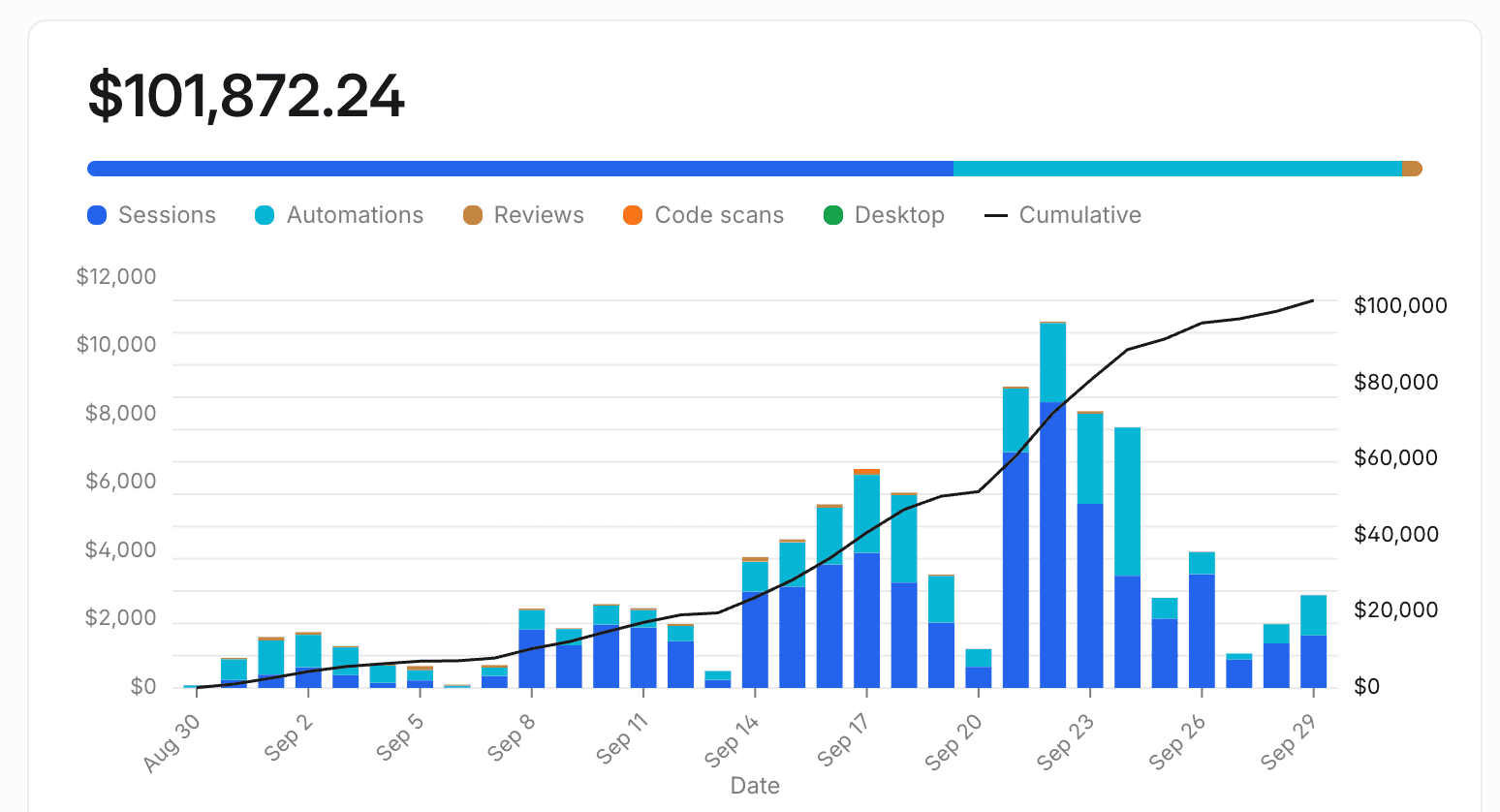
<p>Our Devin bill hit $101,872 in a single month, and only our own team used it. Our engineers kicked off those sessions and automations on models and routing we couldn't control</p>
<p><img decoding="async" loading="lazy" alt="Devin billing dashboard showing $101,872.24 spent between Aug 30 and Sep 29, with daily spend peaking above $10,000." src="https://docs.litellm.ai/assets/images/devin-bill-22730098d78b7ce19a60188c28770466.png" width="1548" height="838" class="img_ev3q"></p>
<p>We already run a gateway that routes across 100+ providers. We wanted our coding agent on our own models and routing, paying for inference instead of seats</p>
<h2 class="anchor anchorWithStickyNavbar_LWe7" id="the-results-79-cheaper">The results: 79% cheaper<a href="https://docs.litellm.ai/blog/moyai-open-source#the-results-79-cheaper" class="hash-link" aria-label="Direct link to The results: 79% cheaper" title="Direct link to The results: 79% cheaper">​</a></h2>
<p>Moyai does the same work for about $700 a day. Over those 31 days we'd have paid about $21,700 instead of $101,872, and kept $80,000 of one month's bill</p>
<figure class="cost_CcW4"><div class="headline_aKzA"><span class="pct_zp4O">79<!-- -->% less</span><span class="headlineText_yA6Y">$21,700<!-- --> on Moyai vs <!-- -->$101,872<!-- --> on Devin over the same 31 days, for the same output</span></div><svg viewBox="0 0 760 320" role="img" aria-label="Cumulative spend over 31 days. Devin reaches $101,872; Moyai reaches $21,700, saving $80,172."><g><line x1="52" x2="610" y1="286" y2="286" class="grid_xyjs"></line><text x="42" y="290" text-anchor="end" class="axis_qblo">$0</text></g><g><line x1="52" x2="610" y1="241" y2="241" class="grid_xyjs"></line><text x="42" y="245" text-anchor="end" class="axis_qblo">$20k</text></g><g><line x1="52" x2="610" y1="196" y2="196" class="grid_xyjs"></line><text x="42" y="200" text-anchor="end" class="axis_qblo">$40k</text></g><g><line x1="52" x2="610" y1="151" y2="151" class="grid_xyjs"></line><text x="42" y="155" text-anchor="end" class="axis_qblo">$60k</text></g><g><line x1="52" x2="610" y1="106" y2="106" class="grid_xyjs"></line><text x="42" y="110" text-anchor="end" class="axis_qblo">$80k</text></g><g><line x1="52" x2="610" y1="61" y2="61" class="grid_xyjs"></line><text x="42" y="65" text-anchor="end" class="axis_qblo">$100k</text></g><g><line x1="52" x2="610" y1="16" y2="16" class="grid_xyjs"></line><text x="42" y="20" text-anchor="end" class="axis_qblo">$120k</text></g><path d="M52.0,285.8L70.6,283.6L89.2,280.1L107.8,276.2L126.4,273.3L145.0,271.7L163.6,270.4L182.2,270.2L200.8,268.8L219.4,263.2L238.0,259.0L256.6,253.2L275.2,247.5L293.8,242.9L312.4,241.8L331.0,232.4L349.6,221.9L368.2,209.3L386.8,194.3L405.4,180.6L424.0,172.5L442.6,169.7L461.2,148.9L479.8,123.6L498.4,104.1L517.0,86.0L535.6,79.9L554.2,70.3L572.8,68.0L591.4,63.4L610.0,56.8L610.0,237.2L591.4,238.8L572.8,240.3L554.2,241.9L535.6,243.5L517.0,245.1L498.4,246.6L479.8,248.2L461.2,249.8L442.6,251.3L424.0,252.9L405.4,254.5L386.8,256.1L368.2,257.6L349.6,259.2L331.0,260.8L312.4,262.4L293.8,263.9L275.2,265.5L256.6,267.1L238.0,268.7L219.4,270.3L200.8,271.8L182.2,273.4L163.6,275.0L145.0,276.6L126.4,278.1L107.8,279.7L89.2,281.3L70.6,282.9L52.0,284.4Z" class="gap_hPyW"></path><path d="M52.0,285.8L70.6,283.6L89.2,280.1L107.8,276.2L126.4,273.3L145.0,271.7L163.6,270.4L182.2,270.2L200.8,268.8L219.4,263.2L238.0,259.0L256.6,253.2L275.2,247.5L293.8,242.9L312.4,241.8L331.0,232.4L349.6,221.9L368.2,209.3L386.8,194.3L405.4,180.6L424.0,172.5L442.6,169.7L461.2,148.9L479.8,123.6L498.4,104.1L517.0,86.0L535.6,79.9L554.2,70.3L572.8,68.0L591.4,63.4L610.0,56.8" class="devin_YveB"></path><path d="M52.0,284.4L70.6,282.9L89.2,281.3L107.8,279.7L126.4,278.1L145.0,276.6L163.6,275.0L182.2,273.4L200.8,271.8L219.4,270.3L238.0,268.7L256.6,267.1L275.2,265.5L293.8,263.9L312.4,262.4L331.0,260.8L349.6,259.2L368.2,257.6L386.8,256.1L405.4,254.5L424.0,252.9L442.6,251.3L461.2,249.8L479.8,248.2L498.4,246.6L517.0,245.1L535.6,243.5L554.2,241.9L572.8,240.3L591.4,238.8L610.0,237.2" class="line__k2s"></path><circle cx="610" cy="56.78745999999998" r="4" class="devinDot_q7m2"></circle><circle cx="610" cy="237.175" r="4" class="moyaiDot_ngts"></circle><line x1="616" x2="616" y1="66.78745999999998" y2="227.175" class="bracket_zizg"></line><text x="624" y="60.78745999999998" class="endLabel_tzRP">Devin <!-- -->$101,872</text><text x="624" y="150.98122999999998" class="savedLabel_XCyf">saved <!-- -->$80,172</text><text x="624" y="241.175" class="endLabelMoyai_w0s7">Moyai <!-- -->$21,700</text><text x="52" y="310" text-anchor="middle" class="axis_qblo">Aug 30</text><text x="163.60000000000002" y="310" text-anchor="middle" class="axis_qblo">Sep 5</text><text x="275.20000000000005" y="310" text-anchor="middle" class="axis_qblo">Sep 11</text><text x="386.8" y="310" text-anchor="middle" class="axis_qblo">Sep 17</text><text x="498.40000000000003" y="310" text-anchor="middle" class="axis_qblo">Sep 23</text><text x="610" y="310" text-anchor="middle" class="axis_qblo">Sep 29</text></svg><figcaption><span><i class="swatchDevin_mmTY"></i>Devin, running total</span><span><i class="swatchMoyai__skB"></i>Moyai, running total</span><span><i class="swatchGap_oXho"></i>Saved</span></figcaption></figure>
<h2 class="anchor anchorWithStickyNavbar_LWe7" id="why-were-open-sourcing-it">Why we're open sourcing it<a href="https://docs.litellm.ai/blog/moyai-open-source#why-were-open-sourcing-it" class="hash-link" aria-label="Direct link to Why we're open sourcing it" title="Direct link to Why we're open sourcing it">​</a></h2>
<p>Last week we wrote about <a href="https://docs.litellm.ai/blog/internal-devin-two-days">how we built our own internal Devin in 2 days</a>, and most replies asked to run it themselves. Moyai is the same code we run in production at LiteLLM. You deploy it on your own infrastructure and point it at your own LiteLLM gateway, so your code and credentials stay in your accounts</p>
<h2 class="anchor anchorWithStickyNavbar_LWe7" id="a-cloud-agent-that-keeps-working">A cloud agent that keeps working<a href="https://docs.litellm.ai/blog/moyai-open-source#a-cloud-agent-that-keeps-working" class="hash-link" aria-label="Direct link to A cloud agent that keeps working" title="Direct link to A cloud agent that keeps working">​</a></h2>
<p>Each session gets its own cloud workspace with a terminal, a filesystem and a browser. The agent edits code and runs your tests there, then opens a pull request for you to review</p>
<p>You can follow along in the web app and send a correction while it works, or pick the thread back up in Slack the next morning. For large tasks, the agent splits the work across parallel workers on separate machines and collects their results</p>
<h2 class="anchor anchorWithStickyNavbar_LWe7" id="any-harness">Any harness<a href="https://docs.litellm.ai/blog/moyai-open-source#any-harness" class="hash-link" aria-label="Direct link to Any harness" title="Direct link to Any harness">​</a></h2>
<p>You pick the agent harness for each session from the composer. Moyai runs it in the same isolated workspace with the same tools and permissions</p>
<figure class="wall_dvan"><figcaption>Harnesses</figcaption><div class="wallGrid_cJTx"><div class="wallItem_Q8fz"><img class="wallLogo_dhua" src="https://docs.litellm.ai/img/blog/moyai_devin_open_source/logos/hermes.png" alt="Hermes" title="Hermes"><span>Hermes</span></div><div class="wallItem_Q8fz"><img class="wallLogo_dhua" src="https://docs.litellm.ai/img/blog/moyai_devin_open_source/logos/anthropic.svg" alt="Claude Code" title="Claude Code"><span>Claude Code</span></div><div class="wallItem_Q8fz"><img class="wallLogo_dhua" src="https://docs.litellm.ai/img/blog/moyai_devin_open_source/logos/openai.svg" alt="Codex" title="Codex"><span>Codex</span></div><div class="wallItem_Q8fz"><img class="wallLogo_dhua" src="https://docs.litellm.ai/img/blog/moyai_devin_open_source/logos/opencode.svg" alt="OpenCode" title="OpenCode"><span>OpenCode</span></div><div class="wallItem_Q8fz"><img class="wallLogo_dhua" src="https://docs.litellm.ai/img/blog/moyai_devin_open_source/logos/langchain.svg" alt="Deep Agents" title="Deep Agents"><span>Deep Agents</span></div></div></figure>
<p>Claude Code, Codex, OpenCode and Deep Agents run through the LiteLLM agent SDK. Adding another harness takes one registry entry</p>
<h2 class="anchor anchorWithStickyNavbar_LWe7" id="any-model-any-provider">Any model, any provider<a href="https://docs.litellm.ai/blog/moyai-open-source#any-model-any-provider" class="hash-link" aria-label="Direct link to Any model, any provider" title="Direct link to Any model, any provider">​</a></h2>
<p>Moyai sends model requests through LiteLLM. You can switch from GPT-6 Astra to Claude Opus 5.5 between messages, and LiteLLM attributes each request to the teammate who made it. Provider keys stay on the server, out of the sandbox</p>
<figure class="wall_dvan"><figcaption>Providers</figcaption><div class="wallGrid_cJTx"><div class="wallItem_Q8fz"><img class="wallLogo_dhua" src="https://docs.litellm.ai/img/blog/moyai_devin_open_source/logos/openai.svg" alt="OpenAI" title="OpenAI"><span>OpenAI</span></div><div class="wallItem_Q8fz"><img class="wallLogo_dhua" src="https://docs.litellm.ai/img/blog/moyai_devin_open_source/logos/anthropic.svg" alt="Anthropic" title="Anthropic"><span>Anthropic</span></div><div class="wallItem_Q8fz"><img class="wallLogo_dhua" src="https://docs.litellm.ai/img/blog/moyai_devin_open_source/logos/fireworks.svg" alt="Fireworks" title="Fireworks"><span>Fireworks</span></div><div class="wallItem_Q8fz"><img class="wallLogo_dhua" src="https://docs.litellm.ai/img/blog/moyai_devin_open_source/logos/google.svg" alt="Google" title="Google"><span>Google</span></div><div class="wallItem_Q8fz"><img class="wallLogo_dhua" src="https://docs.litellm.ai/img/blog/moyai_devin_open_source/logos/xai.svg" alt="xAI" title="xAI"><span>xAI</span></div><div class="wallItem_Q8fz"><img class="wallLogo_dhua" src="https://docs.litellm.ai/img/blog/moyai_devin_open_source/logos/mistral.svg" alt="Mistral" title="Mistral"><span>Mistral</span></div><div class="wallItem_Q8fz"><img class="wallLogo_dhua" src="https://docs.litellm.ai/img/blog/moyai_devin_open_source/logos/deepseek.svg" alt="DeepSeek" title="DeepSeek"><span>DeepSeek</span></div><div class="wallItem_Q8fz"><img class="wallLogo_dhua" src="https://docs.litellm.ai/img/blog/moyai_devin_open_source/logos/bedrock.svg" alt="Bedrock" title="Bedrock"><span>Bedrock</span></div></div></figure>
<p>LiteLLM supports 100+ providers, and Moyai can use any of them</p>
<h2 class="anchor anchorWithStickyNavbar_LWe7" id="get-started">Get started<a href="https://docs.litellm.ai/blog/moyai-open-source#get-started" class="hash-link" aria-label="Direct link to Get started" title="Direct link to Get started">​</a></h2>
<p>You can try the local demo in a couple of minutes without API keys</p>
<div class="language-sh codeBlockContainer_Ckt0 theme-code-block" style="--prism-color:#393A34;--prism-background-color:#f6f8fa"><div class="codeBlockContent_QJqH"><pre tabindex="0" class="prism-code language-sh codeBlock_bY9V thin-scrollbar" style="color:#393A34;background-color:#f6f8fa"><code class="codeBlockLines_e6Vv"><span class="token-line" style="color:#393A34"><span class="token plain">git clone https://github.com/BerriAI/moyai.git</span><br></span><span class="token-line" style="color:#393A34"><span class="token plain">cd moyai</span><br></span><span class="token-line" style="color:#393A34"><span class="token plain">cp .env.example .env</span><br></span><span class="token-line" style="color:#393A34"><span class="token plain">uv sync --frozen</span><br></span><span class="token-line" style="color:#393A34"><span class="token plain">uv run uvicorn app.main:app --host 127.0.0.1 --port 8787 --workers 1</span><br></span></code></pre></div></div>
<p>To run real tasks, <a href="https://github.com/BerriAI/moyai/blob/main/docs/deployment.md" target="_blank" rel="noopener noreferrer">set up cloud execution</a> with Modal and your LiteLLM gateway, then <a href="https://github.com/BerriAI/moyai/blob/main/docs/integrations.md" target="_blank" rel="noopener noreferrer">connect your apps</a>. Issues and PRs are welcome on <a href="https://github.com/BerriAI/moyai" target="_blank" rel="noopener noreferrer">GitHub</a></p>]]></content>
        <author>
            <name>Ishaan Jaffer</name>
            <uri>https://www.linkedin.com/in/reffajnaahsi/</uri>
        </author>
        <author>
            <name>Tin Lo</name>
            <uri>https://www.linkedin.com/in/tinchi-lo/</uri>
        </author>
        <author>
            <name>Moe Khalil</name>
            <uri>https://www.linkedin.com/in/moe-khalil-73a2371a1/</uri>
        </author>
        <category label="agents" term="agents"/>
        <category label="open-source" term="open-source"/>
        <category label="infrastructure" term="infrastructure"/>
    </entry>
    <entry>
        <title type="html"><![CDATA[Day 0 Support: Nano Banana 2.1]]></title>
        <id>https://docs.litellm.ai/blog/nano_banana_2_1</id>
        <link href="https://docs.litellm.ai/blog/nano_banana_2_1"/>
        <updated>2026-10-06T18:00:00.000Z</updated>
        <summary type="html"><![CDATA[Day 0 support for Gemini Nano Banana 2.1 on LiteLLM, on Google AI Studio and Gemini Enterprise Agent Platform, with image output at half Nano Banana 2's price.]]></summary>
        <content type="html"><![CDATA[<p><img decoding="async" loading="lazy" alt="LiteLLM x Nano Banana 2.1" src="https://docs.litellm.ai/assets/images/hero-13d949a43f9f1df134394377f86f048b.png" width="4800" height="2508" class="img_ev3q"></p>
<p>LiteLLM supports <code>gemini-nano-banana-2.1</code> on day 0 on Google AI Studio (<code>gemini/</code>) and Gemini Enterprise Agent Platform, formerly Vertex AI (<code>vertex_ai/</code>), through <code>/v1/images/generations</code>, <code>/v1/images/edits</code> and <code>/chat/completions</code>. It replaces Nano Banana 2 (<code>gemini-3.1-flash-image</code>), which the Gemini API shuts down on October 29, 2026.</p>
<!-- -->
<p><a href="https://ai.google.dev/gemini-api/docs/models/gemini-nano-banana-2.1" target="_blank" rel="noopener noreferrer">Per Google</a>, Nano Banana 2.1 improves visual quality and text rendering at 1K, 2K and 4K, fixes tiling on wide aspect ratios, takes up to 14 reference images, and supports Search grounding and configurable thinking levels.</p>
<div class="theme-admonition theme-admonition-note admonition_xJq3 alert alert--secondary"><div class="admonitionHeading_Gvgb"><span class="admonitionIcon_Rf37"><svg viewBox="0 0 14 16"><path fill-rule="evenodd" d="M6.3 5.69a.942.942 0 0 1-.28-.7c0-.28.09-.52.28-.7.19-.18.42-.28.7-.28.28 0 .52.09.7.28.18.19.28.42.28.7 0 .28-.09.52-.28.7a1 1 0 0 1-.7.3c-.28 0-.52-.11-.7-.3zM8 7.99c-.02-.25-.11-.48-.31-.69-.2-.19-.42-.3-.69-.31H6c-.27.02-.48.13-.69.31-.2.2-.3.44-.31.69h1v3c.02.27.11.5.31.69.2.2.42.31.69.31h1c.27 0 .48-.11.69-.31.2-.19.3-.42.31-.69H8V7.98v.01zM7 2.3c-3.14 0-5.7 2.54-5.7 5.68 0 3.14 2.56 5.7 5.7 5.7s5.7-2.55 5.7-5.7c0-3.15-2.56-5.69-5.7-5.69v.01zM7 .98c3.86 0 7 3.14 7 7s-3.14 7-7 7-7-3.12-7-7 3.14-7 7-7z"></path></svg></span>note</div><div class="admonitionContent_BuS1"><p><strong>No Docker image upgrade needed.</strong> Hit <strong>Reload Model Cost Map</strong> in the Admin UI (or <code>POST /reload/model_cost_map</code>) to pull pricing, on <code>v1.76.0</code> and above.</p></div></div>
<h2 class="anchor anchorWithStickyNavbar_LWe7" id="pricing">Pricing<a href="https://docs.litellm.ai/blog/nano_banana_2_1#pricing" class="hash-link" aria-label="Direct link to Pricing" title="Direct link to Pricing">​</a></h2>
<ul>
<li>Image output: $30 / MTok ($0.0336 per 1K image)</li>
<li>Text input: $1.50 / MTok</li>
<li>Text output: $7.50 / MTok</li>
</ul>
<h2 class="anchor anchorWithStickyNavbar_LWe7" id="quick-start">Quick Start<a href="https://docs.litellm.ai/blog/nano_banana_2_1#quick-start" class="hash-link" aria-label="Direct link to Quick Start" title="Direct link to Quick Start">​</a></h2>
<div class="tabs-container tabList__CuJ"><ul role="tablist" aria-orientation="horizontal" class="tabs"><li role="tab" tabindex="0" aria-selected="true" class="tabs__item tabItem_LNqP tabs__item--active">PROXY</li><li role="tab" tabindex="-1" aria-selected="false" class="tabs__item tabItem_LNqP">SDK</li></ul><div class="margin-top--md"><div role="tabpanel" class="tabItem_Ymn6"><p><strong>1. Setup config.yaml</strong></p><div class="language-yaml codeBlockContainer_Ckt0 theme-code-block" style="--prism-color:#393A34;--prism-background-color:#f6f8fa"><div class="codeBlockContent_QJqH"><pre tabindex="0" class="prism-code language-yaml codeBlock_bY9V thin-scrollbar" style="color:#393A34;background-color:#f6f8fa"><code class="codeBlockLines_e6Vv"><span class="token-line" style="color:#393A34"><span class="token key atrule" style="color:#22863A">model_list</span><span class="token punctuation" style="color:#393A34">:</span><span class="token plain"></span><br></span><span class="token-line" style="color:#393A34"><span class="token plain">  </span><span class="token punctuation" style="color:#393A34">-</span><span class="token plain"> </span><span class="token key atrule" style="color:#22863A">model_name</span><span class="token punctuation" style="color:#393A34">:</span><span class="token plain"> nano</span><span class="token punctuation" style="color:#393A34">-</span><span class="token plain">banana</span><span class="token punctuation" style="color:#393A34">-</span><span class="token number" style="color:#005CC5">2.1</span><span class="token plain"></span><br></span><span class="token-line" style="color:#393A34"><span class="token plain">    </span><span class="token key atrule" style="color:#22863A">litellm_params</span><span class="token punctuation" style="color:#393A34">:</span><span class="token plain"></span><br></span><span class="token-line" style="color:#393A34"><span class="token plain">      </span><span class="token key atrule" style="color:#22863A">model</span><span class="token punctuation" style="color:#393A34">:</span><span class="token plain"> gemini/gemini</span><span class="token punctuation" style="color:#393A34">-</span><span class="token plain">nano</span><span class="token punctuation" style="color:#393A34">-</span><span class="token plain">banana</span><span class="token punctuation" style="color:#393A34">-</span><span class="token number" style="color:#005CC5">2.1</span><span class="token plain"></span><br></span><span class="token-line" style="color:#393A34"><span class="token plain">      </span><span class="token key atrule" style="color:#22863A">api_key</span><span class="token punctuation" style="color:#393A34">:</span><span class="token plain"> os.environ/GEMINI_API_KEY</span><br></span><span class="token-line" style="color:#393A34"><span class="token plain">  </span><span class="token punctuation" style="color:#393A34">-</span><span class="token plain"> </span><span class="token key atrule" style="color:#22863A">model_name</span><span class="token punctuation" style="color:#393A34">:</span><span class="token plain"> nano</span><span class="token punctuation" style="color:#393A34">-</span><span class="token plain">banana</span><span class="token punctuation" style="color:#393A34">-</span><span class="token plain">2.1</span><span class="token punctuation" style="color:#393A34">-</span><span class="token plain">agent</span><span class="token punctuation" style="color:#393A34">-</span><span class="token plain">platform</span><br></span><span class="token-line" style="color:#393A34"><span class="token plain">    </span><span class="token key atrule" style="color:#22863A">litellm_params</span><span class="token punctuation" style="color:#393A34">:</span><span class="token plain"></span><br></span><span class="token-line" style="color:#393A34"><span class="token plain">      </span><span class="token key atrule" style="color:#22863A">model</span><span class="token punctuation" style="color:#393A34">:</span><span class="token plain"> vertex_ai/gemini</span><span class="token punctuation" style="color:#393A34">-</span><span class="token plain">nano</span><span class="token punctuation" style="color:#393A34">-</span><span class="token plain">banana</span><span class="token punctuation" style="color:#393A34">-</span><span class="token number" style="color:#005CC5">2.1</span><span class="token plain"></span><br></span><span class="token-line" style="color:#393A34"><span class="token plain">      </span><span class="token key atrule" style="color:#22863A">vertex_project</span><span class="token punctuation" style="color:#393A34">:</span><span class="token plain"> os.environ/VERTEX_PROJECT</span><br></span><span class="token-line" style="color:#393A34"><span class="token plain">      </span><span class="token key atrule" style="color:#22863A">vertex_location</span><span class="token punctuation" style="color:#393A34">:</span><span class="token plain"> global</span><br></span></code></pre></div></div><p><strong>2. Start the proxy</strong></p><div class="language-bash codeBlockContainer_Ckt0 theme-code-block" style="--prism-color:#393A34;--prism-background-color:#f6f8fa"><div class="codeBlockContent_QJqH"><pre tabindex="0" class="prism-code language-bash codeBlock_bY9V thin-scrollbar" style="color:#393A34;background-color:#f6f8fa"><code class="codeBlockLines_e6Vv"><span class="token-line" style="color:#393A34"><span class="token plain">litellm --config /path/to/config.yaml</span><br></span></code></pre></div></div><p><strong>3. Test it</strong></p><div class="language-bash codeBlockContainer_Ckt0 theme-code-block" style="--prism-color:#393A34;--prism-background-color:#f6f8fa"><div class="codeBlockContent_QJqH"><pre tabindex="0" class="prism-code language-bash codeBlock_bY9V thin-scrollbar" style="color:#393A34;background-color:#f6f8fa"><code class="codeBlockLines_e6Vv"><span class="token-line" style="color:#393A34"><span class="token plain">curl http://0.0.0.0:4000/v1/images/generations \</span><br></span><span class="token-line" style="color:#393A34"><span class="token plain">  -H "Authorization: Bearer $LITELLM_KEY" \</span><br></span><span class="token-line" style="color:#393A34"><span class="token plain">  -H "Content-Type: application/json" \</span><br></span><span class="token-line" style="color:#393A34"><span class="token plain">  -d '{</span><br></span><span class="token-line" style="color:#393A34"><span class="token plain">    "model": "nano-banana-2.1",</span><br></span><span class="token-line" style="color:#393A34"><span class="token plain">    "prompt": "A product shot of a ceramic mug on a walnut desk, soft morning light"</span><br></span><span class="token-line" style="color:#393A34"><span class="token plain">  }'</span><br></span></code></pre></div></div></div><div role="tabpanel" class="tabItem_Ymn6" hidden=""><div class="language-python codeBlockContainer_Ckt0 theme-code-block" style="--prism-color:#393A34;--prism-background-color:#f6f8fa"><div class="codeBlockContent_QJqH"><pre tabindex="0" class="prism-code language-python codeBlock_bY9V thin-scrollbar" style="color:#393A34;background-color:#f6f8fa"><code class="codeBlockLines_e6Vv"><span class="token-line" style="color:#393A34"><span class="token keyword" style="color:#CF222E">import</span><span class="token plain"> litellm</span><br></span><span class="token-line" style="color:#393A34"><span class="token plain" style="display:inline-block"></span><br></span><span class="token-line" style="color:#393A34"><span class="token plain">response </span><span class="token operator" style="color:#D73A49">=</span><span class="token plain"> litellm</span><span class="token punctuation" style="color:#393A34">.</span><span class="token plain">image_generation</span><span class="token punctuation" style="color:#393A34">(</span><span class="token plain"></span><br></span><span class="token-line" style="color:#393A34"><span class="token plain">    model</span><span class="token operator" style="color:#D73A49">=</span><span class="token string" style="color:#C6105F">"gemini/gemini-nano-banana-2.1"</span><span class="token punctuation" style="color:#393A34">,</span><span class="token plain"></span><br></span><span class="token-line" style="color:#393A34"><span class="token plain">    prompt</span><span class="token operator" style="color:#D73A49">=</span><span class="token string" style="color:#C6105F">"A product shot of a ceramic mug on a walnut desk, soft morning light"</span><span class="token punctuation" style="color:#393A34">,</span><span class="token plain"></span><br></span><span class="token-line" style="color:#393A34"><span class="token plain"></span><span class="token punctuation" style="color:#393A34">)</span><span class="token plain"></span><br></span><span class="token-line" style="color:#393A34"><span class="token plain" style="display:inline-block"></span><br></span><span class="token-line" style="color:#393A34"><span class="token plain"></span><span class="token keyword" style="color:#CF222E">print</span><span class="token punctuation" style="color:#393A34">(</span><span class="token plain">response</span><span class="token punctuation" style="color:#393A34">.</span><span class="token plain">data</span><span class="token punctuation" style="color:#393A34">[</span><span class="token number" style="color:#005CC5">0</span><span class="token punctuation" style="color:#393A34">]</span><span class="token punctuation" style="color:#393A34">.</span><span class="token plain">b64_json</span><span class="token punctuation" style="color:#393A34">[</span><span class="token punctuation" style="color:#393A34">:</span><span class="token number" style="color:#005CC5">64</span><span class="token punctuation" style="color:#393A34">]</span><span class="token punctuation" style="color:#393A34">)</span><br></span></code></pre></div></div></div></div></div>
<h2 class="anchor anchorWithStickyNavbar_LWe7" id="feedback">Feedback<a href="https://docs.litellm.ai/blog/nano_banana_2_1#feedback" class="hash-link" aria-label="Direct link to Feedback" title="Direct link to Feedback">​</a></h2>
<p>Questions and feedback go in <a href="https://github.com/BerriAI/litellm/discussions/44983" target="_blank" rel="noopener noreferrer">GitHub discussion #44983</a>.</p>]]></content>
        <author>
            <name>Misbah Syed</name>
            <uri>https://github.com/misbahsy</uri>
        </author>
        <author>
            <name>Mateo Wang</name>
            <uri>https://www.linkedin.com/in/mateo-wang</uri>
        </author>
        <author>
            <name>Kerry Lu</name>
            <uri>https://github.com/kerrylu-berri</uri>
        </author>
        <category label="gemini" term="gemini"/>
        <category label="gemini enterprise agent platform" term="gemini enterprise agent platform"/>
        <category label="nano banana" term="nano banana"/>
        <category label="image generation" term="image generation"/>
        <category label="day 0 support" term="day 0 support"/>
    </entry>
    <entry>
        <title type="html"><![CDATA[How LiteLLM Lens finds repeated failures across 1,000s of agent traces]]></title>
        <id>https://docs.litellm.ai/blog/lens-failure-patterns</id>
        <link href="https://docs.litellm.ai/blog/lens-failure-patterns"/>
        <updated>2026-10-05T00:00:00.000Z</updated>
        <summary type="html"><![CDATA[Inside Lens: parallel trace review, Python tools for large traces, and investigations that connect repeated failures to source evidence.]]></summary>
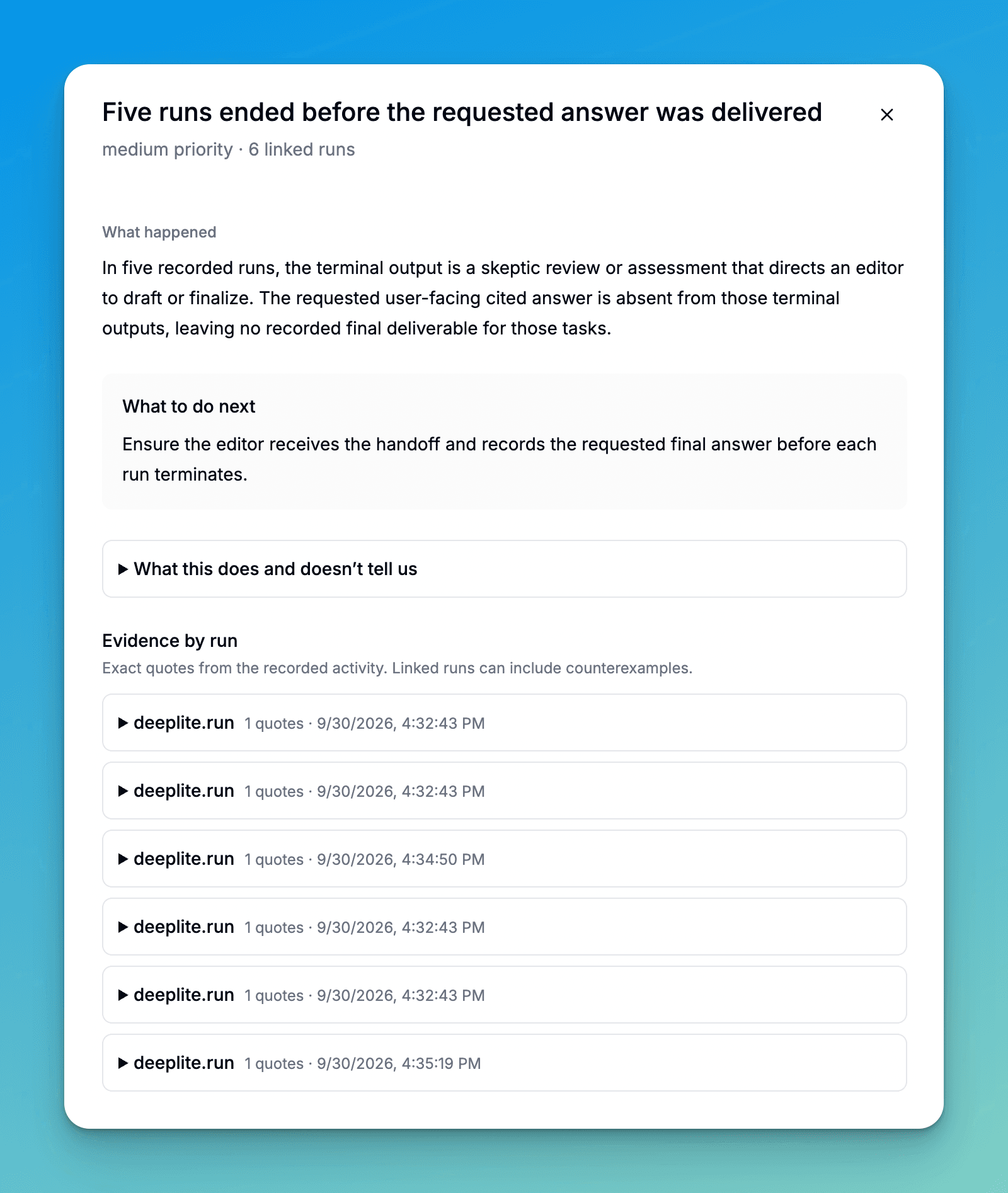
        <content type="html"><![CDATA[<p>A research agent can finish a report after reading the first 8,000 characters of each page. If its web tool cuts off a source and the agent fills in the gaps, you get a completed run with unsupported claims.</p>
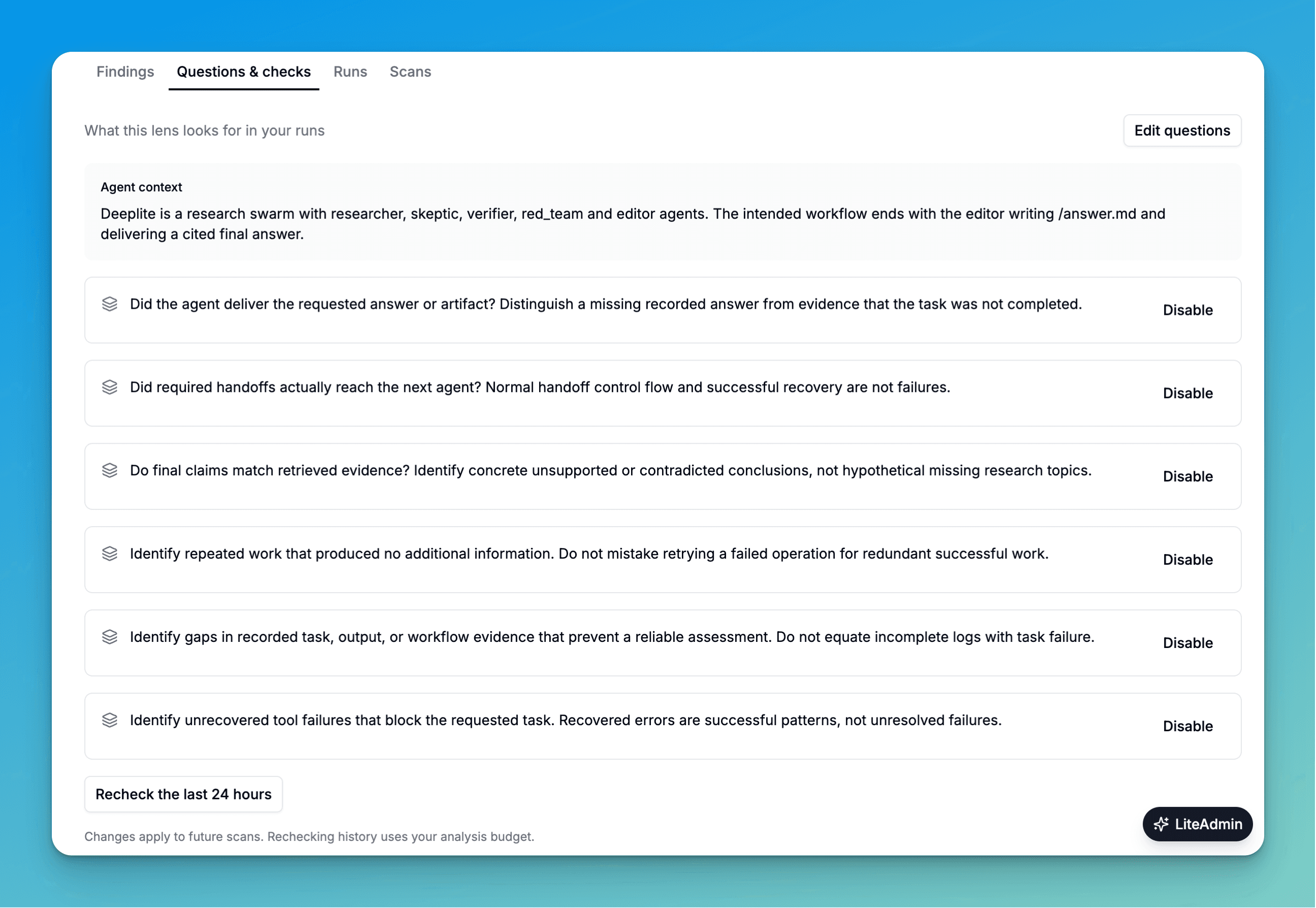
<p>Across thousands of runs, you need to find the affected sessions and what they have in common. <a href="https://docs.litellm.ai/blog/litellm-lens-launch">LiteLLM Lens</a> uses agents to do that work.</p>
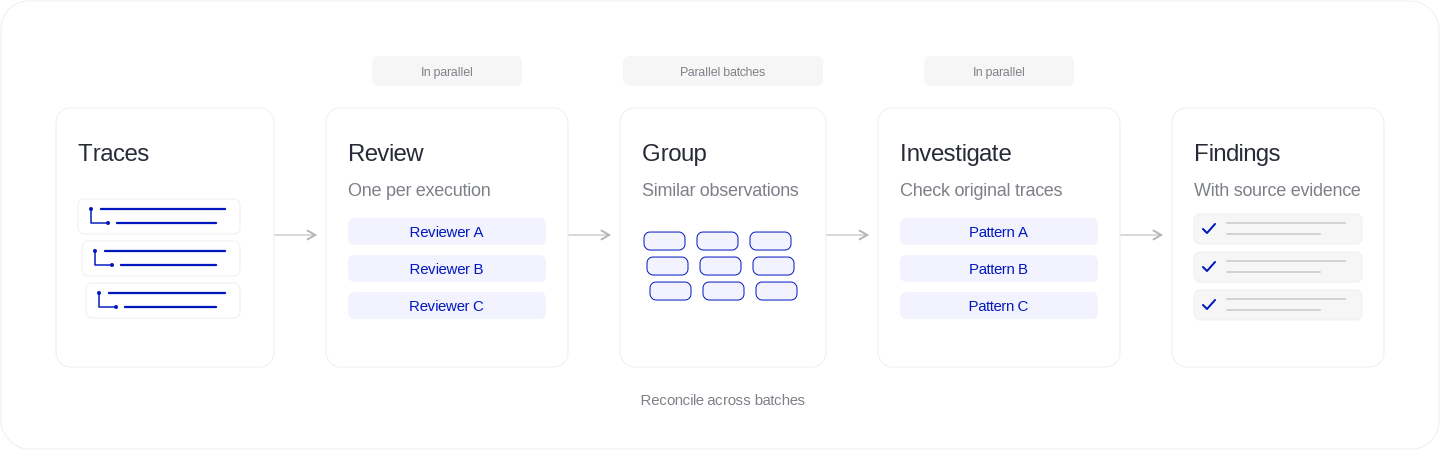
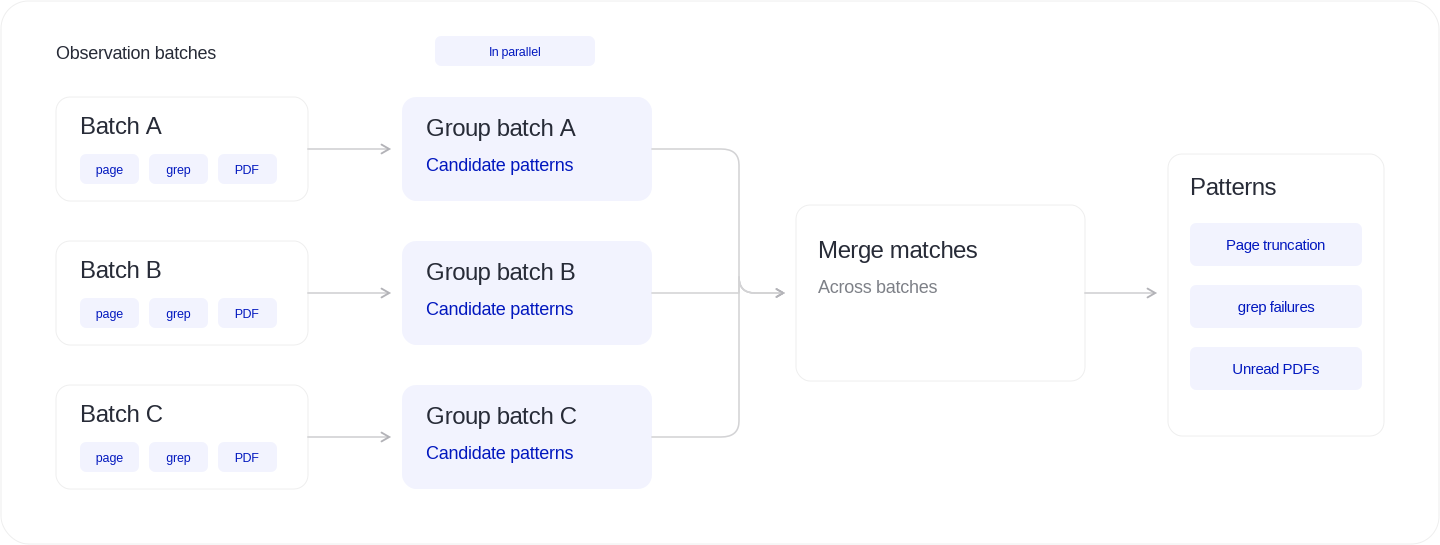
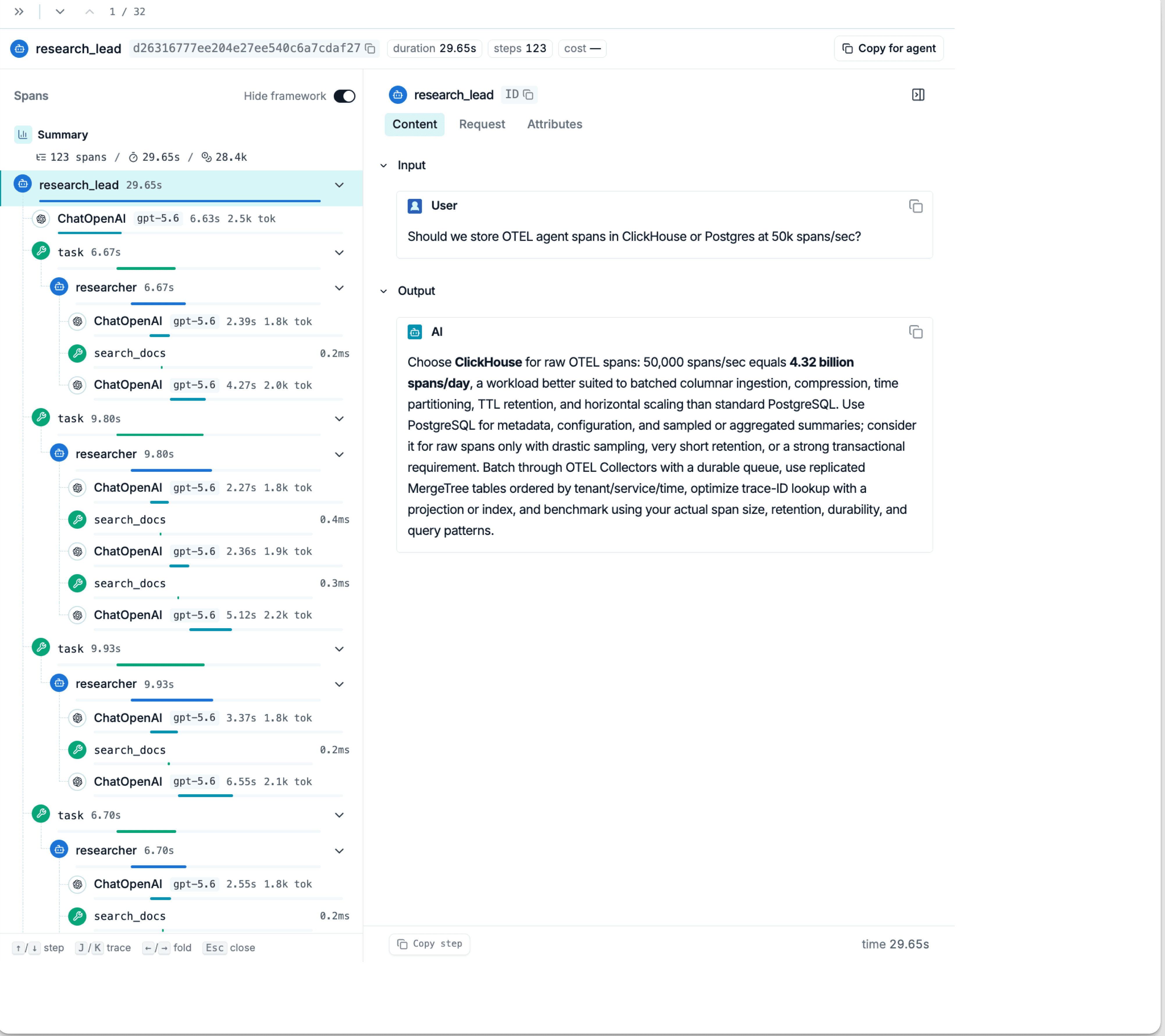
<p>Here's how it works behind the scenes: reviewers inspect executions in parallel, grouping agents connect related observations, and investigators check each candidate pattern against the original traces.</p>
<!-- -->
<p><img decoding="async" loading="lazy" alt="Lens reviews executions in parallel, groups observations, investigates candidate patterns, and returns findings with source evidence." src="https://docs.litellm.ai/assets/images/01-pipeline-305f84b5f833e7cf7ae19e809f3fe3ea.svg" width="1440" height="450" class="img_ev3q"></p>
<h2 class="anchor anchorWithStickyNavbar_LWe7" id="phase-1-review-each-execution">Phase 1: Review each execution<a href="https://docs.litellm.ai/blog/lens-failure-patterns#phase-1-review-each-execution" class="hash-link" aria-label="Direct link to Phase 1: Review each execution" title="Direct link to Phase 1: Review each execution">​</a></h2>
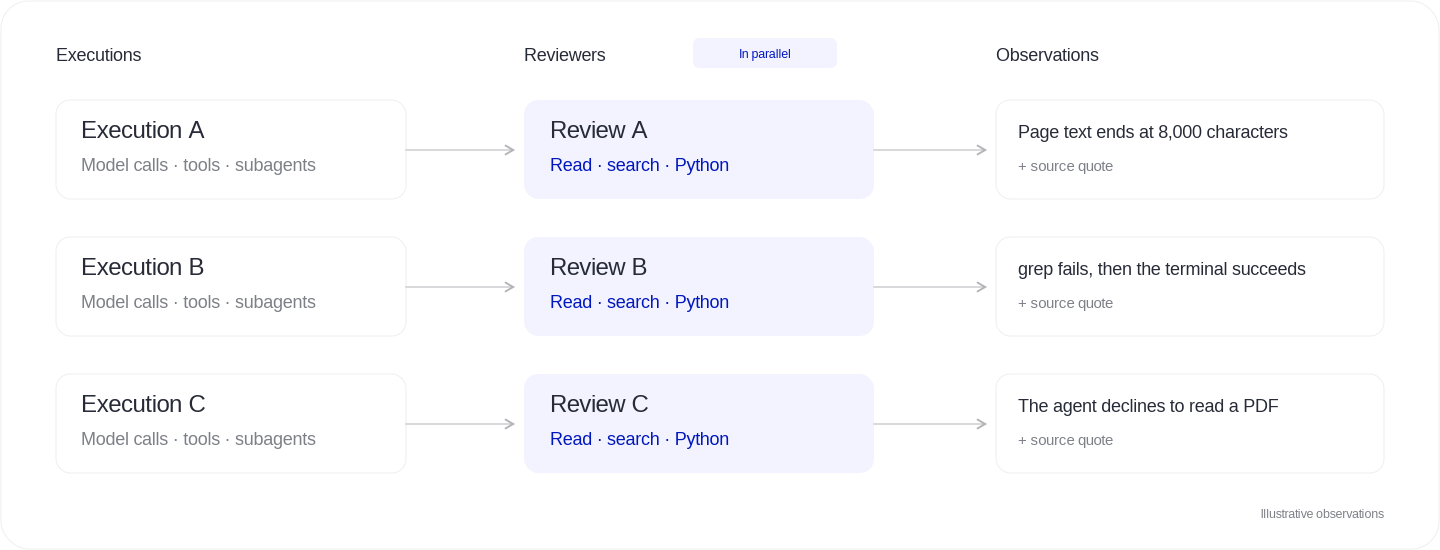
<p>We give each execution its own reviewer and run the reviewers in parallel. Each has a complete run to investigate, because a tool response near the start may explain an incorrect answer hundreds of steps later.</p>
<p><img decoding="async" loading="lazy" alt="Each execution has a reviewer that can read, search, and use Python before returning observations with source quotes." src="https://docs.litellm.ai/assets/images/02-parallel-review-0bdb8b01c35435456bf8c06d554fbc80.svg" width="1440" height="550" class="img_ev3q"></p>
<p>The reviewer decides what to read and follows leads through tool results and subagent handoffs. It keeps going until it has observations to return, and can open other selected executions if it needs a comparison.</p>
<p>In the research example, a reviewer might notice that a page ends mid-sentence and the final answer contains claims the returned text doesn't support. It records what it found with citations and leaves the cause open for investigation.</p>
<p>We ask reviewers to examine the process as well as the outcome. An agent might try an incompatible <code>grep</code> tool five times before succeeding through a terminal. We want to keep those failed attempts in view, even though the agent completed the task.</p>
<h2 class="anchor anchorWithStickyNavbar_LWe7" id="reviewers-can-use-python">Reviewers can use Python<a href="https://docs.litellm.ai/blog/lens-failure-patterns#reviewers-can-use-python" class="hash-link" aria-label="Direct link to Reviewers can use Python" title="Direct link to Reviewers can use Python">​</a></h2>
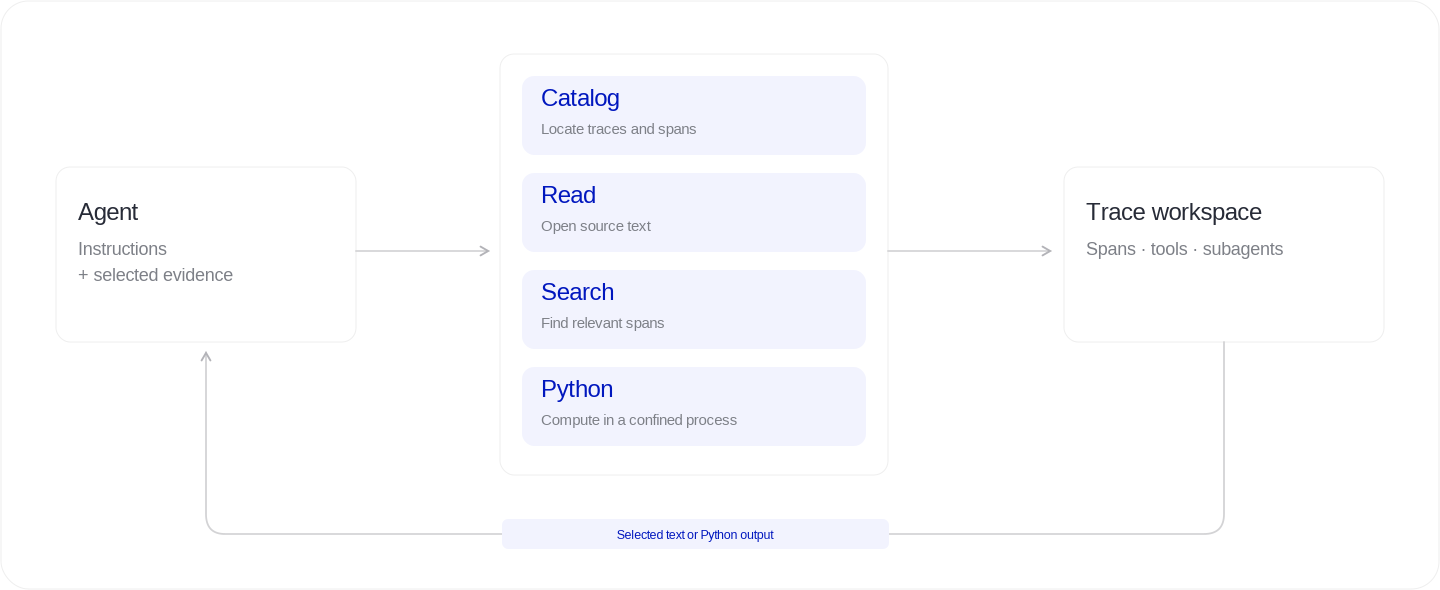
<p>We give reviewers a workspace containing the traces and tools to inspect them, much like a coding agent working in a repository. They can read and search the evidence, or write Python to answer questions that need computation.</p>
<p><img decoding="async" loading="lazy" alt="Reviewers use catalog, read, search, and confined Python to inspect the trace workspace. Selected text or computed output returns to the model." src="https://docs.litellm.ai/assets/images/05-evidence-workspace-028227638f3f5b9f73f2a5e732074c15.svg" width="1440" height="590" class="img_ev3q"></p>
<p>For the research example, a reviewer could write a short script to compare response lengths and find pages that stop at the same point. It uses those measurements to decide which responses to open and which claims to check. It can use the same approach to count repeated failures or reconstruct a sequence of subagent calls.</p>
<p>The traces stay in the workspace, and the reviewer brings the passages or computed results it needs into the model's context. A trace can be larger than the context window because the agent can search and analyze it in pieces.</p>
<p>Python runs in a confined environment without network access. As an investigation grows, the agents can compact their conversations into working notes and return to earlier evidence when they need it.</p>
<h2 class="anchor anchorWithStickyNavbar_LWe7" id="phase-2-group-related-observations">Phase 2: Group related observations<a href="https://docs.litellm.ai/blog/lens-failure-patterns#phase-2-group-related-observations" class="hash-link" aria-label="Direct link to Phase 2: Group related observations" title="Direct link to Phase 2: Group related observations">​</a></h2>
<p>Several reviewers may flag the same underlying problem. We group their observations in parallel batches, then merge matches across batches so an investigator can examine the examples together.</p>
<p><img decoding="async" loading="lazy" alt="Lens groups observation batches in parallel and merges matching candidates across batches." src="https://docs.litellm.ai/assets/images/03-group-patterns-75766769e812f24df3ca5449ad7cdc9b.svg" width="1440" height="545" class="img_ev3q"></p>
<p>We group by the check and suspected cause. A missing PDF tool needs a different fix from a failing PDF renderer, so those should remain separate candidates.</p>
<p>For the page-cutoff example, we collect observations about abrupt endings and unsupported claims into a candidate about missing source content. The investigator gets examples from different runs, with links to their evidence, and can test whether one explanation accounts for them.</p>
<h2 class="anchor anchorWithStickyNavbar_LWe7" id="phase-3-investigate-the-candidate">Phase 3: Investigate the candidate<a href="https://docs.litellm.ai/blog/lens-failure-patterns#phase-3-investigate-the-candidate" class="hash-link" aria-label="Direct link to Phase 3: Investigate the candidate" title="Direct link to Phase 3: Investigate the candidate">​</a></h2>
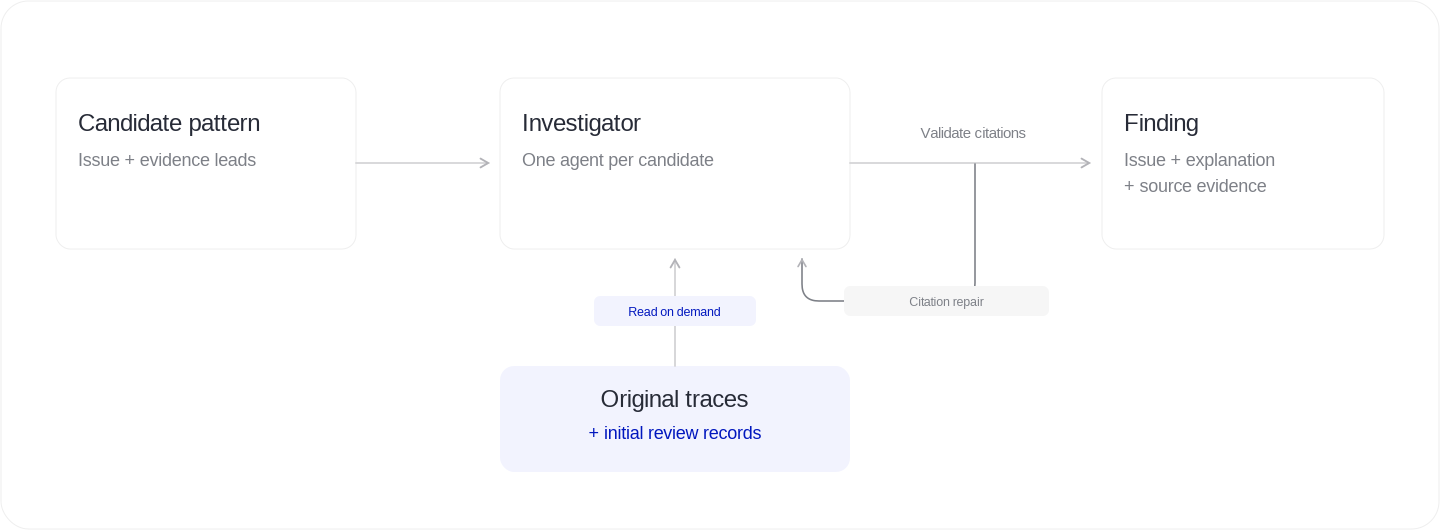
<p>We start an investigator for each candidate and run these agents in parallel. They get the reviewers' observations and access to the original traces, with the same read, search, and Python tools.</p>
<p><img decoding="async" loading="lazy" alt="An investigator checks original traces and review records, then submits a finding whose citations Lens validates." src="https://docs.litellm.ai/assets/images/04-investigate-171fb4339f37c495b8b285061da48da5.svg" width="1440" height="530" class="img_ev3q"></p>
<p>We send investigators back to the original traces because a reviewer may have left out context that changes the explanation. In the research case, the investigator compares page responses with final claims. It also looks for counterexamples, such as runs where the agent acknowledged missing information or fetched the rest of the source.</p>
<p>When different pages repeatedly return exactly 8,000 characters, that suggests the tool is cutting them off at a fixed limit. The investigator still needs to check whether the missing content explains a false claim, and distinguish that evidence from a plausible guess.</p>
<p>The investigator can drop a candidate that doesn't hold up. Before saving a finding, the worker checks its citations against the source and sends invalid quotes back for repair. An exact quote can still support a bad interpretation, so we check that distinction in our evaluations too.</p>
<h2 class="anchor anchorWithStickyNavbar_LWe7" id="checking-the-design-on-a-real-trace">Checking the design on a real trace<a href="https://docs.litellm.ai/blog/lens-failure-patterns#checking-the-design-on-a-real-trace" class="hash-link" aria-label="Direct link to Checking the design on a real trace" title="Direct link to Checking the design on a real trace">​</a></h2>
<p>On a real coding-agent session with 350 spans, reviewers and investigators used Python to inspect validation commands. They found checks piped through <code>tail</code> that reported success even when the underlying check failed. Lens identified the problem and the later passing checks, without claiming those failures remained in the delivered code. We checked the findings' citations against the source.</p>
<p>A search in that session returned more than 544,000 characters. Tool access gives agents control over what they read, but they can still request too much. We inspect their tool use alongside the quality of their findings.</p>
<h2 class="anchor anchorWithStickyNavbar_LWe7" id="how-results-reach-lens">How results reach Lens<a href="https://docs.litellm.ai/blog/lens-failure-patterns#how-results-reach-lens" class="hash-link" aria-label="Direct link to How results reach Lens" title="Direct link to How results reach Lens">​</a></h2>
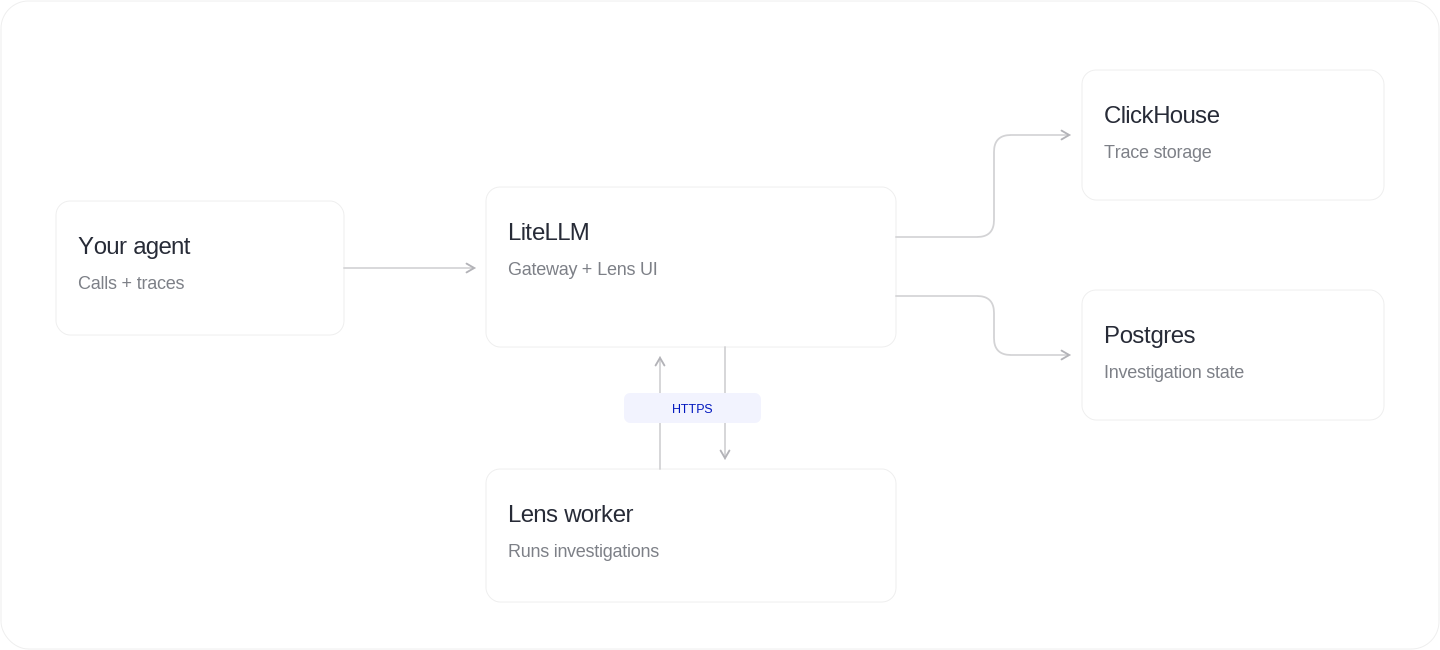
<p>The worker sends progress and findings to the LiteLLM gateway, so you can watch completed reviews appear while other agents are still working. The findings link back to the original steps for inspection.</p>
<p><img decoding="async" loading="lazy" alt="The Lens worker polls LiteLLM for investigations, reads evidence and calls models through the gateway, then reports progress and findings." src="https://docs.litellm.ai/assets/images/06-deployment-bfd51e627f3a2ab9f66acefb25efb92f.svg" width="1440" height="650" class="img_ev3q"></p>
<p>The worker runs on your infrastructure and polls LiteLLM for jobs. It uses the gateway for evidence and calls to your chosen analysis model. ClickHouse stores traces, and Postgres stores investigation state. The <a href="https://github.com/BerriAI/litellm/blob/main/litellm/proxy/lens/context_pipeline.py" target="_blank" rel="noopener noreferrer">pipeline and tools</a> are open source.</p>
<p>For our architecture experiments, we built a golden dataset with 25 investigations, 3,752 sessions, and 99,797 spans. The controlled cases include nested agents, long tool results, healthy runs, and failures followed by recovery. Our architecture found all 11 expected failure patterns: <strong>100% recall</strong>.</p>
<p>To try it on your agent, <a href="https://docs.litellm.ai/docs/proxy/lens/investigations">connect a worker and create an investigation</a>.</p>]]></content>
        <author>
            <name>Moe Khalil</name>
            <uri>https://www.linkedin.com/in/moe-khalil-73a2371a1/</uri>
        </author>
        <category label="lens" term="lens"/>
        <category label="agent-tracing" term="agent-tracing"/>
        <category label="engineering" term="engineering"/>
    </entry>
    <entry>
        <title type="html"><![CDATA[How we cut time to first byte by 94% for long prompts]]></title>
        <id>https://docs.litellm.ai/blog/long-prompt-latency</id>
        <link href="https://docs.litellm.ai/blog/long-prompt-latency"/>
        <updated>2026-10-03T09:00:00.000Z</updated>
        <summary type="html"><![CDATA[A 440k-token benchmark went from 553 ms to 35 ms median time to first byte. We removed unnecessary prompt-cache routing work before the model call.]]></summary>
        <content type="html"><![CDATA[<p><img decoding="async" loading="lazy" alt="LiteLLM&amp;#39;s median time to first byte drops from 553 ms to 35 ms in a local 440k-token, single-deployment benchmark, a 94% reduction" src="https://docs.litellm.ai/assets/images/cover-81c6d13c10d9a3a08429119655132189.gif" width="1800" height="900" class="img_ev3q"></p>
<p>LiteLLM was counting every token in a long conversation to answer a yes-or-no routing question.</p>
<p>Removing that unnecessary work took median time to first byte from <strong>553 ms to 35 ms</strong> in our local 440k-token benchmark: <strong>94% lower</strong>.</p>
<!-- -->
<h2 class="anchor anchorWithStickyNavbar_LWe7" id="counting-440000-tokens-to-check-for-1024">Counting 440,000 tokens to check for 1,024<a href="https://docs.litellm.ai/blog/long-prompt-latency#counting-440000-tokens-to-check-for-1024" class="hash-link" aria-label="Direct link to Counting 440,000 tokens to check for 1,024" title="Direct link to Counting 440,000 tokens to check for 1,024">​</a></h2>
<p>LiteLLM's optional <code>prompt_caching</code> routing check helps keep requests on deployments that can reuse their cached prompt. To check whether a prompt met a deployment's minimum size, often 1,024 tokens, it counted the entire conversation.</p>
<p>For a coding session with hundreds of turns and tool results, that could mean hundreds of milliseconds of Python work before the model call.</p>
<p><strong>We skip the check for one healthy deployment.</strong> There is no routing choice to make, so we now skip the eligibility count, prefix hash, and cache-pin lookup entirely. This is the path measured below.</p>
<p><strong>With multiple deployments, counting stops once the answer is known.</strong> The eligibility check stops after the first message that brings the count to the required minimum. Cache affinity and prefix hashing remain in place. Other uses of token counting, including usage accounting, are unchanged.</p>
<h2 class="anchor anchorWithStickyNavbar_LWe7" id="553-ms--35-ms">553 ms → 35 ms<a href="https://docs.litellm.ai/blog/long-prompt-latency#553-ms--35-ms" class="hash-link" aria-label="Direct link to 553 ms → 35 ms" title="Direct link to 553 ms → 35 ms">​</a></h2>
<p>The benchmark used the Python request path, a 439,945-token conversation with 334 turns and 18 tools, one healthy deployment, Redis response caching, and the <code>prompt_caching</code> check enabled. The test provider replied immediately, isolating request overhead from model generation time.</p>
<figure class="figure_nzn9"><div class="heading_kEx2"><strong>Time to first byte</strong><span class="context_NojL">Median of three requests</span></div><div class="benchmarkGrid_QWMN"><div class="benchmarkCard_rBeg"><div class="cardHeading_sFsH"><span>Chat completions</span></div><div class="comparison_IS2T"><div><span class="metricLabel_yTWF">Before</span><span class="beforeValue_gQoO">553<small>ms</small></span></div><span class="arrow_kODc" aria-hidden="true">→</span><div class="after_M2Pj"><span class="metricLabel_yTWF">After</span><span class="afterValue_oIlf">35<small>ms</small></span></div></div></div><div class="benchmarkCard_rBeg"><div class="cardHeading_sFsH"><span>Messages</span></div><div class="comparison_IS2T"><div><span class="metricLabel_yTWF">Before</span><span class="beforeValue_gQoO">542<small>ms</small></span></div><span class="arrow_kODc" aria-hidden="true">→</span><div class="after_M2Pj"><span class="metricLabel_yTWF">After</span><span class="afterValue_oIlf">40<small>ms</small></span></div></div></div></div><figcaption class="caption_gHZw">440k-token conversation · prompt-caching check enabled · instant mock upstream</figcaption></figure>
<p>Each result is the median of three requests after one warmup, on the same local machine. <code>/v1/responses</code> already bypassed this check and stayed roughly flat. Requests without the optional check are unaffected. <a href="https://github.com/BerriAI/litellm/pull/44221" target="_blank" rel="noopener noreferrer">Full benchmark samples and setup</a>.</p>
<p>See the changes: <a href="https://github.com/BerriAI/litellm/pull/44221" target="_blank" rel="noopener noreferrer">prompt-cache routing optimization</a>.</p>]]></content>
        <author>
            <name>Yassin Kortam</name>
            <uri>https://www.linkedin.com/in/yassink/</uri>
        </author>
        <category label="performance" term="performance"/>
        <category label="proxy" term="proxy"/>
        <category label="engineering" term="engineering"/>
        <category label="ai-gateway" term="ai-gateway"/>
    </entry>
    <entry>
        <title type="html"><![CDATA[How we built our own internal Devin in 2 days]]></title>
        <id>https://docs.litellm.ai/blog/internal-devin-two-days</id>
        <link href="https://docs.litellm.ai/blog/internal-devin-two-days"/>
        <updated>2026-10-03T00:00:00.000Z</updated>
        <summary type="html"><![CDATA[How we built Moyai Devin with Render, Modal, Hermes, Temporal, and LiteLLM: durable sessions, parallel agents, Slack, and shared organization connections.]]></summary>
        <content type="html"><![CDATA[<header class="hero_H9Sr"><div class="heading_o6GM"><time class="date_z7M7" datetime="2026-10-03T00:00:00.000Z">October 3, 2026</time><h1 class="title_WgQS">How we built our own internal Devin in 2 days</h1><p class="subtitle_xpTd">Our team's cloud coding agent, built with Render and Temporal.</p></div><figure id="cloud-workstation-hero" class="cloudHero_NRjK"><div class="cloudStage_tKby"><iframe class="cloudFrame_W6w0" src="/animations/internal-devin-two-days/index.html?embed=1" title="Animated Moyai cloud workstation: our internal Devin, hosted on Render with Temporal sessions" scrolling="no"></iframe></div><figcaption><span>Our internal Devin, running in the cloud.</span><button class="motionToggle_cgqN" aria-pressed="false">Pause animation</button></figcaption></figure></header><nav class="contents_Qkey" aria-label="In this post"><ol><li><a href="https://docs.litellm.ai/blog/internal-devin-two-days#1-main-architecture"><span>[<!-- -->1<!-- -->]</span><span class="dots__xWr" aria-hidden="true"></span><span>Main architecture</span></a></li><li><a href="https://docs.litellm.ai/blog/internal-devin-two-days#2-main-challenges"><span>[<!-- -->2<!-- -->]</span><span class="dots__xWr" aria-hidden="true"></span><span>Main challenges</span></a></li><li><a href="https://docs.litellm.ai/blog/internal-devin-two-days#3-whats-next-and-what-id-recommend"><span>[<!-- -->3<!-- -->]</span><span class="dots__xWr" aria-hidden="true"></span><span>What's next</span></a></li></ol></nav>
<div class="page_YtqF immersiveByline_XkdX horizontalByline_yJxG"><div class="inner_Too9"><span class="published_MQDR">Published: <time datetime="2026-10-03T00:00:00.000Z">Oct 3, 2026</time></span><div class="authors_hW1g"><span class="author_ZRh2"><a href="https://www.linkedin.com/in/tinchi-lo/" target="_blank" rel="noopener noreferrer" tabindex="-1" aria-hidden="true"><img src="https://docs.litellm.ai/img/authors/tin.png" alt="" class="avatar_Sim6"></a><span><a href="https://www.linkedin.com/in/tinchi-lo/" target="_blank" rel="noopener noreferrer" class="authorLink_BPAX"><b>Tin Lo</b></a><small>AI Product Engineer, LiteLLM</small></span></span></div></div></div>
<p>At BerriAI, we built <strong>Moyai Devin</strong>, an internal engineering agent that runs in the cloud. Teammates can give it a task in Slack, follow its progress in a web app, and ask it to prepare a pull request.</p>
<!-- -->
<p>We wanted:</p>
<ul>
<li><strong>Cloud workspaces:</strong> run code, tests, and a browser without using someone's laptop.</li>
<li><strong>Shared organization connections:</strong> access Slack, Linear, Notion, and GitHub.</li>
<li><strong>Ongoing conversations:</strong> continue a task across Slack and the web.</li>
<li><strong>Parallel agents:</strong> split independent work across several machines.</li>
<li><strong>Model choice and spend tracking:</strong> choose Astra or Opus and attribute usage to each teammate.</li>
</ul>
<h2 class="anchor anchorWithStickyNavbar_LWe7" id="what-it-looks-like">What it looks like<a href="https://docs.litellm.ai/blog/internal-devin-two-days#what-it-looks-like" class="hash-link" aria-label="Direct link to What it looks like" title="Direct link to What it looks like">​</a></h2>
<figure class="demo_fj59"><video class="video_wQT_" controls="" muted="" playsinline="" preload="none" src="/assets/medias/bug-workflow-08b41275f096ef7fd90517574cc9b152.mp4" poster="/assets/ideal-img/bug-workflow-poster.9d3a3f1.1280.jpg" width="1600" height="1000" aria-label="18-second walkthrough of Moyai across Slack and the web: a real team workflow request, investigation, regression tests, and a pull request returned to the thread"><a href="https://docs.litellm.ai/assets/medias/bug-workflow-08b41275f096ef7fd90517574cc9b152.mp4">Watch the bug-fix walkthrough</a></video><figcaption class="caption_JM4l">A real <code>/personal:team</code> bug fix across Slack and the web. Edited 18-second walkthrough of a completed session; tests used a mocked Slack transport.</figcaption></figure>
<h2 class="anchor anchorWithStickyNavbar_LWe7" id="1-main-architecture">1. Main architecture<a href="https://docs.litellm.ai/blog/internal-devin-two-days#1-main-architecture" class="hash-link" aria-label="Direct link to 1. Main architecture" title="Direct link to 1. Main architecture">​</a></h2>
<p>We split the system at the lifetime of a chat session. Render owns the conversation, permissions, and saved execution state. Temporal schedules the next step. Modal provides the computer where Hermes runs code and uses a browser.</p>
<p><img decoding="async" loading="lazy" alt="Moyai architecture: Slack and the web enter the Render application; Temporal coordinates sessions; Hermes executes in Modal sandboxes; the Render broker calls LiteLLM and connected applications." src="data:image/svg+xml;base64,PHN2ZyB4bWxucz0iaHR0cDovL3d3dy53My5vcmcvMjAwMC9zdmciIHZpZXdCb3g9IjAgMCA5NjAgODAwIiByb2xlPSJpbWciIGFyaWEtbGFiZWxsZWRieT0idGl0bGUgZGVzYyI+Cjx0aXRsZSBpZD0idGl0bGUiPk1veWFpOiBhcHBsaWNhdGlvbiwgb3JjaGVzdHJhdGlvbiwgYW5kIGFnZW50IGNvbXB1dGVyczwvdGl0bGU+PGRlc2MgaWQ9ImRlc2MiPlNsYWNrIGFuZCB0aGUgd2ViIHNlbmQgbWVzc2FnZXMgdG8gdGhlIFJlbmRlciBhcHAuIFJlbmRlciBrZWVwcyBTUUxpdGUgc3RhdGUsIGEgVGVtcG9yYWwgd29ya2VyLCBhbmQgYSBjcmVkZW50aWFsIGJyb2tlci4gVGVtcG9yYWwgQ2xvdWQgY29vcmRpbmF0ZXMgb25lIHdvcmtmbG93IHBlciBzZXNzaW9uLiBIZXJtZXMgcnVucyBpbiBNb2RhbCBzYW5kYm94ZXMgYW5kIGNhbGxzIHRoZSBicm9rZXIgZm9yIG1vZGVsIGFuZCBjb25uZWN0ZWQtYXBwIGFjY2Vzcy4gUmVuZGVyIGNhbGxzIExpdGVMTE0gYW5kIG9yZ2FuaXphdGlvbiBpbnRlZ3JhdGlvbnMuPC9kZXNjPgo8ZGVmcz48bWFya2VyIGlkPSJhcnJvdyIgbWFya2VyV2lkdGg9IjgiIG1hcmtlckhlaWdodD0iOCIgcmVmWD0iNyIgcmVmWT0iNCIgb3JpZW50PSJhdXRvLXN0YXJ0LXJldmVyc2UiPjxwYXRoIGQ9Ik0xIDEgTDcgNCBMMSA3IiBmaWxsPSJub25lIiBzdHJva2U9IiM5Mjk2YWMiIHN0cm9rZS13aWR0aD0iMS42Ii8+PC9tYXJrZXI+PC9kZWZzPgo8cmVjdCB3aWR0aD0iOTYwIiBoZWlnaHQ9IjgwMCIgcng9IjIwIiBmaWxsPSIjZmFmYWZmIi8+CjxnIGZvbnQtZmFtaWx5PSJBcmlhbCwgSGVsdmV0aWNhLCBzYW5zLXNlcmlmIiBmaWxsPSIjMjAyMjNiIj4KPHRleHQgeD0iMzYiIHk9IjQzIiBmaWxsPSIjMjAyMjNiIiBmb250LXNpemU9IjI1IiBmb250LXdlaWdodD0iNjAwIiB0ZXh0LWFuY2hvcj0ic3RhcnQiPkEgc2Vzc2lvbiBzcGFucyB0aHJlZSBzZXJ2aWNlczwvdGV4dD4KPHRleHQgeD0iMzYiIHk9IjcxIiBmaWxsPSIjNjQ2NzdlIiBmb250LXNpemU9IjE2IiBmb250LXdlaWdodD0iNDAwIiB0ZXh0LWFuY2hvcj0ic3RhcnQiPktlZXAgdGhlIGNvbnZlcnNhdGlvbiBkdXJhYmxlOyBnaXZlIGVhY2ggZXhlY3V0aW5nIGFnZW50IGl0cyBvd24gY29tcHV0ZXIuPC90ZXh0Pgo8cmVjdCB4PSIzNiIgeT0iMTU2IiB3aWR0aD0iMTgwIiBoZWlnaHQ9Ijg2IiByeD0iMTIiIGZpbGw9IiNmZmYiIHN0cm9rZT0iI2RlZGZlYyIgc3Ryb2tlLXdpZHRoPSIxLjUiLz4KPHRleHQgeD0iNTYiIHk9IjE5MCIgZmlsbD0iIzIwMjIzYiIgZm9udC1zaXplPSIyMiIgZm9udC13ZWlnaHQ9IjYwMCIgdGV4dC1hbmNob3I9InN0YXJ0Ij5TbGFjazwvdGV4dD4KPHRleHQgeD0iNTYiIHk9IjIxNyIgZmlsbD0iIzY0Njc3ZSIgZm9udC1zaXplPSIxMyIgZm9udC13ZWlnaHQ9IjQwMCIgdGV4dC1hbmNob3I9InN0YXJ0Ij5NZW50aW9ucyArIHRocmVhZCByZXBsaWVzPC90ZXh0Pgo8cG9seWxpbmUgcG9pbnRzPSIyMTYsMTk5IDI4MCwxOTkiIGZpbGw9Im5vbmUiIHN0cm9rZT0iIzkyOTZhYyIgc3Ryb2tlLXdpZHRoPSIyIiBzdHJva2UtbGluZWpvaW49InJvdW5kIiBtYXJrZXItZW5kPSJ1cmwoI2Fycm93KSIvPgo8cmVjdCB4PSIzNiIgeT0iMjgwIiB3aWR0aD0iMTgwIiBoZWlnaHQ9Ijg2IiByeD0iMTIiIGZpbGw9IiNmZmYiIHN0cm9rZT0iI2RlZGZlYyIgc3Ryb2tlLXdpZHRoPSIxLjUiLz4KPHRleHQgeD0iNTYiIHk9IjMxNCIgZmlsbD0iIzIwMjIzYiIgZm9udC1zaXplPSIyMiIgZm9udC13ZWlnaHQ9IjYwMCIgdGV4dC1hbmNob3I9InN0YXJ0Ij5XZWIgVUk8L3RleHQ+Cjx0ZXh0IHg9IjU2IiB5PSIzNDEiIGZpbGw9IiM2NDY3N2UiIGZvbnQtc2l6ZT0iMTMiIGZvbnQtd2VpZ2h0PSI0MDAiIHRleHQtYW5jaG9yPSJzdGFydCI+Q2hhdCArIGZpbGVzICsgcHJvZ3Jlc3M8L3RleHQ+Cjxwb2x5bGluZSBwb2ludHM9IjIxNiwzMjMgMjgwLDMyMyIgZmlsbD0ibm9uZSIgc3Ryb2tlPSIjOTI5NmFjIiBzdHJva2Utd2lkdGg9IjIiIHN0cm9rZS1saW5lam9pbj0icm91bmQiIG1hcmtlci1lbmQ9InVybCgjYXJyb3cpIi8+CjxyZWN0IHg9IjI4MCIgeT0iMTA4IiB3aWR0aD0iMzUwIiBoZWlnaHQ9IjQzMCIgcng9IjEyIiBmaWxsPSIjZjBlY2ZmIiBzdHJva2U9IiNiN2E3ZWYiIHN0cm9rZS13aWR0aD0iMS41Ii8+Cjx0ZXh0IHg9IjMwOCIgeT0iMTQ2IiBmaWxsPSIjNWIzZmQxIiBmb250LXNpemU9IjE0IiBmb250LXdlaWdodD0iNzAwIiB0ZXh0LWFuY2hvcj0ic3RhcnQiPlJFTkRFUjwvdGV4dD4KPHRleHQgeD0iMzA4IiB5PSIxODAiIGZpbGw9IiMyMDIyM2IiIGZvbnQtc2l6ZT0iMjQiIGZvbnQtd2VpZ2h0PSI2MDAiIHRleHQtYW5jaG9yPSJzdGFydCI+QXBwbGljYXRpb24gKyB3b3JrZXI8L3RleHQ+Cjx0ZXh0IHg9IjMwOCIgeT0iMjExIiBmaWxsPSIjMjAyMjNiIiBmb250LXNpemU9IjE3IiBmb250LXdlaWdodD0iNDAwIiB0ZXh0LWFuY2hvcj0ic3RhcnQiPldlYiBBUEkgLyBzaWduZWQgU2xhY2sgaW50YWtlPC90ZXh0Pgo8cmVjdCB4PSIzMDYiIHk9IjIzNSIgd2lkdGg9IjI5OCIgaGVpZ2h0PSI5MiIgcng9IjgiIGZpbGw9IiNmZmZmZmYiIHN0cm9rZT0iI2Q3Y2NlZiIgc3Ryb2tlLXdpZHRoPSIxLjUiLz4KPHRleHQgeD0iMzI0IiB5PSIyNjciIGZpbGw9IiMyMDIyM2IiIGZvbnQtc2l6ZT0iMTgiIGZvbnQtd2VpZ2h0PSI2MDAiIHRleHQtYW5jaG9yPSJzdGFydCI+UGVyc2lzdGVudCBTUUxpdGUgKyBhcnRpZmFjdHM8L3RleHQ+Cjx0ZXh0IHg9IjMyNCIgeT0iMjkzIiBmaWxsPSIjNjQ2NzdlIiBmb250LXNpemU9IjE1IiBmb250LXdlaWdodD0iNDAwIiB0ZXh0LWFuY2hvcj0ic3RhcnQiPk1lc3NhZ2VzLCBleGVjdXRpb24gcGhhc2VzLDwvdGV4dD4KPHRleHQgeD0iMzI0IiB5PSIzMTQiIGZpbGw9IiM2NDY3N2UiIGZvbnQtc2l6ZT0iMTUiIGZvbnQtd2VpZ2h0PSI0MDAiIHRleHQtYW5jaG9yPSJzdGFydCI+ZGVsaXZlcnkgcmVjZWlwdHMsIHNhdmVkIHJlc3VsdHM8L3RleHQ+Cjx0ZXh0IHg9IjMwOCIgeT0iMzY5IiBmaWxsPSIjMjAyMjNiIiBmb250LXNpemU9IjE5IiBmb250LXdlaWdodD0iNjAwIiB0ZXh0LWFuY2hvcj0ic3RhcnQiPlRlbXBvcmFsIHdvcmtlcjwvdGV4dD4KPHRleHQgeD0iMzA4IiB5PSIzOTUiIGZpbGw9IiM2NDY3N2UiIGZvbnQtc2l6ZT0iMTUiIGZvbnQtd2VpZ2h0PSI0MDAiIHRleHQtYW5jaG9yPSJzdGFydCI+U3RhcnQgb3IgcmVjb25uZWN0IHRvIHRoZSBzYW5kYm94PC90ZXh0Pgo8dGV4dCB4PSIzMDgiIHk9IjQ1MSIgZmlsbD0iIzIwMjIzYiIgZm9udC1zaXplPSIxOSIgZm9udC13ZWlnaHQ9IjYwMCIgdGV4dC1hbmNob3I9InN0YXJ0Ij5Ub29sICsgbW9kZWwgYnJva2VyPC90ZXh0Pgo8dGV4dCB4PSIzMDgiIHk9IjQ3NyIgZmlsbD0iIzY0Njc3ZSIgZm9udC1zaXplPSIxNSIgZm9udC13ZWlnaHQ9IjQwMCIgdGV4dC1hbmNob3I9InN0YXJ0Ij5DaGVjayB0aGUgc2Vzc2lvbiBjYXBhYmlsaXR5PC90ZXh0Pgo8dGV4dCB4PSIzMDgiIHk9IjUwMSIgZmlsbD0iIzY0Njc3ZSIgZm9udC1zaXplPSIxNSIgZm9udC13ZWlnaHQ9IjQwMCIgdGV4dC1hbmNob3I9InN0YXJ0Ij5LZWVwIHByb3ZpZGVyIGNyZWRlbnRpYWxzIGhlcmU8L3RleHQ+CjxyZWN0IHg9IjcwNCIgeT0iMTA4IiB3aWR0aD0iMjIwIiBoZWlnaHQ9IjE2OCIgcng9IjEyIiBmaWxsPSIjZmZmMGUzIiBzdHJva2U9IiNlZmJiOTUiIHN0cm9rZS13aWR0aD0iMS41Ii8+Cjx0ZXh0IHg9IjcyNSIgeT0iMTQ0IiBmaWxsPSIjOWE0ZTFhIiBmb250LXNpemU9IjE0IiBmb250LXdlaWdodD0iNzAwIiB0ZXh0LWFuY2hvcj0ic3RhcnQiPlRFTVBPUkFMIENMT1VEPC90ZXh0Pgo8dGV4dCB4PSI3MjUiIHk9IjE3OCIgZmlsbD0iIzIwMjIzYiIgZm9udC1zaXplPSIyMyIgZm9udC13ZWlnaHQ9IjYwMCIgdGV4dC1hbmNob3I9InN0YXJ0Ij5PbmUgd29ya2Zsb3c8L3RleHQ+Cjx0ZXh0IHg9IjcyNSIgeT0iMjA3IiBmaWxsPSIjMjAyMjNiIiBmb250LXNpemU9IjE5IiBmb250LXdlaWdodD0iNDAwIiB0ZXh0LWFuY2hvcj0ic3RhcnQiPnBlciBjaGF0IHNlc3Npb248L3RleHQ+Cjx0ZXh0IHg9IjcyNSIgeT0iMjM4IiBmaWxsPSIjNjQ2NzdlIiBmb250LXNpemU9IjE1IiBmb250LXdlaWdodD0iNDAwIiB0ZXh0LWFuY2hvcj0ic3RhcnQiPlNpZ25hbHMsIHJldHJpZXMsIHRpbWVyczwvdGV4dD4KPHRleHQgeD0iNzI1IiB5PSIyNTgiIGZpbGw9IiM2NDY3N2UiIGZvbnQtc2l6ZT0iMTQiIGZvbnQtd2VpZ2h0PSI0MDAiIHRleHQtYW5jaG9yPSJzdGFydCI+SURzICsgc21hbGwgc3RhdHVzIHZhbHVlczwvdGV4dD4KPHBvbHlsaW5lIHBvaW50cz0iNjMzLDE4OCA3MDEsMTg4IiBmaWxsPSJub25lIiBzdHJva2U9IiM5Mjk2YWMiIHN0cm9rZS13aWR0aD0iMiIgc3Ryb2tlLWxpbmVqb2luPSJyb3VuZCIgbWFya2VyLWVuZD0idXJsKCNhcnJvdykiIG1hcmtlci1zdGFydD0idXJsKCNhcnJvdykiLz4KPHJlY3QgeD0iNzA0IiB5PSIzNjAiIHdpZHRoPSIyMjAiIGhlaWdodD0iMjYwIiByeD0iMTIiIGZpbGw9IiNlOGY4ZjIiIHN0cm9rZT0iIzkzY2NiYyIgc3Ryb2tlLXdpZHRoPSIxLjUiLz4KPHRleHQgeD0iNzI1IiB5PSIzOTYiIGZpbGw9IiMyNjc3NWUiIGZvbnQtc2l6ZT0iMTQiIGZvbnQtd2VpZ2h0PSI3MDAiIHRleHQtYW5jaG9yPSJzdGFydCI+TU9EQUw8L3RleHQ+Cjx0ZXh0IHg9IjcyNSIgeT0iNDMwIiBmaWxsPSIjMjAyMjNiIiBmb250LXNpemU9IjIzIiBmb250LXdlaWdodD0iNjAwIiB0ZXh0LWFuY2hvcj0ic3RhcnQiPkhlcm1lcyBhZ2VudDwvdGV4dD4KPHRleHQgeD0iNzI1IiB5PSI0NTkiIGZpbGw9IiMyMDIyM2IiIGZvbnQtc2l6ZT0iMTQiIGZvbnQtd2VpZ2h0PSI0MDAiIHRleHQtYW5jaG9yPSJzdGFydCI+VGVybWluYWwgLyBmaWxlcyAvIGJyb3dzZXI8L3RleHQ+Cjx0ZXh0IHg9IjcyNSIgeT0iNDg5IiBmaWxsPSIjNjQ2NzdlIiBmb250LXNpemU9IjE0IiBmb250LXdlaWdodD0iNDAwIiB0ZXh0LWFuY2hvcj0ic3RhcnQiPkNhbGxzIHRoZSBSZW5kZXIgYnJva2VyPC90ZXh0Pgo8dGV4dCB4PSI3MjUiIHk9IjUxMSIgZmlsbD0iIzY0Njc3ZSIgZm9udC1zaXplPSIxNCIgZm9udC13ZWlnaHQ9IjQwMCIgdGV4dC1hbmNob3I9InN0YXJ0Ij5mb3IgbW9kZWxzIGFuZCBhcHAgdG9vbHM8L3RleHQ+Cjxwb2x5bGluZSBwb2ludHM9IjYzMyw0MzkgNzAxLDQzOSIgZmlsbD0ibm9uZSIgc3Ryb2tlPSIjOTI5NmFjIiBzdHJva2Utd2lkdGg9IjIiIHN0cm9rZS1saW5lam9pbj0icm91bmQiIG1hcmtlci1lbmQ9InVybCgjYXJyb3cpIiBtYXJrZXItc3RhcnQ9InVybCgjYXJyb3cpIi8+CjxyZWN0IHg9IjcyMiIgeT0iNTQxIiB3aWR0aD0iMTg0IiBoZWlnaHQ9IjU4IiByeD0iOCIgZmlsbD0iI2ZmZiIgc3Ryb2tlPSIjYjdkYWNkIiBzdHJva2Utd2lkdGg9IjEuNSIvPgo8dGV4dCB4PSI4MTQiIHk9IjU2NiIgZmlsbD0iIzIwMjIzYiIgZm9udC1zaXplPSIxNSIgZm9udC13ZWlnaHQ9IjYwMCIgdGV4dC1hbmNob3I9Im1pZGRsZSI+RmlsZXN5c3RlbSBzbmFwc2hvdHM8L3RleHQ+Cjx0ZXh0IHg9IjgxNCIgeT0iNTg4IiBmaWxsPSIjNjQ2NzdlIiBmb250LXNpemU9IjEyIiBmb250LXdlaWdodD0iNDAwIiB0ZXh0LWFuY2hvcj0ibWlkZGxlIj5TYXZlICsgcmVzdG9yZSB3b3Jrc3BhY2U8L3RleHQ+Cjxwb2x5bGluZSBwb2ludHM9IjM3NSw1NDAgMzc1LDY0MiIgZmlsbD0ibm9uZSIgc3Ryb2tlPSIjOTI5NmFjIiBzdHJva2Utd2lkdGg9IjIiIHN0cm9rZS1saW5lam9pbj0icm91bmQiIG1hcmtlci1lbmQ9InVybCgjYXJyb3cpIi8+Cjx0ZXh0IHg9IjM4NSIgeT0iNTkyIiBmaWxsPSIjNjQ2NzdlIiBmb250LXNpemU9IjE0IiBmb250LXdlaWdodD0iNDAwIiB0ZXh0LWFuY2hvcj0ic3RhcnQiPk1vZGVsIHJlcXVlc3RzPC90ZXh0Pgo8cG9seWxpbmUgcG9pbnRzPSI1NzAsNTQwIDU3MCw2MDUgNjA3LDYwNSA2MDcsNjQyIiBmaWxsPSJub25lIiBzdHJva2U9IiM5Mjk2YWMiIHN0cm9rZS13aWR0aD0iMiIgc3Ryb2tlLWxpbmVqb2luPSJyb3VuZCIgbWFya2VyLWVuZD0idXJsKCNhcnJvdykiLz4KPHRleHQgeD0iNTgyIiB5PSI1NzUiIGZpbGw9IiM2NDY3N2UiIGZvbnQtc2l6ZT0iMTQiIGZvbnQtd2VpZ2h0PSI0MDAiIHRleHQtYW5jaG9yPSJzdGFydCI+QXBwcm92ZWQgYXBwIHRvb2xzPC90ZXh0Pgo8cmVjdCB4PSIyODAiIHk9IjY0NSIgd2lkdGg9IjE5MCIgaGVpZ2h0PSIxMDgiIHJ4PSIxMiIgZmlsbD0iI2VjZWZmZiIgc3Ryb2tlPSIjYmJjM2YzIiBzdHJva2Utd2lkdGg9IjEuNSIvPgo8dGV4dCB4PSIzMDIiIHk9IjY4MiIgZmlsbD0iIzNhNDhhNSIgZm9udC1zaXplPSIyMyIgZm9udC13ZWlnaHQ9IjYwMCIgdGV4dC1hbmNob3I9InN0YXJ0Ij5MaXRlTExNPC90ZXh0Pgo8dGV4dCB4PSIzMDIiIHk9IjcxMCIgZmlsbD0iIzIwMjIzYiIgZm9udC1zaXplPSIxNiIgZm9udC13ZWlnaHQ9IjQwMCIgdGV4dC1hbmNob3I9InN0YXJ0Ij5Nb2RlbCBhY2Nlc3M8L3RleHQ+Cjx0ZXh0IHg9IjMwMiIgeT0iNzMzIiBmaWxsPSIjNjQ2NzdlIiBmb250LXNpemU9IjE1IiBmb250LXdlaWdodD0iNDAwIiB0ZXh0LWFuY2hvcj0ic3RhcnQiPlJlcXVlc3QgY29zdHM8L3RleHQ+CjxyZWN0IHg9IjUwMCIgeT0iNjQ1IiB3aWR0aD0iMjE1IiBoZWlnaHQ9IjEwOCIgcng9IjEyIiBmaWxsPSIjZmZmIiBzdHJva2U9IiNkZWRmZWMiIHN0cm9rZS13aWR0aD0iMS41Ii8+Cjx0ZXh0IHg9IjUyMiIgeT0iNjgyIiBmaWxsPSIjMjAyMjNiIiBmb250LXNpemU9IjIxIiBmb250LXdlaWdodD0iNjAwIiB0ZXh0LWFuY2hvcj0ic3RhcnQiPkNvbm5lY3RlZCBhcHBzPC90ZXh0Pgo8dGV4dCB4PSI1MjIiIHk9IjcxMCIgZmlsbD0iIzIwMjIzYiIgZm9udC1zaXplPSIxNiIgZm9udC13ZWlnaHQ9IjQwMCIgdGV4dC1hbmNob3I9InN0YXJ0Ij5HaXRIdWIgLyBTbGFjazwvdGV4dD4KPHRleHQgeD0iNTIyIiB5PSI3MzMiIGZpbGw9IiMyMDIyM2IiIGZvbnQtc2l6ZT0iMTYiIGZvbnQtd2VpZ2h0PSI0MDAiIHRleHQtYW5jaG9yPSJzdGFydCI+TGluZWFyIC8gTm90aW9uPC90ZXh0Pgo8dGV4dCB4PSIzNiIgeT0iNjkyIiBmaWxsPSIjMjAyMjNiIiBmb250LXNpemU9IjE2IiBmb250LXdlaWdodD0iNjAwIiB0ZXh0LWFuY2hvcj0ic3RhcnQiPk9uZSBSZW5kZXIgaW5zdGFuY2U8L3RleHQ+Cjx0ZXh0IHg9IjM2IiB5PSI3MTkiIGZpbGw9IiM2NDY3N2UiIGZvbnQtc2l6ZT0iMTQiIGZvbnQtd2VpZ2h0PSI0MDAiIHRleHQtYW5jaG9yPSJzdGFydCI+b3ducyB0aGUgcGVyc2lzdGVudCBkaXNrLjwvdGV4dD4KPHRleHQgeD0iMzYiIHk9Ijc0MiIgZmlsbD0iIzY0Njc3ZSIgZm9udC1zaXplPSIxNCIgZm9udC13ZWlnaHQ9IjQwMCIgdGV4dC1hbmNob3I9InN0YXJ0Ij5BZ2VudHMgc2NhbGUgaW4gTW9kYWwuPC90ZXh0Pgo8L2c+PC9zdmc+Cg==" width="960" height="800" class="img_ev3q"></p>
<p><a href="https://docs.litellm.ai/assets/files/architecture-2672ab900da017ef87c2856092b66c89.svg" target="_blank">Open the architecture diagram</a>. Model requests and connected-app tools return through the Render broker. The sandbox receives a session capability; provider credentials stay on the server.</p>
<p>We used five services:</p>
<table><thead><tr><th>Service</th><th>What we use it for</th></tr></thead><tbody><tr><td><a href="https://render.com/" target="_blank" rel="noopener noreferrer">Render</a></td><td>Web app, Google SSO, application database, integration broker, and Temporal worker</td></tr><tr><td><a href="https://modal.com/" target="_blank" rel="noopener noreferrer">Modal</a></td><td>Cloud sandboxes with a terminal, filesystem, and Chromium</td></tr><tr><td><a href="https://github.com/NousResearch/hermes-agent" target="_blank" rel="noopener noreferrer">Hermes Agent</a></td><td>The agent loop: call the model, execute tools, and continue from their results</td></tr><tr><td><a href="https://temporal.io/" target="_blank" rel="noopener noreferrer">Temporal Cloud</a></td><td>Session orchestration, waiting, and recovery across interruptions</td></tr><tr><td><a href="https://github.com/BerriAI/litellm" target="_blank" rel="noopener noreferrer">LiteLLM</a></td><td>Access to multiple models through one gateway, with request costs for accounting</td></tr></tbody></table>
<p><strong>Render hosts the application; Modal hosts the agent's computer.</strong> That separation lets us provision execution environments as work arrives.</p>
<p>Each executing agent gets a sandbox. After a response, we save its workspace and keep the sandbox warm for five minutes. Follow-ups can reuse it; later messages restore a new machine from the checkpoint.</p>
<p>We run one shared Temporal worker on Render to coordinate sessions. We don't need a worker container for each agent.</p>
<p>For storage, we started with SQLite on Render's persistent disk. That keeps deployment simple, but multiple Render instances would require a shared database and artifact store.</p>
<p>A Slack message follows this path: verify the request, find the session for that Slack thread, commit the message to the inbox, and wake its Temporal workflow. The worker loads the saved execution phase and starts or reconnects to the agent's Modal sandbox. We persist the answer before delivering it back to Slack and the web.</p>
<h2 class="anchor anchorWithStickyNavbar_LWe7" id="2-main-challenges">2. Main challenges<a href="https://docs.litellm.ai/blog/internal-devin-two-days#2-main-challenges" class="hash-link" aria-label="Direct link to 2. Main challenges" title="Direct link to 2. Main challenges">​</a></h2>
<h3 class="anchor anchorWithStickyNavbar_LWe7" id="keeping-work-alive-across-deployments">Keeping work alive across deployments<a href="https://docs.litellm.ai/blog/internal-devin-two-days#keeping-work-alive-across-deployments" class="hash-link" aria-label="Direct link to Keeping work alive across deployments" title="Direct link to Keeping work alive across deployments">​</a></h3>
<p>Deploying a new version restarts Moyai on Render. The agent can keep working in its Modal sandbox while the app comes back online.</p>
<p>Each service has a role in recovery:</p>
<ul>
<li><strong>Temporal</strong> keeps track of unfinished steps and retries them when a worker reconnects.</li>
<li><strong>Render's database</strong> keeps the chat, queued messages, and the details needed to find the running agent.</li>
<li><strong>Modal</strong> runs the agent and stores saved copies of its conversation history and files.</li>
</ul>
<p>After a restart, the new Render worker reads the saved session and reconnects to Temporal. Temporal sends it the unfinished step. Moyai reconnects to the same sandbox and picks up the agent's progress. We record agent launches so a retry won't start a second copy.</p>
<p><img decoding="async" loading="lazy" alt="Recovery sequence: Temporal schedules an activity, Render launches a detached supervisor in Modal, Render restarts, and a retried activity reconnects to the same sandbox and reads its journal." src="data:image/svg+xml;base64,PHN2ZyB4bWxucz0iaHR0cDovL3d3dy53My5vcmcvMjAwMC9zdmciIHZpZXdCb3g9IjAgMCA5NjAgODYwIiByb2xlPSJpbWciIGFyaWEtbGFiZWxsZWRieT0idGl0bGUgZGVzYyI+Cjx0aXRsZSBpZD0idGl0bGUiPlJlY292ZXJpbmcgYW4gZXhlY3V0aW9uIGFmdGVyIFJlbmRlciByZXN0YXJ0czwvdGl0bGU+PGRlc2MgaWQ9ImRlc2MiPlRlbXBvcmFsIHNjaGVkdWxlcyBhZHZhbmNlX3Nlc3Npb24uIFJlbmRlciBzYXZlcyBhIGxhdW5jaCBwaGFzZSBhbmQgc3RhcnRzIGEgZGV0YWNoZWQgc3VwZXJ2aXNvciBpbiBNb2RhbC4gV2hlbiBSZW5kZXIgcmVzdGFydHMsIEhlcm1lcyBjYW4ga2VlcCBydW5uaW5nLiBUZW1wb3JhbCByZXRyaWVzIHRoZSBhY3Rpdml0eSwgYW5kIHRoZSByZXBsYWNlbWVudCBSZW5kZXIgd29ya2VyIHJlYWRzIHRoZSBleGlzdGluZyBzYW5kYm94IGpvdXJuYWwgaW5zdGVhZCBvZiBsYXVuY2hpbmcgSGVybWVzIGFnYWluLiBJZiBleGVjdXRpb24gY2Fubm90IGJlIGNvbmZpcm1lZCwgTW95YWkgcmVwb3J0cyBhbiBpbnRlcnJ1cHRpb24uPC9kZXNjPgo8ZGVmcz48bWFya2VyIGlkPSJhcnJvdyIgbWFya2VyV2lkdGg9IjgiIG1hcmtlckhlaWdodD0iOCIgcmVmWD0iNyIgcmVmWT0iNCIgb3JpZW50PSJhdXRvLXN0YXJ0LXJldmVyc2UiPjxwYXRoIGQ9Ik0xIDEgTDcgNCBMMSA3IiBmaWxsPSJub25lIiBzdHJva2U9IiM5Mjk2YWMiIHN0cm9rZS13aWR0aD0iMS42Ii8+PC9tYXJrZXI+PC9kZWZzPgo8cmVjdCB3aWR0aD0iOTYwIiBoZWlnaHQ9Ijg2MCIgcng9IjIwIiBmaWxsPSIjZmFmYWZmIi8+CjxnIGZvbnQtZmFtaWx5PSJBcmlhbCwgSGVsdmV0aWNhLCBzYW5zLXNlcmlmIiBmaWxsPSIjMjAyMjNiIj4KPHRleHQgeD0iMzYiIHk9IjQzIiBmaWxsPSIjMjAyMjNiIiBmb250LXNpemU9IjI1IiBmb250LXdlaWdodD0iNjAwIiB0ZXh0LWFuY2hvcj0ic3RhcnQiPkEgcmV0cnkgcmVjb25uZWN0cyB0byBleGlzdGluZyB3b3JrPC90ZXh0Pgo8dGV4dCB4PSIzNiIgeT0iNzIiIGZpbGw9IiM2NDY3N2UiIGZvbnQtc2l6ZT0iMTYiIGZvbnQtd2VpZ2h0PSI0MDAiIHRleHQtYW5jaG9yPSJzdGFydCI+UmVjb3ZlcnkgcGF0aCB3aGVuIHRoZSBNb2RhbCBzYW5kYm94IHN1cnZpdmVzIHRoZSBSZW5kZXIgcmVzdGFydC48L3RleHQ+CjxyZWN0IHg9IjQwIiB5PSIxMDIiIHdpZHRoPSIyNDAiIGhlaWdodD0iODIiIHJ4PSIxMiIgZmlsbD0iI2ZmZjBlMyIgc3Ryb2tlPSIjZWZiYjk1IiBzdHJva2Utd2lkdGg9IjEuNSIvPgo8dGV4dCB4PSIxNjAiIHk9IjEzNiIgZmlsbD0iIzIwMjIzYiIgZm9udC1zaXplPSIyMCIgZm9udC13ZWlnaHQ9IjYwMCIgdGV4dC1hbmNob3I9Im1pZGRsZSI+VGVtcG9yYWwgQ2xvdWQ8L3RleHQ+Cjx0ZXh0IHg9IjE2MCIgeT0iMTY0IiBmaWxsPSIjNjQ2NzdlIiBmb250LXNpemU9IjE0IiBmb250LXdlaWdodD0iNDAwIiB0ZXh0LWFuY2hvcj0ibWlkZGxlIj5Xb3JrZmxvdyBoaXN0b3J5PC90ZXh0Pgo8cGF0aCBkPSJNMTYwIDE4NyBWNzc1IiBzdHJva2U9IiNkNWQ3ZTMiIHN0cm9rZS13aWR0aD0iMiIgc3Ryb2tlLWRhc2hhcnJheT0iNSA3Ii8+CjxyZWN0IHg9IjM2MCIgeT0iMTAyIiB3aWR0aD0iMjQwIiBoZWlnaHQ9IjgyIiByeD0iMTIiIGZpbGw9IiNmMGVjZmYiIHN0cm9rZT0iI2I3YTdlZiIgc3Ryb2tlLXdpZHRoPSIxLjUiLz4KPHRleHQgeD0iNDgwIiB5PSIxMzYiIGZpbGw9IiMyMDIyM2IiIGZvbnQtc2l6ZT0iMjAiIGZvbnQtd2VpZ2h0PSI2MDAiIHRleHQtYW5jaG9yPSJtaWRkbGUiPlJlbmRlciB3b3JrZXI8L3RleHQ+Cjx0ZXh0IHg9IjQ4MCIgeT0iMTY0IiBmaWxsPSIjNjQ2NzdlIiBmb250LXNpemU9IjE0IiBmb250LXdlaWdodD0iNDAwIiB0ZXh0LWFuY2hvcj0ibWlkZGxlIj5TYXZlZCBleGVjdXRpb24gcGhhc2U8L3RleHQ+CjxwYXRoIGQ9Ik00ODAgMTg3IFY3NzUiIHN0cm9rZT0iI2Q1ZDdlMyIgc3Ryb2tlLXdpZHRoPSIyIiBzdHJva2UtZGFzaGFycmF5PSI1IDciLz4KPHJlY3QgeD0iNjgwIiB5PSIxMDIiIHdpZHRoPSIyNDAiIGhlaWdodD0iODIiIHJ4PSIxMiIgZmlsbD0iI2U4ZjhmMiIgc3Ryb2tlPSIjOTNjY2JjIiBzdHJva2Utd2lkdGg9IjEuNSIvPgo8dGV4dCB4PSI4MDAiIHk9IjEzNiIgZmlsbD0iIzIwMjIzYiIgZm9udC1zaXplPSIyMCIgZm9udC13ZWlnaHQ9IjYwMCIgdGV4dC1hbmNob3I9Im1pZGRsZSI+TW9kYWwgc2FuZGJveDwvdGV4dD4KPHRleHQgeD0iODAwIiB5PSIxNjQiIGZpbGw9IiM2NDY3N2UiIGZvbnQtc2l6ZT0iMTQiIGZvbnQtd2VpZ2h0PSI0MDAiIHRleHQtYW5jaG9yPSJtaWRkbGUiPkhlcm1lcyArIGV2ZW50IGpvdXJuYWw8L3RleHQ+CjxwYXRoIGQ9Ik04MDAgMTg3IFY3NzUiIHN0cm9rZT0iI2Q1ZDdlMyIgc3Ryb2tlLXdpZHRoPSIyIiBzdHJva2UtZGFzaGFycmF5PSI1IDciLz4KPHBvbHlsaW5lIHBvaW50cz0iMTYwLDIxOCA0ODAsMjE4IiBmaWxsPSJub25lIiBzdHJva2U9IiM5Mjk2YWMiIHN0cm9rZS13aWR0aD0iMiIgc3Ryb2tlLWxpbmVqb2luPSJyb3VuZCIgbWFya2VyLWVuZD0idXJsKCNhcnJvdykiLz4KPHRleHQgeD0iMzIwIiB5PSIyMDUiIGZpbGw9IiMyMDIyM2IiIGZvbnQtc2l6ZT0iMTYiIGZvbnQtd2VpZ2h0PSI0MDAiIHRleHQtYW5jaG9yPSJtaWRkbGUiPmFkdmFuY2Vfc2Vzc2lvbihydW5faWQpPC90ZXh0Pgo8cmVjdCB4PSIzNTYiIHk9IjI0MiIgd2lkdGg9IjI0OCIgaGVpZ2h0PSI1NCIgcng9IjgiIGZpbGw9IiNmZmYiIHN0cm9rZT0iI2Q3Y2NlZiIgc3Ryb2tlLXdpZHRoPSIxLjUiLz4KPHRleHQgeD0iNDgwIiB5PSIyNjUiIGZpbGw9IiMyMDIyM2IiIGZvbnQtc2l6ZT0iMTUiIGZvbnQtd2VpZ2h0PSI2MDAiIHRleHQtYW5jaG9yPSJtaWRkbGUiPlBlcnNpc3Qgc2FuZGJveCBJRDwvdGV4dD4KPHRleHQgeD0iNDgwIiB5PSIyODYiIGZpbGw9IiM2NDY3N2UiIGZvbnQtc2l6ZT0iMTQiIGZvbnQtd2VpZ2h0PSI0MDAiIHRleHQtYW5jaG9yPSJtaWRkbGUiPmFuZCBsYXVuY2ggcGhhc2U8L3RleHQ+Cjxwb2x5bGluZSBwb2ludHM9IjQ4MCwzMzAgODAwLDMzMCIgZmlsbD0ibm9uZSIgc3Ryb2tlPSIjOTI5NmFjIiBzdHJva2Utd2lkdGg9IjIiIHN0cm9rZS1saW5lam9pbj0icm91bmQiIG1hcmtlci1lbmQ9InVybCgjYXJyb3cpIi8+Cjx0ZXh0IHg9IjY0MCIgeT0iMzE3IiBmaWxsPSIjMjAyMjNiIiBmb250LXNpemU9IjE2IiBmb250LXdlaWdodD0iNDAwIiB0ZXh0LWFuY2hvcj0ibWlkZGxlIj5TdGFydCBkZXRhY2hlZCBzdXBlcnZpc29yPC90ZXh0Pgo8cmVjdCB4PSI2ODQiIHk9IjM1MiIgd2lkdGg9IjIzMiIgaGVpZ2h0PSI5MyIgcng9IjgiIGZpbGw9IiNlOGY4ZjIiIHN0cm9rZT0iIzkzY2NiYyIgc3Ryb2tlLXdpZHRoPSIxLjUiLz4KPHRleHQgeD0iODAwIiB5PSIzODMiIGZpbGw9IiMyMDIyM2IiIGZvbnQtc2l6ZT0iMTciIGZvbnQtd2VpZ2h0PSI2MDAiIHRleHQtYW5jaG9yPSJtaWRkbGUiPkhlcm1lcyBrZWVwcyBydW5uaW5nPC90ZXh0Pgo8dGV4dCB4PSI4MDAiIHk9IjQxMSIgZmlsbD0iIzY0Njc3ZSIgZm9udC1zaXplPSIxNCIgZm9udC13ZWlnaHQ9IjQwMCIgdGV4dC1hbmNob3I9Im1pZGRsZSI+TG9jayBoZWxkOyBldmVudHMgd3JpdHRlbjwvdGV4dD4KPHRleHQgeD0iODAwIiB5PSI0MzEiIGZpbGw9IiM2NDY3N2UiIGZvbnQtc2l6ZT0iMTQiIGZvbnQtd2VpZ2h0PSI0MDAiIHRleHQtYW5jaG9yPSJtaWRkbGUiPnRvIHRoZSBzYW5kYm94IGpvdXJuYWw8L3RleHQ+CjxyZWN0IHg9IjM2NSIgeT0iMzc2IiB3aWR0aD0iMjMwIiBoZWlnaHQ9IjU3IiByeD0iOCIgZmlsbD0iI2ZmZjBlZSIgc3Ryb2tlPSIjZTRhNmEwIiBzdHJva2Utd2lkdGg9IjEuNSIvPgo8dGV4dCB4PSI0ODAiIHk9IjQxMSIgZmlsbD0iI2E4NDkzZCIgZm9udC1zaXplPSIxOSIgZm9udC13ZWlnaHQ9IjYwMCIgdGV4dC1hbmNob3I9Im1pZGRsZSI+UmVuZGVyIHJlc3RhcnRzPC90ZXh0Pgo8cG9seWxpbmUgcG9pbnRzPSIxNjAsNTA0IDQ4MCw1MDQiIGZpbGw9Im5vbmUiIHN0cm9rZT0iIzkyOTZhYyIgc3Ryb2tlLXdpZHRoPSIyIiBzdHJva2UtbGluZWpvaW49InJvdW5kIiBtYXJrZXItZW5kPSJ1cmwoI2Fycm93KSIgc3Ryb2tlLWRhc2hhcnJheT0iNyA2Ii8+Cjx0ZXh0IHg9IjMyMCIgeT0iNDg5IiBmaWxsPSIjMjAyMjNiIiBmb250LXNpemU9IjE2IiBmb250LXdlaWdodD0iNDAwIiB0ZXh0LWFuY2hvcj0ibWlkZGxlIj5SZXRyeSB0aGUgc2FtZSBhY3Rpdml0eTwvdGV4dD4KPHBvbHlsaW5lIHBvaW50cz0iNDgwLDU4MCA4MDAsNTgwIiBmaWxsPSJub25lIiBzdHJva2U9IiM5Mjk2YWMiIHN0cm9rZS13aWR0aD0iMiIgc3Ryb2tlLWxpbmVqb2luPSJyb3VuZCIgbWFya2VyLWVuZD0idXJsKCNhcnJvdykiLz4KPHRleHQgeD0iNjQwIiB5PSI1NTMiIGZpbGw9IiMyMDIyM2IiIGZvbnQtc2l6ZT0iMTYiIGZvbnQtd2VpZ2h0PSI0MDAiIHRleHQtYW5jaG9yPSJtaWRkbGUiPlJlY29ubmVjdCB0byBzYXZlZCBzYW5kYm94OzwvdGV4dD4KPHRleHQgeD0iNjQwIiB5PSI1NzQiIGZpbGw9IiM2NDY3N2UiIGZvbnQtc2l6ZT0iMTQiIGZvbnQtd2VpZ2h0PSI0MDAiIHRleHQtYW5jaG9yPSJtaWRkbGUiPnJlYWQgZnJvbSB0aGUgbGFzdCBqb3VybmFsIG9mZnNldDwvdGV4dD4KPHBvbHlsaW5lIHBvaW50cz0iODAwLDY1NiA0ODAsNjU2IiBmaWxsPSJub25lIiBzdHJva2U9IiM5Mjk2YWMiIHN0cm9rZS13aWR0aD0iMiIgc3Ryb2tlLWxpbmVqb2luPSJyb3VuZCIgbWFya2VyLWVuZD0idXJsKCNhcnJvdykiLz4KPHRleHQgeD0iNjQwIiB5PSI2NDEiIGZpbGw9IiMyMDIyM2IiIGZvbnQtc2l6ZT0iMTYiIGZvbnQtd2VpZ2h0PSI0MDAiIHRleHQtYW5jaG9yPSJtaWRkbGUiPkV2ZW50cyArIHNhdmVkIGZpbmFsIHJlc3VsdDwvdGV4dD4KPHBvbHlsaW5lIHBvaW50cz0iNDgwLDczMCAxNjAsNzMwIiBmaWxsPSJub25lIiBzdHJva2U9IiM5Mjk2YWMiIHN0cm9rZS13aWR0aD0iMiIgc3Ryb2tlLWxpbmVqb2luPSJyb3VuZCIgbWFya2VyLWVuZD0idXJsKCNhcnJvdykiLz4KPHRleHQgeD0iMzIwIiB5PSI3MTUiIGZpbGw9IiMyMDIyM2IiIGZvbnQtc2l6ZT0iMTYiIGZvbnQtd2VpZ2h0PSI0MDAiIHRleHQtYW5jaG9yPSJtaWRkbGUiPlJldHVybiBuZXh0IHNlc3Npb24gc3RhdHVzPC90ZXh0Pgo8cmVjdCB4PSIzNiIgeT0iNzg4IiB3aWR0aD0iODg4IiBoZWlnaHQ9IjQ4IiByeD0iOCIgZmlsbD0iI2YyZjNmOSIgc3Ryb2tlPSIjZGVkZmVjIiBzdHJva2Utd2lkdGg9IjEuNSIvPgo8dGV4dCB4PSI0ODAiIHk9IjgxOCIgZmlsbD0iIzIwMjIzYiIgZm9udC1zaXplPSIxNiIgZm9udC13ZWlnaHQ9IjQwMCIgdGV4dC1hbmNob3I9Im1pZGRsZSI+SWYgZXhlY3V0aW9uIGNhbm5vdCBiZSBjb25maXJtZWQsIHN0b3AgZm9yIHJldmlldyBpbnN0ZWFkIG9mIHJlcGVhdGluZyBleHRlcm5hbCB3cml0ZXMuPC90ZXh0Pgo8L2c+PC9zdmc+Cg==" width="960" height="860" class="img_ev3q"></p>
<p><a href="https://docs.litellm.ai/assets/files/recovery-014cb86b3c85ccc897127ac38b0d666d.svg" target="_blank">Open the recovery diagram</a>. This path assumes the Modal sandbox survives the Render restart.</p>
<p>The workflow calls a bounded activity with the session ID. This excerpt comes from our <code>SessionWorkflow</code>; the surrounding loop waits for message signals and rolls over its history with Continue-As-New.</p>
<div class="language-python codeBlockContainer_Ckt0 theme-code-block" style="--prism-color:#393A34;--prism-background-color:#f6f8fa"><div class="codeBlockTitle_OeMC">app/session_workflow.py · activity configuration</div><div class="codeBlockContent_QJqH"><pre tabindex="0" class="prism-code language-python codeBlock_bY9V thin-scrollbar" style="color:#393A34;background-color:#f6f8fa"><code class="codeBlockLines_e6Vv"><span class="token-line" style="color:#393A34"><span class="token plain">busy </span><span class="token operator" style="color:#D73A49">=</span><span class="token plain"> </span><span class="token keyword" style="color:#CF222E">await</span><span class="token plain"> workflow</span><span class="token punctuation" style="color:#393A34">.</span><span class="token plain">execute_activity</span><span class="token punctuation" style="color:#393A34">(</span><span class="token plain"></span><br></span><span class="token-line" style="color:#393A34"><span class="token plain">    </span><span class="token string" style="color:#C6105F">"advance_session"</span><span class="token punctuation" style="color:#393A34">,</span><span class="token plain"> run_id</span><span class="token punctuation" style="color:#393A34">,</span><span class="token plain"></span><br></span><span class="token-line" style="color:#393A34"><span class="token plain">    start_to_close_timeout</span><span class="token operator" style="color:#D73A49">=</span><span class="token plain">timedelta</span><span class="token punctuation" style="color:#393A34">(</span><span class="token plain">minutes</span><span class="token operator" style="color:#D73A49">=</span><span class="token number" style="color:#005CC5">15</span><span class="token punctuation" style="color:#393A34">)</span><span class="token punctuation" style="color:#393A34">,</span><span class="token plain"></span><br></span><span class="token-line" style="color:#393A34"><span class="token plain">    heartbeat_timeout</span><span class="token operator" style="color:#D73A49">=</span><span class="token plain">timedelta</span><span class="token punctuation" style="color:#393A34">(</span><span class="token plain">seconds</span><span class="token operator" style="color:#D73A49">=</span><span class="token number" style="color:#005CC5">30</span><span class="token punctuation" style="color:#393A34">)</span><span class="token punctuation" style="color:#393A34">,</span><span class="token plain"></span><br></span><span class="token-line" style="color:#393A34"><span class="token plain">    retry_policy</span><span class="token operator" style="color:#D73A49">=</span><span class="token plain">RetryPolicy</span><span class="token punctuation" style="color:#393A34">(</span><span class="token plain"></span><br></span><span class="token-line" style="color:#393A34"><span class="token plain">        initial_interval</span><span class="token operator" style="color:#D73A49">=</span><span class="token plain">timedelta</span><span class="token punctuation" style="color:#393A34">(</span><span class="token plain">seconds</span><span class="token operator" style="color:#D73A49">=</span><span class="token number" style="color:#005CC5">2</span><span class="token punctuation" style="color:#393A34">)</span><span class="token punctuation" style="color:#393A34">,</span><span class="token plain"></span><br></span><span class="token-line" style="color:#393A34"><span class="token plain">        maximum_interval</span><span class="token operator" style="color:#D73A49">=</span><span class="token plain">timedelta</span><span class="token punctuation" style="color:#393A34">(</span><span class="token plain">seconds</span><span class="token operator" style="color:#D73A49">=</span><span class="token number" style="color:#005CC5">60</span><span class="token punctuation" style="color:#393A34">)</span><span class="token punctuation" style="color:#393A34">,</span><span class="token plain"></span><br></span><span class="token-line" style="color:#393A34"><span class="token plain">    </span><span class="token punctuation" style="color:#393A34">)</span><span class="token punctuation" style="color:#393A34">,</span><span class="token plain"></span><br></span><span class="token-line" style="color:#393A34"><span class="token plain"></span><span class="token punctuation" style="color:#393A34">)</span><br></span></code></pre></div></div>
<p>The Render worker heartbeats every five seconds while it advances the session. If it stops heartbeating, Temporal can retry the activity on a replacement worker. We pass only the session ID and return small status values; prompts, credentials, and workspace files stay outside workflow history.</p>
<p>That retry boundary needed a second safeguard. Render could ask Modal to launch Hermes, lose the response, and retry the same request. We put the launch check inside a detached supervisor in the sandbox:</p>
<div class="language-python codeBlockContainer_Ckt0 theme-code-block" style="--prism-color:#393A34;--prism-background-color:#f6f8fa"><div class="codeBlockTitle_OeMC">sandbox/durable_process.py · launch guard, excerpt</div><div class="codeBlockContent_QJqH"><pre tabindex="0" class="prism-code language-python codeBlock_bY9V thin-scrollbar" style="color:#393A34;background-color:#f6f8fa"><code class="codeBlockLines_e6Vv"><span class="token-line" style="color:#393A34"><span class="token keyword" style="color:#CF222E">with</span><span class="token plain"> </span><span class="token punctuation" style="color:#393A34">(</span><span class="token plain">directory </span><span class="token operator" style="color:#D73A49">/</span><span class="token plain"> </span><span class="token string" style="color:#C6105F">"lock"</span><span class="token punctuation" style="color:#393A34">)</span><span class="token punctuation" style="color:#393A34">.</span><span class="token builtin">open</span><span class="token punctuation" style="color:#393A34">(</span><span class="token string" style="color:#C6105F">"a"</span><span class="token punctuation" style="color:#393A34">)</span><span class="token plain"> </span><span class="token keyword" style="color:#CF222E">as</span><span class="token plain"> lock</span><span class="token punctuation" style="color:#393A34">:</span><span class="token plain"></span><br></span><span class="token-line" style="color:#393A34"><span class="token plain">    </span><span class="token keyword" style="color:#CF222E">try</span><span class="token punctuation" style="color:#393A34">:</span><span class="token plain"></span><br></span><span class="token-line" style="color:#393A34"><span class="token plain">        fcntl</span><span class="token punctuation" style="color:#393A34">.</span><span class="token plain">flock</span><span class="token punctuation" style="color:#393A34">(</span><span class="token plain">lock</span><span class="token punctuation" style="color:#393A34">,</span><span class="token plain"> fcntl</span><span class="token punctuation" style="color:#393A34">.</span><span class="token plain">LOCK_EX </span><span class="token operator" style="color:#D73A49">|</span><span class="token plain"> fcntl</span><span class="token punctuation" style="color:#393A34">.</span><span class="token plain">LOCK_NB</span><span class="token punctuation" style="color:#393A34">)</span><span class="token plain"></span><br></span><span class="token-line" style="color:#393A34"><span class="token plain">    </span><span class="token keyword" style="color:#CF222E">except</span><span class="token plain"> BlockingIOError</span><span class="token punctuation" style="color:#393A34">:</span><span class="token plain"></span><br></span><span class="token-line" style="color:#393A34"><span class="token plain">        </span><span class="token keyword" style="color:#CF222E">return</span><span class="token plain">  </span><span class="token comment" style="color:#6B6B6B;font-style:italic"># Another supervisor still owns this execution.</span><span class="token plain"></span><br></span><span class="token-line" style="color:#393A34"><span class="token plain" style="display:inline-block"></span><br></span><span class="token-line" style="color:#393A34"><span class="token plain">    </span><span class="token keyword" style="color:#CF222E">if</span><span class="token plain"> </span><span class="token punctuation" style="color:#393A34">(</span><span class="token plain">directory </span><span class="token operator" style="color:#D73A49">/</span><span class="token plain"> </span><span class="token string" style="color:#C6105F">"started.json"</span><span class="token punctuation" style="color:#393A34">)</span><span class="token punctuation" style="color:#393A34">.</span><span class="token plain">exists</span><span class="token punctuation" style="color:#393A34">(</span><span class="token punctuation" style="color:#393A34">)</span><span class="token punctuation" style="color:#393A34">:</span><span class="token plain"></span><br></span><span class="token-line" style="color:#393A34"><span class="token plain">        </span><span class="token keyword" style="color:#CF222E">return</span><span class="token plain">  </span><span class="token comment" style="color:#6B6B6B;font-style:italic"># A previous launch may already have run tools.</span><span class="token plain"></span><br></span><span class="token-line" style="color:#393A34"><span class="token plain" style="display:inline-block"></span><br></span><span class="token-line" style="color:#393A34"><span class="token plain">    atomic</span><span class="token punctuation" style="color:#393A34">(</span><span class="token plain">directory </span><span class="token operator" style="color:#D73A49">/</span><span class="token plain"> </span><span class="token string" style="color:#C6105F">"started.json"</span><span class="token punctuation" style="color:#393A34">,</span><span class="token plain"> </span><span class="token punctuation" style="color:#393A34">{</span><span class="token string" style="color:#C6105F">"pid"</span><span class="token punctuation" style="color:#393A34">:</span><span class="token plain"> os</span><span class="token punctuation" style="color:#393A34">.</span><span class="token plain">getpid</span><span class="token punctuation" style="color:#393A34">(</span><span class="token punctuation" style="color:#393A34">)</span><span class="token punctuation" style="color:#393A34">}</span><span class="token punctuation" style="color:#393A34">)</span><span class="token plain"></span><br></span><span class="token-line" style="color:#393A34"><span class="token plain">    </span><span class="token comment" style="color:#6B6B6B;font-style:italic"># Still holding the lock, start Hermes and journal its events.</span><br></span></code></pre></div></div>
<p>Each execution segment has its own directory. Our <code>atomic</code> helper writes a temporary file, flushes it with <code>fsync</code>, and renames it into place. The supervisor holds the lock while Hermes runs, appends events to a journal, and saves the final result separately. After a disconnect, the replacement Render worker resumes reading at its saved journal offset.</p>
<p>The marker covers a different failure from the lock. A live supervisor holds the lock; a dead supervisor may leave only <code>started.json</code>. If we find a started marker without a live owner or confirmed result, we stop and report an interrupted execution. Starting over could repeat a tool that already changed an external system.</p>
<p>We save the conversation and files between tool rounds so we can restore them on a new sandbox. We also save the final answer before packaging files.</p>
<p>Retries need care: if creating a PR succeeds but its response gets lost, we check our publication records before trying again.</p>
<p>Temporal retries activities; it does not make external side effects exactly-once. A filesystem snapshot also excludes running processes and browser tabs. Losing the Render disk would lose our application records, so Temporal history cannot replace a database backup.</p>
<h3 class="anchor anchorWithStickyNavbar_LWe7" id="orchestrating-parallel-agents">Orchestrating parallel agents<a href="https://docs.litellm.ai/blog/internal-devin-two-days#orchestrating-parallel-agents" class="hash-link" aria-label="Direct link to Orchestrating parallel agents" title="Direct link to Orchestrating parallel agents">​</a></h3>
<p>We wanted to support requests such as: "Run 100 test cases across five agents."</p>
<p>Our coordinator:</p>
<ol>
<li>Splits the work into five assignments.</li>
<li>Gives each worker an isolated copy of the workspace.</li>
<li>Saves its own state and releases its sandbox while waiting.</li>
<li>Resumes after the workers finish and collects their results.</li>
</ol>
<p>We verified that flow with five workers handling 20 deterministic cases each. Users can open individual workers from the sidebar to inspect progress or continue their conversations.</p>
<p>Sandbox capacity follows demand. Executing agents and sessions within the idle window consume machines; a coordinator waiting for children does not.</p>
<p>We configured a ceiling of 100 sandboxes. Our five-worker test validates the orchestration, but a 100-agent load test remains separate work. Modal quotas and the server's model-request limit also constrain concurrency.</p>
<h3 class="anchor anchorWithStickyNavbar_LWe7" id="making-slack-behave-like-a-conversation">Making Slack behave like a conversation<a href="https://docs.litellm.ai/blog/internal-devin-two-days#making-slack-behave-like-a-conversation" class="hash-link" aria-label="Direct link to Making Slack behave like a conversation" title="Direct link to Making Slack behave like a conversation">​</a></h3>
<p>Slack took more work than receiving a mention and posting an answer.</p>
<p>We needed to:</p>
<ul>
<li>Read the discussion behind a request.</li>
<li>Continue the same session through thread replies and DMs.</li>
<li>Mirror web messages into the linked Slack thread.</li>
<li>Handle duplicate events without starting duplicate work.</li>
<li>Show working status and deliver answers to the correct conversation.</li>
</ul>
<p>We used <a href="https://github.com/BerriAI/agentchat" target="_blank" rel="noopener noreferrer">AgentChat</a> for normalized messages, conversation handling, replies, and working-status support.</p>
<p>Moyai adds persisted inbound and outbound message records, Slack signature verification, and web-session mirroring. AgentChat reduced the messaging code we had to build; we retained responsibility for durable delivery and permissions.</p>
<p>The subtle failure is acknowledging a Slack event before its message is durable. Slack might stop retrying even though we never queued the work. We save the receipt and user message in the same SQLite transaction. Here is the ordinary-message path, shortened after signature validation and thread-to-session lookup:</p>
<div class="language-python codeBlockContainer_Ckt0 theme-code-block" style="--prism-color:#393A34;--prism-background-color:#f6f8fa"><div class="codeBlockTitle_OeMC">app/slack_chat.py · shortened message intake</div><div class="codeBlockContent_QJqH"><pre tabindex="0" class="prism-code language-python codeBlock_bY9V thin-scrollbar" style="color:#393A34;background-color:#f6f8fa"><code class="codeBlockLines_e6Vv"><span class="token-line" style="color:#393A34"><span class="token keyword" style="color:#CF222E">with</span><span class="token plain"> self</span><span class="token punctuation" style="color:#393A34">.</span><span class="token plain">store</span><span class="token punctuation" style="color:#393A34">.</span><span class="token plain">connect</span><span class="token punctuation" style="color:#393A34">(</span><span class="token punctuation" style="color:#393A34">)</span><span class="token plain"> </span><span class="token keyword" style="color:#CF222E">as</span><span class="token plain"> conn</span><span class="token punctuation" style="color:#393A34">:</span><span class="token plain"></span><br></span><span class="token-line" style="color:#393A34"><span class="token plain">    conn</span><span class="token punctuation" style="color:#393A34">.</span><span class="token plain">execute</span><span class="token punctuation" style="color:#393A34">(</span><span class="token string" style="color:#C6105F">"BEGIN IMMEDIATE"</span><span class="token punctuation" style="color:#393A34">)</span><span class="token plain"></span><br></span><span class="token-line" style="color:#393A34"><span class="token plain">    duplicate </span><span class="token operator" style="color:#D73A49">=</span><span class="token plain"> conn</span><span class="token punctuation" style="color:#393A34">.</span><span class="token plain">execute</span><span class="token punctuation" style="color:#393A34">(</span><span class="token plain"></span><br></span><span class="token-line" style="color:#393A34"><span class="token plain">        </span><span class="token triple-quoted-string string" style="color:#C6105F">"""SELECT 1 FROM slack_receipts</span><br></span><span class="token-line" style="color:#393A34"><span class="token triple-quoted-string string" style="color:#C6105F">           WHERE event_id=?</span><br></span><span class="token-line" style="color:#393A34"><span class="token triple-quoted-string string" style="color:#C6105F">              OR (team_id=? AND channel=? AND message_ts=?)"""</span><span class="token punctuation" style="color:#393A34">,</span><span class="token plain"></span><br></span><span class="token-line" style="color:#393A34"><span class="token plain">        </span><span class="token punctuation" style="color:#393A34">(</span><span class="token plain">event_id</span><span class="token punctuation" style="color:#393A34">,</span><span class="token plain"> team</span><span class="token punctuation" style="color:#393A34">,</span><span class="token plain"> channel</span><span class="token punctuation" style="color:#393A34">,</span><span class="token plain"> ts</span><span class="token punctuation" style="color:#393A34">)</span><span class="token punctuation" style="color:#393A34">,</span><span class="token plain"></span><br></span><span class="token-line" style="color:#393A34"><span class="token plain">    </span><span class="token punctuation" style="color:#393A34">)</span><span class="token punctuation" style="color:#393A34">.</span><span class="token plain">fetchone</span><span class="token punctuation" style="color:#393A34">(</span><span class="token punctuation" style="color:#393A34">)</span><span class="token plain"></span><br></span><span class="token-line" style="color:#393A34"><span class="token plain">    </span><span class="token keyword" style="color:#CF222E">if</span><span class="token plain"> duplicate</span><span class="token punctuation" style="color:#393A34">:</span><span class="token plain"></span><br></span><span class="token-line" style="color:#393A34"><span class="token plain">        </span><span class="token keyword" style="color:#CF222E">return</span><span class="token plain"> </span><span class="token boolean" style="color:#005CC5">None</span><span class="token plain"></span><br></span><span class="token-line" style="color:#393A34"><span class="token plain" style="display:inline-block"></span><br></span><span class="token-line" style="color:#393A34"><span class="token plain">    message</span><span class="token punctuation" style="color:#393A34">,</span><span class="token plain"> _ </span><span class="token operator" style="color:#D73A49">=</span><span class="token plain"> self</span><span class="token punctuation" style="color:#393A34">.</span><span class="token plain">store</span><span class="token punctuation" style="color:#393A34">.</span><span class="token plain">enqueue_message_in</span><span class="token punctuation" style="color:#393A34">(</span><span class="token plain"></span><br></span><span class="token-line" style="color:#393A34"><span class="token plain">        conn</span><span class="token punctuation" style="color:#393A34">,</span><span class="token plain"> run_id</span><span class="token punctuation" style="color:#393A34">,</span><span class="token plain"> prompt</span><span class="token punctuation" style="color:#393A34">,</span><span class="token plain"></span><br></span><span class="token-line" style="color:#393A34"><span class="token plain">        </span><span class="token string" style="color:#C6105F">"slack:"</span><span class="token plain"> </span><span class="token operator" style="color:#D73A49">+</span><span class="token plain"> digest</span><span class="token punctuation" style="color:#393A34">(</span><span class="token plain">team </span><span class="token operator" style="color:#D73A49">+</span><span class="token plain"> channel </span><span class="token operator" style="color:#D73A49">+</span><span class="token plain"> ts</span><span class="token punctuation" style="color:#393A34">)</span><span class="token punctuation" style="color:#393A34">,</span><span class="token plain"></span><br></span><span class="token-line" style="color:#393A34"><span class="token plain">        user_id</span><span class="token operator" style="color:#D73A49">=</span><span class="token plain">actor_id</span><span class="token punctuation" style="color:#393A34">,</span><span class="token plain"></span><br></span><span class="token-line" style="color:#393A34"><span class="token plain">    </span><span class="token punctuation" style="color:#393A34">)</span><span class="token plain"></span><br></span><span class="token-line" style="color:#393A34"><span class="token plain">    conn</span><span class="token punctuation" style="color:#393A34">.</span><span class="token plain">execute</span><span class="token punctuation" style="color:#393A34">(</span><span class="token plain"></span><br></span><span class="token-line" style="color:#393A34"><span class="token plain">        </span><span class="token triple-quoted-string string" style="color:#C6105F">"""INSERT INTO slack_receipts</span><br></span><span class="token-line" style="color:#393A34"><span class="token triple-quoted-string string" style="color:#C6105F">           (event_id, team_id, channel, message_ts,</span><br></span><span class="token-line" style="color:#393A34"><span class="token triple-quoted-string string" style="color:#C6105F">            user_id, run_id, message_id)</span><br></span><span class="token-line" style="color:#393A34"><span class="token triple-quoted-string string" style="color:#C6105F">           VALUES (?, ?, ?, ?, ?, ?, ?)"""</span><span class="token punctuation" style="color:#393A34">,</span><span class="token plain"></span><br></span><span class="token-line" style="color:#393A34"><span class="token plain">        </span><span class="token punctuation" style="color:#393A34">(</span><span class="token plain">event_id</span><span class="token punctuation" style="color:#393A34">,</span><span class="token plain"> team</span><span class="token punctuation" style="color:#393A34">,</span><span class="token plain"> channel</span><span class="token punctuation" style="color:#393A34">,</span><span class="token plain"> ts</span><span class="token punctuation" style="color:#393A34">,</span><span class="token plain"> user</span><span class="token punctuation" style="color:#393A34">,</span><span class="token plain"> run_id</span><span class="token punctuation" style="color:#393A34">,</span><span class="token plain"> message</span><span class="token punctuation" style="color:#393A34">[</span><span class="token string" style="color:#C6105F">"id"</span><span class="token punctuation" style="color:#393A34">]</span><span class="token punctuation" style="color:#393A34">)</span><span class="token punctuation" style="color:#393A34">,</span><span class="token plain"></span><br></span><span class="token-line" style="color:#393A34"><span class="token plain">    </span><span class="token punctuation" style="color:#393A34">)</span><br></span></code></pre></div></div>
<p>We deduplicate both the delivery ID and the physical Slack message, identified by team, channel, and timestamp. The receipt table also enforces those keys with database constraints. Thread replies resolve through a separate <code>(team_id, channel, thread_ts)</code> mapping, so a follow-up joins the existing session instead of creating another agent.</p>
<p>The workflow wake is a separate step after this commit. We retain pending wake requests until Temporal accepts them, and startup recovery scans the inbox for queued work. That covers a restart between saving the message and dispatching it.</p>
<p>Sending an answer has an ambiguity of its own: Slack can accept a post before our connection drops. We mark an outbox row as <code>sending</code> before the request, then <code>sent</code> after a confirmed response. A timeout leaves it <code>uncertain</code>; we keep the answer in the web session and avoid an automatic duplicate post. That trades automatic redelivery for a visible delivery failure the user can inspect.</p>
<h3 class="anchor anchorWithStickyNavbar_LWe7" id="sharing-access-without-handing-credentials-to-agents">Sharing access without handing credentials to agents<a href="https://docs.litellm.ai/blog/internal-devin-two-days#sharing-access-without-handing-credentials-to-agents" class="hash-link" aria-label="Direct link to Sharing access without handing credentials to agents" title="Direct link to Sharing access without handing credentials to agents">​</a></h3>
<p>Teammates sign in through Google Workspace and use organization connections. Provider credentials stay on the trusted server, behind tools that check the current session's permissions.</p>
<p>For GitHub, Moyai can prepare and publish a normal PR after administrator approval. We expose no tools for approving or merging PRs.</p>
<p>We also added personal and organization skills, plus secure credential requests with explicit sharing choices. Users can reuse instructions and supported API keys without pasting secrets into conversations.</p>
<h2 class="anchor anchorWithStickyNavbar_LWe7" id="3-whats-next-and-what-id-recommend">3. What's next, and what I'd recommend<a href="https://docs.litellm.ai/blog/internal-devin-two-days#3-whats-next-and-what-id-recommend" class="hash-link" aria-label="Direct link to 3. What's next, and what I'd recommend" title="Direct link to 3. What's next, and what I'd recommend">​</a></h2>
<p>Our next priorities are:</p>
<ul>
<li><strong>Billing recovery.</strong> LiteLLM can bill a request whose final response never reaches Moyai. We track returned costs today; we're evaluating durable receipts to recover the missing ones.</li>
<li><strong>Higher-concurrency testing.</strong> Exercise larger worker groups, failure recovery, and resource limits before increasing usage.</li>
<li><strong>Total cost visibility.</strong> Combine model spend with Render, Modal, and Temporal charges.</li>
</ul>
<p>If you're building something similar, start with one complete session: accept a message, execute the task, save the answer and workspace, then resume from a follow-up.</p>
<p>Test a deployment interruption, duplicate Slack event, and failed workspace save before adding more concurrency. Those tests expose the gaps that a successful single prompt won't catch.</p>]]></content>
        <author>
            <name>Tin Lo</name>
            <uri>https://www.linkedin.com/in/tinchi-lo/</uri>
        </author>
        <category label="engineering" term="engineering"/>
        <category label="agents" term="agents"/>
        <category label="infrastructure" term="infrastructure"/>
        <category label="slack" term="slack"/>
    </entry>
    <entry>
        <title type="html"><![CDATA[Adding Self-hosted Auto Router Classifiers: Laya & Nimble]]></title>
        <id>https://docs.litellm.ai/blog/laya-nimble-classifiers</id>
        <link href="https://docs.litellm.ai/blog/laya-nimble-classifiers"/>
        <updated>2026-10-02T12:00:00.000Z</updated>
        <summary type="html"><![CDATA[Use Laya or Bespoke Nimble to classify Auto Router requests on your own infrastructure. Control where classification runs, which model you serve, and how you provision it.]]></summary>
        <content type="html"><![CDATA[<p>LiteLLM Auto Router now supports <strong>Laya</strong> and <strong>Bespoke Nimble</strong> as self-hosted classifiers. Run either model on your infrastructure to choose which completion model handles each request. Your application keeps calling the same router endpoint.</p>
<!-- -->
<h2 class="anchor anchorWithStickyNavbar_LWe7" id="why-self-host-a-classifier">Why self-host a classifier?<a href="https://docs.litellm.ai/blog/laya-nimble-classifiers#why-self-host-a-classifier" class="hash-link" aria-label="Direct link to Why self-host a classifier?" title="Direct link to Why self-host a classifier?">​</a></h2>
<p>Customers have asked to keep classification local, avoid another hosted classifier vendor, and use clusters they already operate. Self-hosting gives you control over:</p>
<ul>
<li><strong>Prompt data.</strong> Process classification context on servers you control, with your own access and logging policies.</li>
<li><strong>Vendor dependencies.</strong> Run the classifier without opening an account with a separate hosted classifier service.</li>
<li><strong>Deployment location.</strong> Choose the network and region where classification runs, including your existing private cluster.</li>
<li><strong>Capacity and latency tuning.</strong> Allocate compute for your traffic, keep the model warm, and place it near the gateway.</li>
<li><strong>Model versions.</strong> Choose the supported checkpoint you serve and decide when to roll out upgrades.</li>
<li><strong>Compute costs.</strong> Use your infrastructure budget and compare its cost against hosted inference on your workload.</li>
</ul>
<p>You operate and pay for the classifier service. Measure latency, routing quality, and total cost on your own traffic with the <a href="https://docs.litellm.ai/docs/auto_router/evaluate">evaluation guide</a>.</p>
<h2 class="anchor anchorWithStickyNavbar_LWe7" id="how-it-works">How it works<a href="https://docs.litellm.ai/blog/laya-nimble-classifiers#how-it-works" class="hash-link" aria-label="Direct link to How it works" title="Direct link to How it works">​</a></h2>
<ol>
<li>Your application sends a request to the LiteLLM Auto Router.</li>
<li>Your self-hosted classifier chooses a complexity tier, such as <code>SIMPLE</code> or <code>COMPLEX</code>.</li>
<li>LiteLLM calls a completion model assigned to that tier to generate the answer.</li>
</ol>
<p>The completion model still receives the request. You choose separately whether that model runs locally or through a hosted provider.</p>
<h2 class="anchor anchorWithStickyNavbar_LWe7" id="get-started">Get started<a href="https://docs.litellm.ai/blog/laya-nimble-classifiers#get-started" class="hash-link" aria-label="Direct link to Get started" title="Direct link to Get started">​</a></h2>
<p>Connect your classifier endpoint to LiteLLM:</p>
<ul>
<li><strong><a href="https://docs.litellm.ai/docs/auto_router/decision_classifiers#laya-self-hosted-http-server">Connect Laya</a>:</strong> set your server's base URL, credentials, and classifier model.</li>
<li><strong><a href="https://docs.litellm.ai/docs/auto_router/decision_classifiers#nimble-self-hosted-system-one-server">Connect Nimble</a>:</strong> connect your System One endpoint and select the model it serves.</li>
</ul>
<p>In <strong>Models + Endpoints → Auto Router</strong>, select <strong>OSS Classifier</strong>, choose your provider, and assign completion models to tiers. Use <strong><a href="https://docs.litellm.ai/docs/auto_router/decision_classifiers#test-routing-and-send-a-request">Test Routing</a></strong> to inspect the choice before sending completions.</p>
<p>The <strong><a href="https://docs.litellm.ai/docs/auto_router/decision_classifiers">connection guide</a></strong> covers endpoint settings and credentials, with a <strong><a href="https://docs.litellm.ai/docs/auto_router/decision_classifiers#configure-the-router">complete YAML example</a></strong> for configuring tiers and fallback behavior. Jev remains available as the hosted classifier option.</p>]]></content>
        <author>
            <name>Tin Lo</name>
            <uri>https://www.linkedin.com/in/tinchi-lo/</uri>
        </author>
        <category label="auto-router" term="auto-router"/>
        <category label="product" term="product"/>
        <category label="ai-gateway" term="ai-gateway"/>
    </entry>
    <entry>
        <title type="html"><![CDATA[Launching LiteLLM Lens]]></title>
        <id>https://docs.litellm.ai/blog/litellm-lens-launch</id>
        <link href="https://docs.litellm.ai/blog/litellm-lens-launch"/>
        <updated>2026-10-01T09:00:00.000Z</updated>
        <summary type="html"><![CDATA[LiteLLM Lens turns the traces flowing through your gateway into findings your agents can act on. Built for agent swarms generating 200K+ traces.]]></summary>
        <content type="html"><![CDATA[
<!-- -->
<canvas class="stars_UdGB" aria-hidden="true"></canvas><section class="scroller_JrbL" data-stage="0"><div class="hero_kD2X"><div class="date_OxJY">October 1, 2026</div><h1 class="headline_XV85">LiteLLM Lens</h1><div class="stage_ZUnN"><div class="lens-hero field__LJY"><style>
.lens-hero { --bg: #ffffff; --fg: #12142b; --muted: #6b6f8c; --faint: rgba(18,20,43,0.075); --gate: #0017b7;
  position: relative; width: 100%; aspect-ratio: 16 / 8.2; margin: 0.5rem 0 2rem; }
[data-theme=&#x27;dark&#x27;] .lens-hero { --bg: #1b1b1d; --fg: #eceefe; --muted: #9296b8; --faint: rgba(236,238,254,0.07); --gate: #7085ff; }
.lens-hero canvas { position: absolute; inset: 0; width: 100%; height: 100%; display: block; }
.lens-hero .tag { position: absolute; font-family: var(--ifm-font-family-monospace); font-size: 12px; line-height: 1.35;
  color: var(--muted); background: color-mix(in srgb, var(--bg) 84%, transparent); padding: 3px 6px; border-radius: 3px;
  white-space: nowrap; pointer-events: none; }
.lens-hero .tag b { display: block; color: var(--fg); font-weight: 500; }
.lens-hero .tag.blue b { color: var(--gate); }
.lens-hero .t-swarm { left: 0; top: 0; }
.lens-hero .t-gate { left: 46%; top: 16%; transform: translateX(-50%); text-align: center; }
.lens-hero .t-out { right: 0; top: 22%; text-align: right; }
.lens-hero .t-loop { left: 71.5%; bottom: 2%; transform: translateX(-50%); text-align: center; }
.lens-hero .t-run { left: 71.5%; top: 60%; transform: translateX(-50%); text-align: center; font-variant-numeric: tabular-nums; }
@media (max-width: 640px) { .lens-hero .tag { font-size: 10px; } .lens-hero .t-out, .lens-hero .t-swarm { display: none; } }
</style><canvas aria-label="Agent swarms converge into the LiteLLM gateway, leave as one trace, and Lens loops insight back into the gateway"></canvas><div hidden=""></div></div><div class="label_JkSJ lSwarm_dMuD"><b>Agent swarms</b>200K+ traces from every agent</div><div class="label_JkSJ lGate_sDiZ"><b>LiteLLM gateway</b>every call, one chokepoint</div><div class="label_JkSJ lLens_fxhH"><b>Lens</b>insight flows back to your agents</div></div><p class="tagline_J8XG">The gateway that helps your agents improve</p></div></section><ol class="toc_a57f"><li><a href="https://docs.litellm.ai/blog/litellm-lens-launch#the-agentic-swarm-developer"><span>[<!-- -->1<!-- -->]</span><span class="dots_Kkn3" aria-hidden="true"></span><span>The agentic swarm developer</span></a></li><li><a href="https://docs.litellm.ai/blog/litellm-lens-launch#the-problem"><span>[<!-- -->2<!-- -->]</span><span class="dots_Kkn3" aria-hidden="true"></span><span>The problem</span></a></li><li><a href="https://docs.litellm.ai/blog/litellm-lens-launch#our-solution"><span>[<!-- -->3<!-- -->]</span><span class="dots_Kkn3" aria-hidden="true"></span><span>Our solution</span></a></li><li><a href="https://docs.litellm.ai/blog/litellm-lens-launch#launch-partners"><span>[<!-- -->4<!-- -->]</span><span class="dots_Kkn3" aria-hidden="true"></span><span>Launch partners</span></a></li><li><a href="https://docs.litellm.ai/blog/litellm-lens-launch#get-started"><span>[<!-- -->5<!-- -->]</span><span class="dots_Kkn3" aria-hidden="true"></span><span>Get started</span></a></li></ol>
<div class="page_YtqF immersiveByline_XkdX"><div class="inner_Too9"><span class="published_MQDR">Published: <time datetime="2026-10-01T09:00:00.000Z">Oct 1, 2026</time></span><div class="authors_hW1g"><span class="author_ZRh2"><a href="https://www.linkedin.com/in/reffajnaahsi/" target="_blank" rel="noopener noreferrer" tabindex="-1" aria-hidden="true"><img src="https://pbs.twimg.com/profile_images/1613813310264340481/lz54oEiB_400x400.jpg" alt="" class="avatar_Sim6"></a><span><a href="https://www.linkedin.com/in/reffajnaahsi/" target="_blank" rel="noopener noreferrer" class="authorLink_BPAX"><b>Ishaan Jaffer</b></a><small>CTO, LiteLLM</small></span></span><span class="author_ZRh2"><a href="https://www.linkedin.com/in/moe-khalil-73a2371a1/" target="_blank" rel="noopener noreferrer" tabindex="-1" aria-hidden="true"><img src="https://docs.litellm.ai/img/authors/moe.jpg" alt="" class="avatar_Sim6"></a><span><a href="https://www.linkedin.com/in/moe-khalil-73a2371a1/" target="_blank" rel="noopener noreferrer" class="authorLink_BPAX"><b>Moe Khalil</b></a><small>AI Product Engineer, LiteLLM</small></span></span><span class="author_ZRh2"><a href="https://www.linkedin.com/in/tinchi-lo/" target="_blank" rel="noopener noreferrer" tabindex="-1" aria-hidden="true"><img src="https://docs.litellm.ai/img/authors/tin.png" alt="" class="avatar_Sim6"></a><span><a href="https://www.linkedin.com/in/tinchi-lo/" target="_blank" rel="noopener noreferrer" class="authorLink_BPAX"><b>Tin Lo</b></a><small>AI Product Engineer, LiteLLM</small></span></span><span class="author_ZRh2"><a href="https://www.linkedin.com/in/yujong1ee/" target="_blank" rel="noopener noreferrer" tabindex="-1" aria-hidden="true"><img src="https://avatars.githubusercontent.com/u/61503739?v=4" alt="" class="avatar_Sim6"></a><span><a href="https://www.linkedin.com/in/yujong1ee/" target="_blank" rel="noopener noreferrer" class="authorLink_BPAX"><b>Yujong Lee</b></a><small>Senior SWE, LiteLLM</small></span></span></div></div></div>
<canvas class="rails_pW1p" aria-hidden="true"></canvas><nav class="sideNav_O1u7 sideNavShown_sova" aria-label="On this page"><div class="sideNavTitle_Sc9z">On this page</div><ol><li class="sideNavActive_GHNx"><a href="https://docs.litellm.ai/blog/litellm-lens-launch#the-agentic-swarm-developer"><span>[<!-- -->1<!-- -->]</span>The agentic swarm developer</a></li><li><a href="https://docs.litellm.ai/blog/litellm-lens-launch#the-problem"><span>[<!-- -->2<!-- -->]</span>The problem</a></li><li><a href="https://docs.litellm.ai/blog/litellm-lens-launch#our-solution"><span>[<!-- -->3<!-- -->]</span>Our solution</a></li><li><a href="https://docs.litellm.ai/blog/litellm-lens-launch#launch-partners"><span>[<!-- -->4<!-- -->]</span>Launch partners</a></li><li><a href="https://docs.litellm.ai/blog/litellm-lens-launch#get-started"><span>[<!-- -->5<!-- -->]</span>Get started</a></li></ol></nav>
<p>Today we're launching LiteLLM Lens. Tell Lens what to look for in your agents, let it analyze your traces, then read the findings and go deeper into any trace</p>
<h2 class="anchor anchorWithStickyNavbar_LWe7" id="the-agentic-swarm-developer">The agentic swarm developer<a href="https://docs.litellm.ai/blog/litellm-lens-launch#the-agentic-swarm-developer" class="hash-link" aria-label="Direct link to The agentic swarm developer" title="Direct link to The agentic swarm developer">​</a></h2>
<p>We're building for a future where developers run agentic swarms: hundreds of agents working in parallel, each one making LLM and tool calls, together generating 200K+ traces</p>
<p>LiteLLM is already the chokepoint for 100% of your enterprise's AI traffic, so every one of those calls already flows through the gateway</p>
<!-- -->
<h2 class="anchor anchorWithStickyNavbar_LWe7" id="the-problem">The problem<a href="https://docs.litellm.ai/blog/litellm-lens-launch#the-problem" class="hash-link" aria-label="Direct link to The problem" title="Direct link to The problem">​</a></h2>
<p>Nobody can read 200K traces by hand. When a swarm gets something wrong, the evidence is spread across thousands of runs, and you can't tell what's working, what's failing, or how your agents should improve</p>
<p>Tracing platforms make it harder. Your data sits in someone else's system behind rate limits, so you can't point Codex or Claude Code at it to dig in</p>
<h2 class="anchor anchorWithStickyNavbar_LWe7" id="our-solution">Our solution<a href="https://docs.litellm.ai/blog/litellm-lens-launch#our-solution" class="hash-link" aria-label="Direct link to Our solution" title="Direct link to Our solution">​</a></h2>
<p>We believe the next era of the gateway is using the data flowing through it to help your agents improve. Lens does this in three steps, and puts an agent-first tracing API underneath them</p>
<h3 class="anchor anchorWithStickyNavbar_LWe7" id="1-tell-lens-what-to-look-for">1. Tell Lens what to look for<a href="https://docs.litellm.ai/blog/litellm-lens-launch#1-tell-lens-what-to-look-for" class="hash-link" aria-label="Direct link to 1. Tell Lens what to look for" title="Direct link to 1. Tell Lens what to look for">​</a></h3>
<p>For each of your agents, describe what you want Lens to look for. What does a good run look like, and what does a bad one look like? You can also add specific questions, one per line, like "Find tool failures the agent does not recover from"</p>
<p><img decoding="async" loading="lazy" alt="Saved agent context and checks for a research agent." src="https://docs.litellm.ai/assets/images/questions-and-checks-22216ddb975152adeeb2b8d784a5f680.png" width="2590" height="1788" class="img_ev3q"></p>
<h3 class="anchor anchorWithStickyNavbar_LWe7" id="2-lens-analyzes-your-traces">2. Lens analyzes your traces<a href="https://docs.litellm.ai/blog/litellm-lens-launch#2-lens-analyzes-your-traces" class="hash-link" aria-label="Direct link to 2. Lens analyzes your traces" title="Direct link to 2. Lens analyzes your traces">​</a></h3>
<p>Lens uses AI agents to review your traces for you. It investigates the runs, groups similar problems, and shows you its findings for each of your agents: what happened, what to do next, and the runs that support it</p>
<p><img decoding="async" loading="lazy" alt="A finding showing what happened, what to do next, and links to the supporting runs." src="https://docs.litellm.ai/assets/images/finding-detail-96c62adcac80ef5ace90f751d006ca21.png" width="1600" height="1894" class="img_ev3q"></p>
<h3 class="anchor anchorWithStickyNavbar_LWe7" id="3-read-the-findings-then-go-deeper-into-the-trace">3. Read the findings, then go deeper into the trace<a href="https://docs.litellm.ai/blog/litellm-lens-launch#3-read-the-findings-then-go-deeper-into-the-trace" class="hash-link" aria-label="Direct link to 3. Read the findings, then go deeper into the trace" title="Direct link to 3. Read the findings, then go deeper into the trace">​</a></h3>
<p>Start with the findings. When you need more, every finding links back to the exact step in the original trace, so you can read the input, output, and attributes behind it</p>
<p>An individual trace looks like this: the full step tree on the left, and the input and output of the selected step on the right</p>
<p><img decoding="async" loading="lazy" alt="An individual trace for a research agent, with its step tree, timing, and the selected step&amp;#39;s input and output." src="https://docs.litellm.ai/assets/images/trace-detail-research-lead-7ad17c201e5ab5c7087c4048eaaa8bb8.png" width="4005" height="3562" class="img_ev3q"></p>
<h3 class="anchor anchorWithStickyNavbar_LWe7" id="agent-first-tracing-apis">Agent-first tracing APIs<a href="https://docs.litellm.ai/blog/litellm-lens-launch#agent-first-tracing-apis" class="hash-link" aria-label="Direct link to Agent-first tracing APIs" title="Direct link to Agent-first tracing APIs">​</a></h3>
<p>Own your infra. Traces land in ClickHouse that you run, next to the LiteLLM gateway you already deploy. Query them with simple SQL, or let Codex and Claude Code analyze them through the tracing API without tracing-platform rate limits</p>
<h2 class="anchor anchorWithStickyNavbar_LWe7" id="launch-partners">Launch partners<a href="https://docs.litellm.ai/blog/litellm-lens-launch#launch-partners" class="hash-link" aria-label="Direct link to Launch partners" title="Direct link to Launch partners">​</a></h2>
<p>Lens was built and designed with our launch partners</p>
<figure class="partner_l72O"><a class="partnerName_y_dL" href="https://mindfort.ai/?utm_source=litellm&amp;utm_medium=spotlight&amp;utm_campaign=spotlight" target="_blank" rel="noopener noreferrer"><img src="https://docs.litellm.ai/img/blog/litellm_lens_launch/partners/mindfort.svg" alt="">MindFort</a><blockquote class="partnerQuote_uLiW"><p>“<!-- -->We built the world's first fully autonomous security swarm. MindFort uses thousands of agents that work together to find real, exploitable vulnerabilities live on target, then safely build and roll out patches, continuously.</p><p>We use Lens to power our internal applied AI research and production engineering, letting us analyze hundreds of thousands of agent interactions at scale while maintaining complete data sovereignty.<!-- -->”</p></blockquote><figcaption class="partnerAuthor_lTmr">Akul Gupta, Co-founder &amp; CTO, MindFort</figcaption></figure>
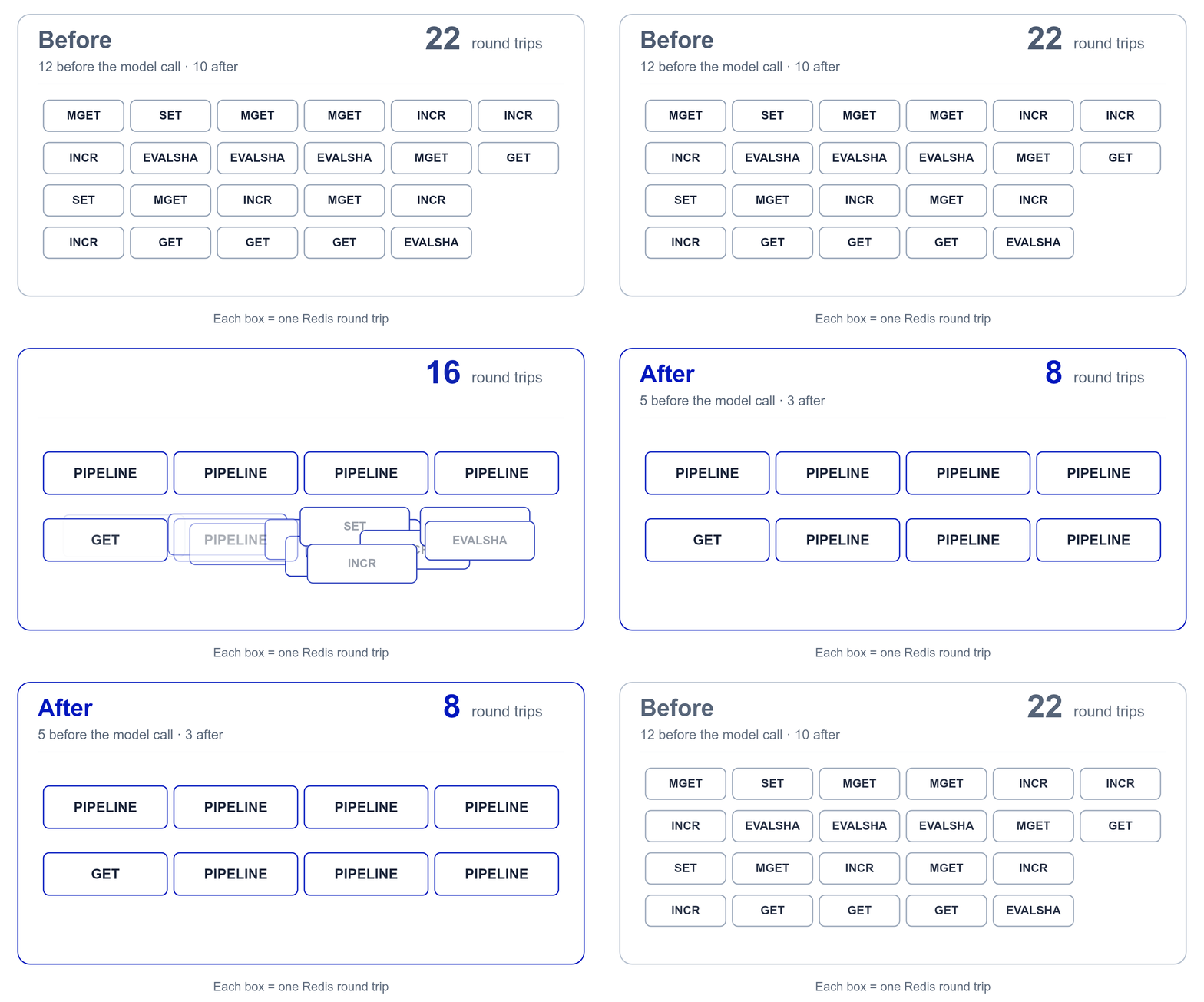
<h2 class="anchor anchorWithStickyNavbar_LWe7" id="get-started">Get started<a href="https://docs.litellm.ai/blog/litellm-lens-launch#get-started" class="hash-link" aria-label="Direct link to Get started" title="Direct link to Get started">​</a></h2>
<p>The era of self-improving agents is here. <a href="https://forms.gle/3GC1Ner4vjthGWi18" target="_blank" rel="noopener noreferrer">Sign up for early access</a>, or follow the <a href="https://docs.litellm.ai/docs/proxy/lens">Lens docs</a> to deploy it on your own LiteLLM gateway today</p>]]></content>
        <author>
            <name>Ishaan Jaffer</name>
            <uri>https://www.linkedin.com/in/reffajnaahsi/</uri>
        </author>
        <author>
            <name>Moe Khalil</name>
            <uri>https://www.linkedin.com/in/moe-khalil-73a2371a1/</uri>
        </author>
        <author>
            <name>Tin Lo</name>
            <uri>https://www.linkedin.com/in/tinchi-lo/</uri>
        </author>
        <author>
            <name>Yujong Lee</name>
            <email>yujong@berri.ai</email>
            <uri>https://www.linkedin.com/in/yujong1ee/</uri>
        </author>
        <category label="lens" term="lens"/>
        <category label="agent-tracing" term="agent-tracing"/>
    </entry>
    <entry>
        <title type="html"><![CDATA[How we cut LiteLLM's Redis round trips per request by 64%]]></title>
        <id>https://docs.litellm.ai/blog/redis-request-pipelines</id>
        <link href="https://docs.litellm.ai/blog/redis-request-pipelines"/>
        <updated>2026-10-01T09:00:00.000Z</updated>
        <summary type="html"><![CDATA[A governed request to the LiteLLM AI Gateway waited on Redis 22 times. It now waits 8 times: one pipeline per Redis backend before the model call, one after.]]></summary>
        <content type="html"><![CDATA[<p><img decoding="async" loading="lazy" alt="LiteLLM&amp;#39;s 22 Redis round trips merge into 8, a 64% reduction per request" src="https://docs.litellm.ai/assets/images/cover-be0674413e2f2820663db4946cc50660.gif" width="1620" height="900" class="img_ev3q"></p>
<p>This week, we cut the number of times a request to the LiteLLM proxy waits on Redis from <strong>22 to 8</strong>.</p>
<p>A request from a key with a budget, in a team with a budget and TPM/RPM limits, against a model group with usage-based routing and a Redis response cache, made 22 Redis round trips: 12 before the model was called and 10 after. The same request, with the same checks and the same writes, now makes <strong>5 before and 3 after</strong>.</p>
<!-- -->
<figure class="figure_o7gF"><div class="results_i98j"><div class="resultHeading_AJ8r"><p class="eyebrow_Mh6p">Redis round trips per request</p><span class="improvement_HD15">14 fewer Redis round trips per request</span></div><div class="timing_hjbg"><div class="beforeTime_BXMO"><span class="timeLabel_VchS">Before</span><span class="timeValue_Hhx_">22<span class="timeUnit_JhNW"> <!-- -->round trips</span></span></div><svg class="timingArrow_f6mt" width="24" height="24" viewBox="0 0 24 24" fill="none" aria-hidden="true"><path d="M4 12h15m-6-6 6 6-6 6" stroke="currentColor" stroke-width="1.5" stroke-linecap="round" stroke-linejoin="round"></path></svg><div class="afterTime_RTF3"><span class="timeLabel_VchS">After</span><span class="timeValue_Hhx_">8<span class="timeUnit_JhNW"> <!-- -->round trips</span></span></div></div><table class="metrics_z24J" aria-label="Redis round trips: Redis round trips before and after"><thead><tr><th scope="col">Redis round trips</th><th scope="col">Before</th><th scope="col">After</th></tr></thead><tbody><tr><th scope="row">Before the model call</th><td>12</td><td>5</td></tr><tr><th scope="row">After the model call</th><td>10</td><td>3</td></tr><tr><th scope="row">Streaming request</th><td>24</td><td>8</td></tr><tr><th scope="row">Response-cache hit</th><td>18</td><td>7</td></tr><tr><th scope="row">Once-a-minute auth refresh</th><td>46</td><td>16</td></tr></tbody></table></div><figcaption class="caption_dHe4">One /v1/chat/completions request · key, team and end-user budgets · TPM and RPM limits · usage-based routing · response cache</figcaption></figure>
<h2 class="anchor anchorWithStickyNavbar_LWe7" id="why-it-was-slow">Why it was slow<a href="https://docs.litellm.ai/blog/redis-request-pipelines#why-it-was-slow" class="hash-link" aria-label="Direct link to Why it was slow" title="Direct link to Why it was slow">​</a></h2>
<p>Seven parts of the proxy talk to Redis on a request: auth, spend counters, budget reservation, the rate limiter, the router, the response cache, and the post-call accounting. Each one read what it needed, decided, wrote, and returned before the next one started. The rate limiter alone ran three Lua scripts one after another. Budget reservation re-read the spend counters auth had just read, then sent one increment per entity.</p>
<p>Of the 22 round trips, <strong>5 carried information a decision depended on</strong>: the identity rows, the spend counters, the rate-limit scripts, the routing state and the response-cache lookup. The other 17 were re-reads of values already in hand, write-backs, and counter updates nothing waited for. Redis was never the bottleneck. The cost was waiting for the answer, 22 times in a row, on every request.</p>
<figure class="figure_o7gF"><div class="timeline_i6NJ"><div class="lane_NPTW"><div class="laneLabel_BapR"><div class="laneHeading_TQPa"><span class="laneName_H0Ib">Before</span><span class="laneTotal_W63K"><strong>22</strong> round trips</span></div><span class="laneCount_FoG8">12 before the model call, 10 after</span></div><ol class="trips_XZy4" aria-label="Before Redis round trips"><li class="trip_z37Z" data-owner="identity"><span class="tripOp__LZi">MGET</span><span class="tripDetail_G2ag">team, membership</span></li><li class="trip_z37Z" data-owner="identity"><span class="tripOp__LZi">SET</span><span class="tripDetail_G2ag">write back</span></li><li class="trip_z37Z" data-owner="spend"><span class="tripOp__LZi">MGET</span><span class="tripDetail_G2ag">spend counters</span></li><li class="trip_z37Z" data-owner="spend"><span class="tripOp__LZi">MGET</span><span class="tripDetail_G2ag">same counters</span></li><li class="trip_z37Z" data-owner="spend"><span class="tripOp__LZi">INCR</span><span class="tripDetail_G2ag">reserve key</span></li><li class="trip_z37Z" data-owner="spend"><span class="tripOp__LZi">INCR</span><span class="tripDetail_G2ag">reserve team</span></li><li class="trip_z37Z" data-owner="spend"><span class="tripOp__LZi">INCR</span><span class="tripDetail_G2ag">reserve end user</span></li><li class="trip_z37Z" data-owner="limits"><span class="tripOp__LZi">EVALSHA</span><span class="tripDetail_G2ag">RPM check</span></li><li class="trip_z37Z" data-owner="limits"><span class="tripOp__LZi">EVALSHA</span><span class="tripDetail_G2ag">key TPM</span></li><li class="trip_z37Z" data-owner="limits"><span class="tripOp__LZi">EVALSHA</span><span class="tripDetail_G2ag">team TPM</span></li><li class="trip_z37Z" data-owner="routing"><span class="tripOp__LZi">MGET</span><span class="tripDetail_G2ag">cooldowns, usage</span></li><li class="trip_z37Z" data-owner="cache"><span class="tripOp__LZi">GET</span><span class="tripDetail_G2ag">response cache</span></li><li class="provider_hv1C">model call</li><li class="trip_z37Z" data-owner="cache"><span class="tripOp__LZi">SET</span><span class="tripDetail_G2ag">response cache</span></li><li class="trip_z37Z" data-owner="spend"><span class="tripOp__LZi">MGET</span><span class="tripDetail_G2ag">spend counters</span></li><li class="trip_z37Z" data-owner="spend"><span class="tripOp__LZi">INCR</span><span class="tripDetail_G2ag">settle reservation</span></li><li class="trip_z37Z" data-owner="spend"><span class="tripOp__LZi">MGET</span><span class="tripDetail_G2ag">same counters</span></li><li class="trip_z37Z" data-owner="spend"><span class="tripOp__LZi">INCR</span><span class="tripDetail_G2ag">other counters</span></li><li class="trip_z37Z" data-owner="routing"><span class="tripOp__LZi">INCR</span><span class="tripDetail_G2ag">deployment TPM</span></li><li class="trip_z37Z" data-owner="spend"><span class="tripOp__LZi">GET</span><span class="tripDetail_G2ag">user spend</span></li><li class="trip_z37Z" data-owner="spend"><span class="tripOp__LZi">GET</span><span class="tripDetail_G2ag">tag spend</span></li><li class="trip_z37Z" data-owner="spend"><span class="tripOp__LZi">GET</span><span class="tripDetail_G2ag">tag spend</span></li><li class="trip_z37Z" data-owner="limits"><span class="tripOp__LZi">EVALSHA</span><span class="tripDetail_G2ag">token usage</span></li></ol></div><div class="lane_NPTW laneAfter_TJIT"><div class="laneLabel_BapR"><div class="laneHeading_TQPa"><span class="laneName_H0Ib">After</span><span class="laneTotal_W63K"><strong>8</strong> round trips</span></div><span class="laneCount_FoG8">5 before the model call, 3 after</span></div><ol class="trips_XZy4" aria-label="After Redis round trips"><li class="trip_z37Z" data-owner="mixed"><span class="tripOp__LZi">PIPELINE</span><span class="tripDetail_G2ag">identity MGET + spend MGET</span></li><li class="trip_z37Z" data-owner="spend"><span class="tripOp__LZi">PIPELINE</span><span class="tripDetail_G2ag">reserve key, team, end user</span></li><li class="trip_z37Z" data-owner="mixed"><span class="tripOp__LZi">PIPELINE</span><span class="tripDetail_G2ag">identity write back + routing MGET + RPM check</span></li><li class="trip_z37Z" data-owner="limits"><span class="tripOp__LZi">PIPELINE</span><span class="tripDetail_G2ag">key TPM + team TPM</span></li><li class="trip_z37Z" data-owner="cache"><span class="tripOp__LZi">GET</span><span class="tripDetail_G2ag">response cache</span></li><li class="provider_hv1C">model call</li><li class="trip_z37Z" data-owner="spend"><span class="tripOp__LZi">PIPELINE</span><span class="tripDetail_G2ag">spend counters</span></li><li class="trip_z37Z" data-owner="spend"><span class="tripOp__LZi">PIPELINE</span><span class="tripDetail_G2ag">user, tag spend</span></li><li class="trip_z37Z" data-owner="mixed"><span class="tripOp__LZi">PIPELINE</span><span class="tripDetail_G2ag">cache SET + 8 counter INCRs + deployment TPM + token usage</span></li></ol></div><div class="legend_voeT"><span class="legendItem__oOh"><span class="swatch_CmIJ" data-owner="identity"></span>Identity</span><span class="legendItem__oOh"><span class="swatch_CmIJ" data-owner="spend"></span>Spend and budgets</span><span class="legendItem__oOh"><span class="swatch_CmIJ" data-owner="limits"></span>Rate limits</span><span class="legendItem__oOh"><span class="swatch_CmIJ" data-owner="routing"></span>Routing</span><span class="legendItem__oOh"><span class="swatch_CmIJ" data-owner="cache"></span>Response cache</span><span class="legendItem__oOh"><span class="swatch_CmIJ" data-owner="mixed"></span>Shared pipeline</span></div></div><figcaption class="caption_dHe4">Every box is one wait on Redis. Same request, same checks, same writes.</figcaption></figure>
<h2 class="anchor anchorWithStickyNavbar_LWe7" id="what-we-changed">What we changed<a href="https://docs.litellm.ai/blog/redis-request-pipelines#what-we-changed" class="hash-link" aria-label="Direct link to What we changed" title="Direct link to What we changed">​</a></h2>
<p><strong>Every request now owns one Redis batch per backend.</strong> Auth, the spend check, the rate limiter and the router declare their reads and scripts on it and get a handle back. The first time anyone awaits a handle, everything declared so far leaves as one pipeline, and every caller reads its own reply. The checks themselves did not move: budget rejects still happen in the budget code, rate-limit rejects in the rate limiter, in the same order as before.</p>
<figure class="figure_o7gF"><div class="flows_JY6Y"><div class="flow_Q9fj"><div><span class="flowLabel_TGsz">Before</span><p class="flowTitle_CU0V">Each subsystem reads, decides and writes before the next one starts</p></div><ol class="stages_D30Q" aria-label="Before request flow"><li class="stage_SFcE"><span class="stageLabel_Zqp1">Auth</span><span class="stageDetail_IpN3">Read identity rows, write them back, read the spend counters</span></li><li class="stage_SFcE"><svg class="flowArrow_hk3f" width="24" height="24" viewBox="0 0 24 24" fill="none" aria-hidden="true"><path d="M4 12h15m-6-6 6 6-6 6" stroke="currentColor" stroke-width="1.5" stroke-linecap="round" stroke-linejoin="round"></path></svg><span class="stageLabel_Zqp1">Budgets</span><span class="stageDetail_IpN3">Read the same spend counters again, then reserve with three increments</span></li><li class="stage_SFcE"><svg class="flowArrow_hk3f" width="24" height="24" viewBox="0 0 24 24" fill="none" aria-hidden="true"><path d="M4 12h15m-6-6 6 6-6 6" stroke="currentColor" stroke-width="1.5" stroke-linecap="round" stroke-linejoin="round"></path></svg><span class="stageLabel_Zqp1">Rate limits</span><span class="stageDetail_IpN3">Run the RPM script, then the key TPM script, then the team TPM script</span></li><li class="stage_SFcE"><svg class="flowArrow_hk3f" width="24" height="24" viewBox="0 0 24 24" fill="none" aria-hidden="true"><path d="M4 12h15m-6-6 6 6-6 6" stroke="currentColor" stroke-width="1.5" stroke-linecap="round" stroke-linejoin="round"></path></svg><span class="stageLabel_Zqp1">Routing and cache</span><span class="stageDetail_IpN3">Read cooldowns and usage, pick a deployment, read the response cache</span></li></ol></div><div class="flow_Q9fj after_xC4k"><div><span class="flowLabel_TGsz">After</span><p class="flowTitle_CU0V">Declare, flush once, decide</p></div><ol class="stages_D30Q" aria-label="After request flow"><li class="stage_SFcE"><span class="stageLabel_Zqp1">Declare</span><span class="stageDetail_IpN3">Auth, budgets, rate limits and routing queue their reads and scripts on the request batch and get a handle each</span></li><li class="stage_SFcE"><svg class="flowArrow_hk3f" width="24" height="24" viewBox="0 0 24 24" fill="none" aria-hidden="true"><path d="M4 12h15m-6-6 6 6-6 6" stroke="currentColor" stroke-width="1.5" stroke-linecap="round" stroke-linejoin="round"></path></svg><span class="stageLabel_Zqp1">Flush</span><span class="stageDetail_IpN3">The first await sends everything queued as one pipeline per Redis backend; every command gets its own reply</span></li><li class="stage_SFcE"><svg class="flowArrow_hk3f" width="24" height="24" viewBox="0 0 24 24" fill="none" aria-hidden="true"><path d="M4 12h15m-6-6 6 6-6 6" stroke="currentColor" stroke-width="1.5" stroke-linecap="round" stroke-linejoin="round"></path></svg><span class="stageLabel_Zqp1">Decide</span><span class="stageDetail_IpN3">Each subsystem reads its reply and runs the same checks in the same order; a failed command fails only its owner</span></li><li class="stage_SFcE"><svg class="flowArrow_hk3f" width="24" height="24" viewBox="0 0 24 24" fill="none" aria-hidden="true"><path d="M4 12h15m-6-6 6 6-6 6" stroke="currentColor" stroke-width="1.5" stroke-linecap="round" stroke-linejoin="round"></path></svg><span class="stageLabel_Zqp1">Settle</span><span class="stageDetail_IpN3">After the model call, writes collect in a post-call batch and leave in one pipeline once the callbacks finish</span></li></ol></div></div><figcaption class="caption_dHe4">Only the I/O scheduling changed. Every check still runs in the module that owns it.</figcaption></figure>
<p>After the model responds, nothing waits on the writes, so they collect in a post-call batch: the response-cache write, the spend increments, the deployment usage counter and the rate limiter's token script. They leave in one pipeline when the success or failure callbacks finish. A one-second deadline flushes the batch if no callback closes it, and shutdown drains whatever is still pending, so a pod restart does not lose accounting.</p>
<p>Each command in a pipeline gets its own reply. A Lua script that is not loaded fails only its owner, which falls back to a direct call exactly as it did before. A pipeline that fails as a whole looks to every owner like Redis being unreachable, which they already handle. Redis Cluster clients keep making direct calls, since a cluster pipeline fans out per node. Requests that touch two Redis backends get one pipeline per backend, and the proxy and router caches share a pipeline when they point at the same server.</p>
<h2 class="anchor anchorWithStickyNavbar_LWe7" id="redis-round-trips-per-request-22--8">Redis round trips per request: 22 → 8<a href="https://docs.litellm.ai/blog/redis-request-pipelines#redis-round-trips-per-request-22--8" class="hash-link" aria-label="Direct link to Redis round trips per request: 22 → 8" title="Direct link to Redis round trips per request: 22 → 8">​</a></h2>
<p>The same harness ran every endpoint shape the proxy governs the same way, with and without streaming, with usage-based and simple-shuffle routing, and with a response-cache hit. <code>/v1/responses</code> keeps one extra round trip on each side because its native handler still makes two synchronous cache calls from a worker thread.</p>
<figure class="figure_o7gF"><table class="metrics_z24J" aria-label="Request: Redis round trips before and after"><thead><tr><th scope="col">Request</th><th scope="col">Before</th><th scope="col">After</th></tr></thead><tbody><tr><th scope="row"><code>/v1/chat/completions</code></th><td>22</td><td>8</td></tr><tr><th scope="row"><code>/v1/chat/completions</code><span class="requestVariant_Xf1E">streaming</span></th><td>24</td><td>8</td></tr><tr><th scope="row"><code>/v1/chat/completions</code><span class="requestVariant_Xf1E">simple-shuffle routing</span></th><td>22</td><td>8</td></tr><tr><th scope="row"><code>/v1/messages</code></th><td>21</td><td>8</td></tr><tr><th scope="row"><code>/v1/responses</code></th><td>26</td><td>9</td></tr><tr><th scope="row"><code>/v1/chat/completions</code><span class="requestVariant_Xf1E">response-cache hit</span></th><td>18</td><td>7</td></tr></tbody></table></figure>
<h2 class="anchor anchorWithStickyNavbar_LWe7" id="auth-refresh-requests-46--16-redis-round-trips">Auth refresh requests: 46 → 16 Redis round trips<a href="https://docs.litellm.ai/blog/redis-request-pipelines#auth-refresh-requests-46--16-redis-round-trips" class="hash-link" aria-label="Direct link to Auth refresh requests: 46 → 16 Redis round trips" title="Direct link to Auth refresh requests: 46 → 16 Redis round trips">​</a></h2>
<p>Auth keeps its management objects, the key, the end user, the team and the model-access registry, in memory for 60 seconds. On the first request after they expire, the proxy refreshed each one from Redis and then Postgres one call at a time: 16 serial Redis trips before routing started, the end user, the key and the registry each read twice, and the team alias deleted with a synchronous call on the event loop. That request cost 46 round trips instead of 22, once a minute for every active key.</p>
<p>The same request now reads whatever memory is missing with one MGET on the request pipeline, reads the team, and sends the write-backs and the alias delete as one pipeline behind it. The refresh is 3 trips, and the request as a whole went from <strong>46 to 16 round trips</strong> for chat and from 40 to 14 for <code>/v1/messages</code>.</p>
<h2 class="anchor anchorWithStickyNavbar_LWe7" id="how-we-measured">How we measured<a href="https://docs.litellm.ai/blog/redis-request-pipelines#how-we-measured" class="hash-link" aria-label="Direct link to How we measured" title="Direct link to How we measured">​</a></h2>
<p>We measured both versions on the same local proxy, from the commit before this work (<code>27c110cb</code>) to main with all five changes in it (<code>13d004fc</code>): Redis 6.0 and Postgres 14, mock deployments so the count does not depend on a provider, and a tracer that logs every Redis call and every pipeline flush with its caller. A pipeline or a Lua script counts as one round trip. Every sample was preceded by a warm-up request 12 seconds earlier, and the harness idles for 65 seconds every three samples so the 60-second cache expiry never lands inside a sample. For the refresh case, the harness sent a warm-up request, waited 65 seconds and traced the next one. All requests returned HTTP 200 in both arms.</p>
<p>See the changes: <a href="https://github.com/BerriAI/litellm/pull/43320" target="_blank" rel="noopener noreferrer">routing reads</a>, <a href="https://github.com/BerriAI/litellm/pull/43369" target="_blank" rel="noopener noreferrer">spend counters</a>, <a href="https://github.com/BerriAI/litellm/pull/43407" target="_blank" rel="noopener noreferrer">the pre-call pipeline</a>, <a href="https://github.com/BerriAI/litellm/pull/43779" target="_blank" rel="noopener noreferrer">the post-call pipeline</a> and <a href="https://github.com/BerriAI/litellm/pull/43776" target="_blank" rel="noopener noreferrer">the auth refresh</a>.</p>]]></content>
        <author>
            <name>Yassin Kortam</name>
            <uri>https://www.linkedin.com/in/yassink/</uri>
        </author>
        <category label="performance" term="performance"/>
        <category label="redis" term="redis"/>
        <category label="proxy" term="proxy"/>
        <category label="engineering" term="engineering"/>
        <category label="ai-gateway" term="ai-gateway"/>
    </entry>
    <entry>
        <title type="html"><![CDATA[How we made the LiteLLM Usage page 120x faster]]></title>
        <id>https://docs.litellm.ai/blog/usage-page-bounded-loading</id>
        <link href="https://docs.litellm.ai/blog/usage-page-bounded-loading"/>
        <updated>2026-09-30T09:00:00.000Z</updated>
        <summary type="html"><![CDATA[From six minutes to 3.2 seconds: how moving aggregation into Postgres made LiteLLM's Usage page roughly 120x faster in our benchmark.]]></summary>
        <content type="html"><![CDATA[<p>This week, we made the LiteLLM Usage page roughly 120x faster.</p>
<p>With 5,000 API keys, our Usage page took <strong>over six minutes</strong> to show 30 days of totals. We redesigned how it loads data and brought that down to <strong>3.2 seconds</strong> in our benchmark. That's roughly <strong>120x faster</strong>.</p>
<!-- -->
<figure class="figure_K3lX"><div class="results_oF6b"><div class="resultHeading_hwA2"><p class="eyebrow_xoZB">Time to usage totals</p><span class="improvement_YvyX">120×<!-- --> faster in this benchmark</span></div><div class="timing_Itsf"><div class="beforeTime_sGle"><span class="timeLabel_VIR9">Before</span><span class="timeValue_N9Nm">386<span class="timeUnit_TctC">s</span></span></div><svg class="timingArrow_eqSJ" width="24" height="24" viewBox="0 0 24 24" fill="none" aria-hidden="true"><path d="M4 12h15m-6-6 6 6-6 6" stroke="currentColor" stroke-width="1.5" stroke-linecap="round" stroke-linejoin="round"></path></svg><div class="afterTime_L9fR"><span class="timeLabel_VIR9">After</span><span class="timeValue_N9Nm">3.2<span class="timeUnit_TctC">s</span></span></div></div><table class="metrics_XaDM"><thead><tr><th scope="col">30-day page load</th><th scope="col">Before</th><th scope="col">After</th></tr></thead><tbody><tr><th scope="row">Usage requests</th><td>315</td><td>6</td></tr><tr><th scope="row">Data transferred</th><td>1.3 GB</td><td>17 MB</td></tr><tr><th scope="row">Peak browser heap</th><td>2.0 GB</td><td>72 MB</td></tr></tbody></table></div><figcaption class="caption_lv0v">30-day Usage view · 5,000 API keys · same database</figcaption></figure>
<h2 class="anchor anchorWithStickyNavbar_LWe7" id="why-it-was-slow">Why it was slow<a href="https://docs.litellm.ai/blog/usage-page-bounded-loading#why-it-was-slow" class="hash-link" aria-label="Direct link to Why it was slow" title="Direct link to Why it was slow">​</a></h2>
<p>The browser downloaded every key's daily usage, 1,000 rows at a time, then calculated totals and rankings in JavaScript.</p>
<p>More keys and more history meant more requests, more data, and more work in the browser. Our 30-day test needed <strong>315 requests and 1.3 GB of data</strong> before the totals appeared.</p>
<h2 class="anchor anchorWithStickyNavbar_LWe7" id="what-we-changed">What we changed<a href="https://docs.litellm.ai/blog/usage-page-bounded-loading#what-we-changed" class="hash-link" aria-label="Direct link to What we changed" title="Direct link to What we changed">​</a></h2>
<p><strong>Postgres now does the aggregation.</strong> The page receives calculated totals and usage breakdowns, instead of downloading every key's history to calculate them.</p>
<figure class="figure_K3lX"><div class="flows_I_1r"><div class="flow_ynXR"><div><span class="flowLabel_yBPG">Before</span><p class="flowTitle_xFtv">Download, then calculate</p></div><ol class="stages_gvrw" aria-label="Before data flow"><li class="stage_nVmF"><span class="stageLabel_VCxT">Database</span><span class="stageDetail_JmZ2">Daily rows for every key</span></li><li class="stage_nVmF"><svg class="flowArrow_bpTK" width="24" height="24" viewBox="0 0 24 24" fill="none" aria-hidden="true"><path d="M4 12h15m-6-6 6 6-6 6" stroke="currentColor" stroke-width="1.5" stroke-linecap="round" stroke-linejoin="round"></path></svg><span class="stageLabel_VCxT">Transfer</span><span class="stageDetail_JmZ2">Page through the results</span></li><li class="stage_nVmF"><svg class="flowArrow_bpTK" width="24" height="24" viewBox="0 0 24 24" fill="none" aria-hidden="true"><path d="M4 12h15m-6-6 6 6-6 6" stroke="currentColor" stroke-width="1.5" stroke-linecap="round" stroke-linejoin="round"></path></svg><span class="stageLabel_VCxT">Browser</span><span class="stageDetail_JmZ2">Sum totals and sort keys</span></li></ol></div><div class="flow_ynXR after_ZODV"><div><span class="flowLabel_yBPG">After</span><p class="flowTitle_xFtv">Calculate, then download</p></div><ol class="stages_gvrw" aria-label="After data flow"><li class="stage_nVmF"><span class="stageLabel_VCxT">Database</span><span class="stageDetail_JmZ2">Aggregate across all keys</span></li><li class="stage_nVmF"><svg class="flowArrow_bpTK" width="24" height="24" viewBox="0 0 24 24" fill="none" aria-hidden="true"><path d="M4 12h15m-6-6 6 6-6 6" stroke="currentColor" stroke-width="1.5" stroke-linecap="round" stroke-linejoin="round"></path></svg><span class="stageLabel_VCxT">Transfer</span><span class="stageDetail_JmZ2">Totals and usage breakdowns</span></li><li class="stage_nVmF"><svg class="flowArrow_bpTK" width="24" height="24" viewBox="0 0 24 24" fill="none" aria-hidden="true"><path d="M4 12h15m-6-6 6 6-6 6" stroke="currentColor" stroke-width="1.5" stroke-linecap="round" stroke-linejoin="round"></path></svg><span class="stageLabel_VCxT">Browser</span><span class="stageDetail_JmZ2">Display the results</span></li></ol></div></div><figcaption class="caption_lv0v">Aggregate in the database. Send less to the browser.</figcaption></figure>
<p>Totals still include <strong>all keys</strong> in the selected range. The key list loads 50 keys at a time as you scroll, and a key's daily charts load when you expand it, so the browser never holds every key's history. Search and CSV export run in Postgres too, so you can still find any virtual key and export complete usage data.</p>
<h2 class="anchor anchorWithStickyNavbar_LWe7" id="the-results-hold-up-over-longer-ranges">The results hold up over longer ranges<a href="https://docs.litellm.ai/blog/usage-page-bounded-loading#the-results-hold-up-over-longer-ranges" class="hash-link" aria-label="Direct link to The results hold up over longer ranges" title="Direct link to The results hold up over longer ranges">​</a></h2>
<p>For 90 days of usage, time to totals fell from <strong>about 34 minutes to 10 seconds</strong>. The same redesign covers the User, Agent, Team, Tag, Organization, and Customer usage views.</p>
<p>We tested both designs against the same Postgres database: <strong>5,000 API keys and 4.9 million daily rows across 91 days</strong>. Both used production UI builds. New timings are medians of five runs with a cold browser cache; old timings come from runs allowed to finish beyond our 90-second cutoff. These measurements track time to visible totals. We later reran the final code side by side with the version we first measured, on a separate machine, and time to totals matched within 2%.</p>
<p><img decoding="async" loading="lazy" alt="LiteLLM Usage page Key Activity tab showing complete 30-day totals for 5,000 keys, with the key list loading below." src="https://docs.litellm.ai/assets/images/after_usage_30d-4b65413c1e34262c6db066a3aaebcb9a.png" width="1600" height="1000" class="img_ev3q"></p>
<p>See the changes: <a href="https://github.com/BerriAI/litellm/pull/43398" target="_blank" rel="noopener noreferrer">database queries</a>, <a href="https://github.com/BerriAI/litellm/pull/43408" target="_blank" rel="noopener noreferrer">API routes</a>, and <a href="https://github.com/BerriAI/litellm/pull/43409" target="_blank" rel="noopener noreferrer">Admin UI</a>. We're making it faster to see where your LLM spend is going, even as your deployment grows.</p>]]></content>
        <author>
            <name>Yassin Kortam</name>
            <uri>https://www.linkedin.com/in/yassink/</uri>
        </author>
        <category label="performance" term="performance"/>
        <category label="admin-ui" term="admin-ui"/>
        <category label="postgres" term="postgres"/>
        <category label="engineering" term="engineering"/>
        <category label="ai-gateway" term="ai-gateway"/>
    </entry>
    <entry>
        <title type="html"><![CDATA[Day 0 Support: GPT-6.1 Sol]]></title>
        <id>https://docs.litellm.ai/blog/gpt_6_1_sol</id>
        <link href="https://docs.litellm.ai/blog/gpt_6_1_sol"/>
        <updated>2026-09-29T12:00:00.000Z</updated>
        <summary type="html"><![CDATA[Day 0 support for GPT-6.1 Sol on LiteLLM, with cached input at half GPT-6 Sol's price.]]></summary>
        <content type="html"><![CDATA[<p><img decoding="async" loading="lazy" alt="LiteLLM x GPT-6.1 Sol" src="https://docs.litellm.ai/assets/images/litellm_gpt_6_1_sol_announcement-c8521af0e74fa2c208af7ad7b2e494a9.png" width="4800" height="2508" class="img_ev3q"></p>
<p>LiteLLM now supports <a href="https://openai.com/index/introducing-gpt-6-1-sol/" target="_blank" rel="noopener noreferrer">GPT-6.1 Sol</a>. Route traffic to it through the LiteLLM AI Gateway with the same config you use for every other OpenAI model.</p>
<!-- -->
<p>GPT-6.1 Sol is an upgrade to GPT-6 Sol at the same $2 input and $10 output per 1M tokens, with cached input cut in half to $0.10. Per OpenAI, it matches GPT-6 Astra on DeepSWE v1.1 at roughly a fifth of the cost, and on Terminal-Bench Science it averages $5.47 a task against $23.21 for Opus 5.5.</p>
<div class="theme-admonition theme-admonition-note admonition_xJq3 alert alert--secondary"><div class="admonitionHeading_Gvgb"><span class="admonitionIcon_Rf37"><svg viewBox="0 0 14 16"><path fill-rule="evenodd" d="M6.3 5.69a.942.942 0 0 1-.28-.7c0-.28.09-.52.28-.7.19-.18.42-.28.7-.28.28 0 .52.09.7.28.18.19.28.42.28.7 0 .28-.09.52-.28.7a1 1 0 0 1-.7.3c-.28 0-.52-.11-.7-.3zM8 7.99c-.02-.25-.11-.48-.31-.69-.2-.19-.42-.3-.69-.31H6c-.27.02-.48.13-.69.31-.2.2-.3.44-.31.69h1v3c.02.27.11.5.31.69.2.2.42.31.69.31h1c.27 0 .48-.11.69-.31.2-.19.3-.42.31-.69H8V7.98v.01zM7 2.3c-3.14 0-5.7 2.54-5.7 5.68 0 3.14 2.56 5.7 5.7 5.7s5.7-2.55 5.7-5.7c0-3.15-2.56-5.69-5.7-5.69v.01zM7 .98c3.86 0 7 3.14 7 7s-3.14 7-7 7-7-3.12-7-7 3.14-7 7-7z"></path></svg></span>note</div><div class="admonitionContent_BuS1"><p><strong>No image upgrade needed.</strong> Pricing landed in <a href="https://github.com/BerriAI/litellm/pull/43738" target="_blank" rel="noopener noreferrer">PR #43738</a>; hit <strong>Reload Model Cost Map</strong> in the Admin UI (or <code>POST /reload/model_cost_map</code>) to pull it, on <code>v1.76.0</code> and above.</p></div></div>
<h2 class="anchor anchorWithStickyNavbar_LWe7" id="usage">Usage<a href="https://docs.litellm.ai/blog/gpt_6_1_sol#usage" class="hash-link" aria-label="Direct link to Usage" title="Direct link to Usage">​</a></h2>
<div class="tabs-container tabList__CuJ"><ul role="tablist" aria-orientation="horizontal" class="tabs"><li role="tab" tabindex="0" aria-selected="true" class="tabs__item tabItem_LNqP tabs__item--active">LiteLLM Proxy</li><li role="tab" tabindex="-1" aria-selected="false" class="tabs__item tabItem_LNqP">LiteLLM Python SDK</li></ul><div class="margin-top--md"><div role="tabpanel" class="tabItem_Ymn6"><p><strong>1. Setup config.yaml</strong></p><div class="language-yaml codeBlockContainer_Ckt0 theme-code-block" style="--prism-color:#393A34;--prism-background-color:#f6f8fa"><div class="codeBlockContent_QJqH"><pre tabindex="0" class="prism-code language-yaml codeBlock_bY9V thin-scrollbar" style="color:#393A34;background-color:#f6f8fa"><code class="codeBlockLines_e6Vv"><span class="token-line" style="color:#393A34"><span class="token key atrule" style="color:#22863A">model_list</span><span class="token punctuation" style="color:#393A34">:</span><span class="token plain"></span><br></span><span class="token-line" style="color:#393A34"><span class="token plain">  </span><span class="token punctuation" style="color:#393A34">-</span><span class="token plain"> </span><span class="token key atrule" style="color:#22863A">model_name</span><span class="token punctuation" style="color:#393A34">:</span><span class="token plain"> gpt</span><span class="token punctuation" style="color:#393A34">-</span><span class="token plain">6.1</span><span class="token punctuation" style="color:#393A34">-</span><span class="token plain">sol</span><br></span><span class="token-line" style="color:#393A34"><span class="token plain">    </span><span class="token key atrule" style="color:#22863A">litellm_params</span><span class="token punctuation" style="color:#393A34">:</span><span class="token plain"></span><br></span><span class="token-line" style="color:#393A34"><span class="token plain">      </span><span class="token key atrule" style="color:#22863A">model</span><span class="token punctuation" style="color:#393A34">:</span><span class="token plain"> openai/gpt</span><span class="token punctuation" style="color:#393A34">-</span><span class="token plain">6.1</span><span class="token punctuation" style="color:#393A34">-</span><span class="token plain">sol</span><br></span><span class="token-line" style="color:#393A34"><span class="token plain">      </span><span class="token key atrule" style="color:#22863A">api_key</span><span class="token punctuation" style="color:#393A34">:</span><span class="token plain"> os.environ/OPENAI_API_KEY</span><br></span></code></pre></div></div><p><strong>2. Start the proxy</strong></p><div class="language-bash codeBlockContainer_Ckt0 theme-code-block" style="--prism-color:#393A34;--prism-background-color:#f6f8fa"><div class="codeBlockContent_QJqH"><pre tabindex="0" class="prism-code language-bash codeBlock_bY9V thin-scrollbar" style="color:#393A34;background-color:#f6f8fa"><code class="codeBlockLines_e6Vv"><span class="token-line" style="color:#393A34"><span class="token plain">docker run -d \</span><br></span><span class="token-line" style="color:#393A34"><span class="token plain">  -p 4000:4000 \</span><br></span><span class="token-line" style="color:#393A34"><span class="token plain">  -e OPENAI_API_KEY=$OPENAI_API_KEY \</span><br></span><span class="token-line" style="color:#393A34"><span class="token plain">  -v $(pwd)/config.yaml:/app/config.yaml \</span><br></span><span class="token-line" style="color:#393A34"><span class="token plain">  ghcr.io/berriai/litellm:main-latest \</span><br></span><span class="token-line" style="color:#393A34"><span class="token plain">  --config /app/config.yaml</span><br></span></code></pre></div></div><p><strong>3. Test it</strong></p><div class="language-bash codeBlockContainer_Ckt0 theme-code-block" style="--prism-color:#393A34;--prism-background-color:#f6f8fa"><div class="codeBlockContent_QJqH"><pre tabindex="0" class="prism-code language-bash codeBlock_bY9V thin-scrollbar" style="color:#393A34;background-color:#f6f8fa"><code class="codeBlockLines_e6Vv"><span class="token-line" style="color:#393A34"><span class="token plain">curl -X POST "http://0.0.0.0:4000/chat/completions" \</span><br></span><span class="token-line" style="color:#393A34"><span class="token plain">  -H "Content-Type: application/json" \</span><br></span><span class="token-line" style="color:#393A34"><span class="token plain">  -H "Authorization: Bearer $LITELLM_KEY" \</span><br></span><span class="token-line" style="color:#393A34"><span class="token plain">  -d '{</span><br></span><span class="token-line" style="color:#393A34"><span class="token plain">    "model": "gpt-6.1-sol",</span><br></span><span class="token-line" style="color:#393A34"><span class="token plain">    "messages": [</span><br></span><span class="token-line" style="color:#393A34"><span class="token plain">      {"role": "user", "content": "Write a Python function to check if a number is prime."}</span><br></span><span class="token-line" style="color:#393A34"><span class="token plain">    ],</span><br></span><span class="token-line" style="color:#393A34"><span class="token plain">    "reasoning_effort": "high"</span><br></span><span class="token-line" style="color:#393A34"><span class="token plain">  }'</span><br></span></code></pre></div></div></div><div role="tabpanel" class="tabItem_Ymn6" hidden=""><div class="language-python codeBlockContainer_Ckt0 theme-code-block" style="--prism-color:#393A34;--prism-background-color:#f6f8fa"><div class="codeBlockContent_QJqH"><pre tabindex="0" class="prism-code language-python codeBlock_bY9V thin-scrollbar" style="color:#393A34;background-color:#f6f8fa"><code class="codeBlockLines_e6Vv"><span class="token-line" style="color:#393A34"><span class="token keyword" style="color:#CF222E">from</span><span class="token plain"> litellm </span><span class="token keyword" style="color:#CF222E">import</span><span class="token plain"> completion</span><br></span><span class="token-line" style="color:#393A34"><span class="token plain" style="display:inline-block"></span><br></span><span class="token-line" style="color:#393A34"><span class="token plain">response </span><span class="token operator" style="color:#D73A49">=</span><span class="token plain"> completion</span><span class="token punctuation" style="color:#393A34">(</span><span class="token plain"></span><br></span><span class="token-line" style="color:#393A34"><span class="token plain">    model</span><span class="token operator" style="color:#D73A49">=</span><span class="token string" style="color:#C6105F">"openai/gpt-6.1-sol"</span><span class="token punctuation" style="color:#393A34">,</span><span class="token plain"></span><br></span><span class="token-line" style="color:#393A34"><span class="token plain">    messages</span><span class="token operator" style="color:#D73A49">=</span><span class="token punctuation" style="color:#393A34">[</span><span class="token plain"></span><br></span><span class="token-line" style="color:#393A34"><span class="token plain">        </span><span class="token punctuation" style="color:#393A34">{</span><span class="token string" style="color:#C6105F">"role"</span><span class="token punctuation" style="color:#393A34">:</span><span class="token plain"> </span><span class="token string" style="color:#C6105F">"user"</span><span class="token punctuation" style="color:#393A34">,</span><span class="token plain"> </span><span class="token string" style="color:#C6105F">"content"</span><span class="token punctuation" style="color:#393A34">:</span><span class="token plain"> </span><span class="token string" style="color:#C6105F">"Write a Python function to check if a number is prime."</span><span class="token punctuation" style="color:#393A34">}</span><span class="token plain"></span><br></span><span class="token-line" style="color:#393A34"><span class="token plain">    </span><span class="token punctuation" style="color:#393A34">]</span><span class="token punctuation" style="color:#393A34">,</span><span class="token plain"></span><br></span><span class="token-line" style="color:#393A34"><span class="token plain">    reasoning_effort</span><span class="token operator" style="color:#D73A49">=</span><span class="token string" style="color:#C6105F">"high"</span><span class="token punctuation" style="color:#393A34">,</span><span class="token plain"></span><br></span><span class="token-line" style="color:#393A34"><span class="token plain"></span><span class="token punctuation" style="color:#393A34">)</span><span class="token plain"></span><br></span><span class="token-line" style="color:#393A34"><span class="token plain" style="display:inline-block"></span><br></span><span class="token-line" style="color:#393A34"><span class="token plain"></span><span class="token keyword" style="color:#CF222E">print</span><span class="token punctuation" style="color:#393A34">(</span><span class="token plain">response</span><span class="token punctuation" style="color:#393A34">.</span><span class="token plain">choices</span><span class="token punctuation" style="color:#393A34">[</span><span class="token number" style="color:#005CC5">0</span><span class="token punctuation" style="color:#393A34">]</span><span class="token punctuation" style="color:#393A34">.</span><span class="token plain">message</span><span class="token punctuation" style="color:#393A34">.</span><span class="token plain">content</span><span class="token punctuation" style="color:#393A34">)</span><br></span></code></pre></div></div></div></div></div>
<h2 class="anchor anchorWithStickyNavbar_LWe7" id="pricing">Pricing<a href="https://docs.litellm.ai/blog/gpt_6_1_sol#pricing" class="hash-link" aria-label="Direct link to Pricing" title="Direct link to Pricing">​</a></h2>
<p>Per 1M tokens (USD), short context (≤272K tokens) / long context (&gt;272K tokens).</p>
<table><thead><tr><th>Model</th><th>Input</th><th>Cached input</th><th>Cache write</th><th>Output</th></tr></thead><tbody><tr><td><code>gpt-6.1-sol</code></td><td>$2.00 / $4.00</td><td>$0.10 / $0.20</td><td>$2.50 / $5.00</td><td>$10.00 / $15.00</td></tr></tbody></table>
<p>Batch and Flex run at half these rates and Fast mode at double; LiteLLM tracks all of them from the same cost map row.</p>
<h2 class="anchor anchorWithStickyNavbar_LWe7" id="notes">Notes<a href="https://docs.litellm.ai/blog/gpt_6_1_sol#notes" class="hash-link" aria-label="Direct link to Notes" title="Direct link to Notes">​</a></h2>
<p>OpenAI serves tool calling for this model on the Responses API only. LiteLLM bridges a <code>/chat/completions</code> request with tools to <code>/v1/responses</code> for you, so existing tool-calling code keeps working.</p>
<p>Reasoning effort runs <code>low</code> to <code>max</code>, defaulting to <code>medium</code>. Unlike GPT-6 Sol, <code>none</code> is not supported, so <code>temperature</code> is not available on this model.</p>
<h2 class="anchor anchorWithStickyNavbar_LWe7" id="feedback">Feedback<a href="https://docs.litellm.ai/blog/gpt_6_1_sol#feedback" class="hash-link" aria-label="Direct link to Feedback" title="Direct link to Feedback">​</a></h2>
<p>Running GPT-6.1 Sol through LiteLLM and hitting something unexpected? Share it on <a href="https://github.com/BerriAI/litellm/discussions/43742" target="_blank" rel="noopener noreferrer">GitHub discussion #43742</a>.</p>]]></content>
        <author>
            <name>Misbah Syed</name>
            <uri>https://github.com/misbahsy</uri>
        </author>
        <author>
            <name>Mateo Wang</name>
            <uri>https://www.linkedin.com/in/mateo-wang</uri>
        </author>
        <author>
            <name>Kerry Lu</name>
            <uri>https://github.com/kerrylu-berri</uri>
        </author>
        <category label="openai" term="openai"/>
        <category label="gpt-6" term="gpt-6"/>
        <category label="gpt-6.1-sol" term="gpt-6.1-sol"/>
        <category label="completion" term="completion"/>
        <category label="day 0 support" term="day 0 support"/>
    </entry>
    <entry>
        <title type="html"><![CDATA[Learn the LiteLLM gateway with a guided course]]></title>
        <id>https://docs.litellm.ai/blog/litellm-gateway-course</id>
        <link href="https://docs.litellm.ai/blog/litellm-gateway-course"/>
        <updated>2026-09-28T17:00:00.000Z</updated>
        <summary type="html"><![CDATA[Follow a request through the LiteLLM gateway, Router, and SDK. A guided course for teams deploying the gateway and contributors making code changes.]]></summary>
        <content type="html"><![CDATA[<img src="https://docs.litellm.ai/assets/ideal-img/hero.2356978.1280.png" alt="Learn the LiteLLM gateway at litellm.ai/course. Follow a request through gateway access checks, Router deployment selection, and SDK provider translation." class="themedComponent_mlkZ themedComponent--light_NVdE" style="width:100%"><img src="https://docs.litellm.ai/assets/ideal-img/hero-dark.b5f1ab5.1280.png" alt="Learn the LiteLLM gateway at litellm.ai/course. Follow a request through gateway access checks, Router deployment selection, and SDK provider translation." class="themedComponent_mlkZ themedComponent--dark_xIcU" style="width:100%">
<p>The <a href="https://litellm.ai/course" target="_blank" rel="noopener noreferrer">LiteLLM gateway course</a> walks you through how the gateway, Router, and SDK work together. We built it for developers and platform teams deploying LiteLLM, and contributors who want to understand the code before opening a pull request.</p>
<!-- -->
<h2 class="anchor anchorWithStickyNavbar_LWe7" id="start-with-one-request">Start with one request<a href="https://docs.litellm.ai/blog/litellm-gateway-course#start-with-one-request" class="hash-link" aria-label="Direct link to Start with one request" title="Direct link to Start with one request">​</a></h2>
<p>The first lessons follow a support app that sends a question to a model called <code>support-chat</code>. The gateway checks the caller's access. The Router chooses a deployment. The SDK translates the call into the provider's format.</p>
<p>Later lessons build on that same app. You add access rules, compare routing choices, follow retries and fallbacks, and see how costs and logs are recorded.</p>
<p>In <a href="https://litellm.ai/course#/lesson/request-lifetime" target="_blank" rel="noopener noreferrer">Follow one request</a>, you can switch between an allowed request, a denied model, and a blocked answer. Select a scenario to see which steps run and where the request stops.</p>
<p><img decoding="async" loading="lazy" alt="Request flow with Answer blocked selected. The provider generates an answer before a response check blocks delivery." src="https://docs.litellm.ai/assets/images/request-stops-1b5b1195ee9d9b0362c4bd7757914121.png" width="738" height="390" class="img_ev3q"></p>
<h2 class="anchor anchorWithStickyNavbar_LWe7" id="understand-the-deployment-you-run">Understand the deployment you run<a href="https://docs.litellm.ai/blog/litellm-gateway-course#understand-the-deployment-you-run" class="hash-link" aria-label="Direct link to Understand the deployment you run" title="Direct link to Understand the deployment you run">​</a></h2>
<p>For platform teams, the lessons cover everyday decisions: how to give a team access to models, set a budget, choose fallbacks, and investigate a failed request.</p>
<p>The operations chapters explain how gateway workers, Redis, and PostgreSQL fit together. Other chapters cover streaming, caching, tools, and agents.</p>
<p>Use the <a href="https://docs.litellm.ai/docs/proxy/prod" target="_blank" rel="noopener noreferrer">production guide</a> alongside the course when you configure your deployment.</p>
<h2 class="anchor anchorWithStickyNavbar_LWe7" id="find-where-a-code-change-belongs">Find where a code change belongs<a href="https://docs.litellm.ai/blog/litellm-gateway-course#find-where-a-code-change-belongs" class="hash-link" aria-label="Direct link to Find where a code change belongs" title="Direct link to Find where a code change belongs">​</a></h2>
<p>For contributors, the course helps you find where a change belongs. A provider request in the wrong format points toward an SDK adapter. An unexpected deployment choice points toward the Router. A permission error starts with the gateway's access checks.</p>
<p>The lessons include <strong>Why this exists</strong> and <strong>Where the code lives</strong> sections. Open them to read the reason for a behavior and follow links to the relevant implementation, documentation, or tests.</p>
<p>The final chapter follows a change across the system, from a dashboard field to permissions, stored data, and the settings loaded by gateway workers. It shows you how to trace the behavior and choose what to test. The <a href="https://docs.litellm.ai/docs/extras/contributing_code" target="_blank" rel="noopener noreferrer">contribution guide</a> covers repository setup and the pull request process.</p>
<h2 class="anchor anchorWithStickyNavbar_LWe7" id="take-the-course">Take the course<a href="https://docs.litellm.ai/blog/litellm-gateway-course#take-the-course" class="hash-link" aria-label="Direct link to Take the course" title="Direct link to Take the course">​</a></h2>
<p>The course has 83 lessons in 15 chapters. Follow the lessons in order, or use the sidebar to return to a topic. Your progress is saved in your browser. No login is required.</p>
<p><strong><a href="https://litellm.ai/course" target="_blank" rel="noopener noreferrer">Start the LiteLLM gateway course →</a></strong></p>]]></content>
        <author>
            <name>Moe Khalil</name>
            <uri>https://www.linkedin.com/in/moe-khalil-73a2371a1/</uri>
        </author>
        <category label="proxy" term="proxy"/>
        <category label="product" term="product"/>
    </entry>
    <entry>
        <title type="html"><![CDATA[Day 0 Support: Claude Sonnet 5.5]]></title>
        <id>https://docs.litellm.ai/blog/claude_sonnet_5_5</id>
        <link href="https://docs.litellm.ai/blog/claude_sonnet_5_5"/>
        <updated>2026-09-28T10:00:00.000Z</updated>
        <summary type="html"><![CDATA[Day 0 support for Claude Sonnet 5.5 on the LiteLLM AI Gateway. Use it across Anthropic, Bedrock, Gemini Enterprise Agent Platform, and Azure.]]></summary>
        <content type="html"><![CDATA[<p><img decoding="async" loading="lazy" alt="LiteLLM x Claude Sonnet 5.5" src="https://docs.litellm.ai/assets/images/litellm_claude_sonnet_5_5_announcement-b67ee287e6ead46c827ffe8e4184caf5.png" width="4800" height="2508" class="img_ev3q"></p>
<p>LiteLLM now supports <a href="https://www.anthropic.com/claude-sonnet-5-5" target="_blank" rel="noopener noreferrer">Claude Sonnet 5.5</a> on Day 0. Use it across Anthropic, Bedrock, Gemini Enterprise Agent Platform, and Azure through the LiteLLM AI Gateway, with spend, rate limits, and logging in one place.</p>
<!-- -->
<h2 class="anchor anchorWithStickyNavbar_LWe7" id="whats-new-in-sonnet-55">What's new in Sonnet 5.5<a href="https://docs.litellm.ai/blog/claude_sonnet_5_5#whats-new-in-sonnet-55" class="hash-link" aria-label="Direct link to What's new in Sonnet 5.5" title="Direct link to What's new in Sonnet 5.5">​</a></h2>
<ul>
<li><strong>Same price as Sonnet 5:</strong> $2 / MTok input, $10 / MTok output, $0.20 / MTok cache reads</li>
<li><strong>30%+ faster</strong>, and up to 30% less per task, per Anthropic</li>
<li><strong>70.6% on Terminal-Bench 4.0</strong>, up from Sonnet 5's 10.3%</li>
<li><strong>1M-token context</strong>, up to 128K output tokens</li>
</ul>
<h2 class="anchor anchorWithStickyNavbar_LWe7" id="enabling-sonnet-55">Enabling Sonnet 5.5<a href="https://docs.litellm.ai/blog/claude_sonnet_5_5#enabling-sonnet-55" class="hash-link" aria-label="Direct link to Enabling Sonnet 5.5" title="Direct link to Enabling Sonnet 5.5">​</a></h2>
<p>Pricing landed in <a href="https://github.com/BerriAI/litellm/pull/43586" target="_blank" rel="noopener noreferrer">PR #43586</a>. No upgrade needed: open <strong>Price Data</strong> under <strong>Models + Endpoints</strong> in the UI and click <strong>Reload Price Data</strong> (or <code>POST /reload/model_cost_map</code>), on <code>v1.76.0</code> and above.</p>
<h2 class="anchor anchorWithStickyNavbar_LWe7" id="usage">Usage<a href="https://docs.litellm.ai/blog/claude_sonnet_5_5#usage" class="hash-link" aria-label="Direct link to Usage" title="Direct link to Usage">​</a></h2>
<div class="tabs-container tabList__CuJ"><ul role="tablist" aria-orientation="horizontal" class="tabs"><li role="tab" tabindex="0" aria-selected="true" class="tabs__item tabItem_LNqP tabs__item--active">Anthropic</li><li role="tab" tabindex="-1" aria-selected="false" class="tabs__item tabItem_LNqP">Bedrock</li><li role="tab" tabindex="-1" aria-selected="false" class="tabs__item tabItem_LNqP">Gemini Enterprise Agent Platform</li><li role="tab" tabindex="-1" aria-selected="false" class="tabs__item tabItem_LNqP">Azure</li></ul><div class="margin-top--md"><div role="tabpanel" class="tabItem_Ymn6"><p><strong>1. Setup config.yaml</strong></p><div class="language-yaml codeBlockContainer_Ckt0 theme-code-block" style="--prism-color:#393A34;--prism-background-color:#f6f8fa"><div class="codeBlockContent_QJqH"><pre tabindex="0" class="prism-code language-yaml codeBlock_bY9V thin-scrollbar" style="color:#393A34;background-color:#f6f8fa"><code class="codeBlockLines_e6Vv"><span class="token-line" style="color:#393A34"><span class="token key atrule" style="color:#22863A">model_list</span><span class="token punctuation" style="color:#393A34">:</span><span class="token plain"></span><br></span><span class="token-line" style="color:#393A34"><span class="token plain">  </span><span class="token punctuation" style="color:#393A34">-</span><span class="token plain"> </span><span class="token key atrule" style="color:#22863A">model_name</span><span class="token punctuation" style="color:#393A34">:</span><span class="token plain"> claude</span><span class="token punctuation" style="color:#393A34">-</span><span class="token plain">sonnet</span><span class="token punctuation" style="color:#393A34">-</span><span class="token plain">5</span><span class="token punctuation" style="color:#393A34">-</span><span class="token number" style="color:#005CC5">5</span><span class="token plain"></span><br></span><span class="token-line" style="color:#393A34"><span class="token plain">    </span><span class="token key atrule" style="color:#22863A">litellm_params</span><span class="token punctuation" style="color:#393A34">:</span><span class="token plain"></span><br></span><span class="token-line" style="color:#393A34"><span class="token plain">      </span><span class="token key atrule" style="color:#22863A">model</span><span class="token punctuation" style="color:#393A34">:</span><span class="token plain"> anthropic/claude</span><span class="token punctuation" style="color:#393A34">-</span><span class="token plain">sonnet</span><span class="token punctuation" style="color:#393A34">-</span><span class="token plain">5</span><span class="token punctuation" style="color:#393A34">-</span><span class="token number" style="color:#005CC5">5</span><span class="token plain"></span><br></span><span class="token-line" style="color:#393A34"><span class="token plain">      </span><span class="token key atrule" style="color:#22863A">api_key</span><span class="token punctuation" style="color:#393A34">:</span><span class="token plain"> os.environ/ANTHROPIC_API_KEY</span><br></span></code></pre></div></div><p><strong>2. Start the proxy</strong></p><div class="language-bash codeBlockContainer_Ckt0 theme-code-block" style="--prism-color:#393A34;--prism-background-color:#f6f8fa"><div class="codeBlockContent_QJqH"><pre tabindex="0" class="prism-code language-bash codeBlock_bY9V thin-scrollbar" style="color:#393A34;background-color:#f6f8fa"><code class="codeBlockLines_e6Vv"><span class="token-line" style="color:#393A34"><span class="token plain">docker run -d \</span><br></span><span class="token-line" style="color:#393A34"><span class="token plain">  -p 4000:4000 \</span><br></span><span class="token-line" style="color:#393A34"><span class="token plain">  -e ANTHROPIC_API_KEY=$ANTHROPIC_API_KEY \</span><br></span><span class="token-line" style="color:#393A34"><span class="token plain">  -v $(pwd)/config.yaml:/app/config.yaml \</span><br></span><span class="token-line" style="color:#393A34"><span class="token plain">  ghcr.io/berriai/litellm:v1.103.0 \</span><br></span><span class="token-line" style="color:#393A34"><span class="token plain">  --config /app/config.yaml</span><br></span></code></pre></div></div></div><div role="tabpanel" class="tabItem_Ymn6" hidden=""><p><strong>1. Setup config.yaml</strong></p><div class="language-yaml codeBlockContainer_Ckt0 theme-code-block" style="--prism-color:#393A34;--prism-background-color:#f6f8fa"><div class="codeBlockContent_QJqH"><pre tabindex="0" class="prism-code language-yaml codeBlock_bY9V thin-scrollbar" style="color:#393A34;background-color:#f6f8fa"><code class="codeBlockLines_e6Vv"><span class="token-line" style="color:#393A34"><span class="token key atrule" style="color:#22863A">model_list</span><span class="token punctuation" style="color:#393A34">:</span><span class="token plain"></span><br></span><span class="token-line" style="color:#393A34"><span class="token plain">  </span><span class="token punctuation" style="color:#393A34">-</span><span class="token plain"> </span><span class="token key atrule" style="color:#22863A">model_name</span><span class="token punctuation" style="color:#393A34">:</span><span class="token plain"> claude</span><span class="token punctuation" style="color:#393A34">-</span><span class="token plain">sonnet</span><span class="token punctuation" style="color:#393A34">-</span><span class="token plain">5</span><span class="token punctuation" style="color:#393A34">-</span><span class="token number" style="color:#005CC5">5</span><span class="token plain"></span><br></span><span class="token-line" style="color:#393A34"><span class="token plain">    </span><span class="token key atrule" style="color:#22863A">litellm_params</span><span class="token punctuation" style="color:#393A34">:</span><span class="token plain"></span><br></span><span class="token-line" style="color:#393A34"><span class="token plain">      </span><span class="token key atrule" style="color:#22863A">model</span><span class="token punctuation" style="color:#393A34">:</span><span class="token plain"> bedrock/anthropic.claude</span><span class="token punctuation" style="color:#393A34">-</span><span class="token plain">sonnet</span><span class="token punctuation" style="color:#393A34">-</span><span class="token plain">5</span><span class="token punctuation" style="color:#393A34">-</span><span class="token number" style="color:#005CC5">5</span><span class="token plain"></span><br></span><span class="token-line" style="color:#393A34"><span class="token plain">      </span><span class="token key atrule" style="color:#22863A">aws_access_key_id</span><span class="token punctuation" style="color:#393A34">:</span><span class="token plain"> os.environ/AWS_ACCESS_KEY_ID</span><br></span><span class="token-line" style="color:#393A34"><span class="token plain">      </span><span class="token key atrule" style="color:#22863A">aws_secret_access_key</span><span class="token punctuation" style="color:#393A34">:</span><span class="token plain"> os.environ/AWS_SECRET_ACCESS_KEY</span><br></span><span class="token-line" style="color:#393A34"><span class="token plain">      </span><span class="token key atrule" style="color:#22863A">aws_region_name</span><span class="token punctuation" style="color:#393A34">:</span><span class="token plain"> us</span><span class="token punctuation" style="color:#393A34">-</span><span class="token plain">east</span><span class="token punctuation" style="color:#393A34">-</span><span class="token number" style="color:#005CC5">1</span><br></span></code></pre></div></div><div class="theme-admonition theme-admonition-note admonition_xJq3 alert alert--secondary"><div class="admonitionHeading_Gvgb"><span class="admonitionIcon_Rf37"><svg viewBox="0 0 14 16"><path fill-rule="evenodd" d="M6.3 5.69a.942.942 0 0 1-.28-.7c0-.28.09-.52.28-.7.19-.18.42-.28.7-.28.28 0 .52.09.7.28.18.19.28.42.28.7 0 .28-.09.52-.28.7a1 1 0 0 1-.7.3c-.28 0-.52-.11-.7-.3zM8 7.99c-.02-.25-.11-.48-.31-.69-.2-.19-.42-.3-.69-.31H6c-.27.02-.48.13-.69.31-.2.2-.3.44-.31.69h1v3c.02.27.11.5.31.69.2.2.42.31.69.31h1c.27 0 .48-.11.69-.31.2-.19.3-.42.31-.69H8V7.98v.01zM7 2.3c-3.14 0-5.7 2.54-5.7 5.68 0 3.14 2.56 5.7 5.7 5.7s5.7-2.55 5.7-5.7c0-3.15-2.56-5.69-5.7-5.69v.01zM7 .98c3.86 0 7 3.14 7 7s-3.14 7-7 7-7-3.12-7-7 3.14-7 7-7z"></path></svg></span>note</div><div class="admonitionContent_BuS1"><p>For cross-region routing, use a regional inference profile such as <code>bedrock/converse/us.anthropic.claude-sonnet-5-5</code>. Regional profiles carry a 10% premium and <code>global.</code> stays at base price; LiteLLM tracks each variant.</p></div></div><p><strong>2. Start the proxy</strong></p><div class="language-bash codeBlockContainer_Ckt0 theme-code-block" style="--prism-color:#393A34;--prism-background-color:#f6f8fa"><div class="codeBlockContent_QJqH"><pre tabindex="0" class="prism-code language-bash codeBlock_bY9V thin-scrollbar" style="color:#393A34;background-color:#f6f8fa"><code class="codeBlockLines_e6Vv"><span class="token-line" style="color:#393A34"><span class="token plain">docker run -d \</span><br></span><span class="token-line" style="color:#393A34"><span class="token plain">  -p 4000:4000 \</span><br></span><span class="token-line" style="color:#393A34"><span class="token plain">  -e AWS_ACCESS_KEY_ID=$AWS_ACCESS_KEY_ID \</span><br></span><span class="token-line" style="color:#393A34"><span class="token plain">  -e AWS_SECRET_ACCESS_KEY=$AWS_SECRET_ACCESS_KEY \</span><br></span><span class="token-line" style="color:#393A34"><span class="token plain">  -v $(pwd)/config.yaml:/app/config.yaml \</span><br></span><span class="token-line" style="color:#393A34"><span class="token plain">  ghcr.io/berriai/litellm:v1.103.0 \</span><br></span><span class="token-line" style="color:#393A34"><span class="token plain">  --config /app/config.yaml</span><br></span></code></pre></div></div></div><div role="tabpanel" class="tabItem_Ymn6" hidden=""><p><strong>1. Setup config.yaml</strong></p><div class="language-yaml codeBlockContainer_Ckt0 theme-code-block" style="--prism-color:#393A34;--prism-background-color:#f6f8fa"><div class="codeBlockContent_QJqH"><pre tabindex="0" class="prism-code language-yaml codeBlock_bY9V thin-scrollbar" style="color:#393A34;background-color:#f6f8fa"><code class="codeBlockLines_e6Vv"><span class="token-line" style="color:#393A34"><span class="token key atrule" style="color:#22863A">model_list</span><span class="token punctuation" style="color:#393A34">:</span><span class="token plain"></span><br></span><span class="token-line" style="color:#393A34"><span class="token plain">  </span><span class="token punctuation" style="color:#393A34">-</span><span class="token plain"> </span><span class="token key atrule" style="color:#22863A">model_name</span><span class="token punctuation" style="color:#393A34">:</span><span class="token plain"> claude</span><span class="token punctuation" style="color:#393A34">-</span><span class="token plain">sonnet</span><span class="token punctuation" style="color:#393A34">-</span><span class="token plain">5</span><span class="token punctuation" style="color:#393A34">-</span><span class="token number" style="color:#005CC5">5</span><span class="token plain"></span><br></span><span class="token-line" style="color:#393A34"><span class="token plain">    </span><span class="token key atrule" style="color:#22863A">litellm_params</span><span class="token punctuation" style="color:#393A34">:</span><span class="token plain"></span><br></span><span class="token-line" style="color:#393A34"><span class="token plain">      </span><span class="token key atrule" style="color:#22863A">model</span><span class="token punctuation" style="color:#393A34">:</span><span class="token plain"> vertex_ai/claude</span><span class="token punctuation" style="color:#393A34">-</span><span class="token plain">sonnet</span><span class="token punctuation" style="color:#393A34">-</span><span class="token plain">5</span><span class="token punctuation" style="color:#393A34">-</span><span class="token number" style="color:#005CC5">5</span><span class="token plain"></span><br></span><span class="token-line" style="color:#393A34"><span class="token plain">      </span><span class="token key atrule" style="color:#22863A">vertex_project</span><span class="token punctuation" style="color:#393A34">:</span><span class="token plain"> os.environ/VERTEX_PROJECT</span><br></span><span class="token-line" style="color:#393A34"><span class="token plain">      </span><span class="token key atrule" style="color:#22863A">vertex_location</span><span class="token punctuation" style="color:#393A34">:</span><span class="token plain"> global</span><br></span></code></pre></div></div><p><strong>2. Start the proxy</strong></p><div class="language-bash codeBlockContainer_Ckt0 theme-code-block" style="--prism-color:#393A34;--prism-background-color:#f6f8fa"><div class="codeBlockContent_QJqH"><pre tabindex="0" class="prism-code language-bash codeBlock_bY9V thin-scrollbar" style="color:#393A34;background-color:#f6f8fa"><code class="codeBlockLines_e6Vv"><span class="token-line" style="color:#393A34"><span class="token plain">docker run -d \</span><br></span><span class="token-line" style="color:#393A34"><span class="token plain">  -p 4000:4000 \</span><br></span><span class="token-line" style="color:#393A34"><span class="token plain">  -e VERTEX_PROJECT=$VERTEX_PROJECT \</span><br></span><span class="token-line" style="color:#393A34"><span class="token plain">  -e GOOGLE_APPLICATION_CREDENTIALS=/app/credentials.json \</span><br></span><span class="token-line" style="color:#393A34"><span class="token plain">  -v $(pwd)/config.yaml:/app/config.yaml \</span><br></span><span class="token-line" style="color:#393A34"><span class="token plain">  -v $(pwd)/credentials.json:/app/credentials.json \</span><br></span><span class="token-line" style="color:#393A34"><span class="token plain">  ghcr.io/berriai/litellm:v1.103.0 \</span><br></span><span class="token-line" style="color:#393A34"><span class="token plain">  --config /app/config.yaml</span><br></span></code></pre></div></div></div><div role="tabpanel" class="tabItem_Ymn6" hidden=""><p><strong>1. Setup config.yaml</strong></p><div class="language-yaml codeBlockContainer_Ckt0 theme-code-block" style="--prism-color:#393A34;--prism-background-color:#f6f8fa"><div class="codeBlockContent_QJqH"><pre tabindex="0" class="prism-code language-yaml codeBlock_bY9V thin-scrollbar" style="color:#393A34;background-color:#f6f8fa"><code class="codeBlockLines_e6Vv"><span class="token-line" style="color:#393A34"><span class="token key atrule" style="color:#22863A">model_list</span><span class="token punctuation" style="color:#393A34">:</span><span class="token plain"></span><br></span><span class="token-line" style="color:#393A34"><span class="token plain">  </span><span class="token punctuation" style="color:#393A34">-</span><span class="token plain"> </span><span class="token key atrule" style="color:#22863A">model_name</span><span class="token punctuation" style="color:#393A34">:</span><span class="token plain"> claude</span><span class="token punctuation" style="color:#393A34">-</span><span class="token plain">sonnet</span><span class="token punctuation" style="color:#393A34">-</span><span class="token plain">5</span><span class="token punctuation" style="color:#393A34">-</span><span class="token number" style="color:#005CC5">5</span><span class="token plain"></span><br></span><span class="token-line" style="color:#393A34"><span class="token plain">    </span><span class="token key atrule" style="color:#22863A">litellm_params</span><span class="token punctuation" style="color:#393A34">:</span><span class="token plain"></span><br></span><span class="token-line" style="color:#393A34"><span class="token plain">      </span><span class="token key atrule" style="color:#22863A">model</span><span class="token punctuation" style="color:#393A34">:</span><span class="token plain"> azure_ai/claude</span><span class="token punctuation" style="color:#393A34">-</span><span class="token plain">sonnet</span><span class="token punctuation" style="color:#393A34">-</span><span class="token plain">5</span><span class="token punctuation" style="color:#393A34">-</span><span class="token number" style="color:#005CC5">5</span><span class="token plain"></span><br></span><span class="token-line" style="color:#393A34"><span class="token plain">      </span><span class="token key atrule" style="color:#22863A">api_key</span><span class="token punctuation" style="color:#393A34">:</span><span class="token plain"> os.environ/AZURE_AI_API_KEY</span><br></span><span class="token-line" style="color:#393A34"><span class="token plain">      </span><span class="token key atrule" style="color:#22863A">api_base</span><span class="token punctuation" style="color:#393A34">:</span><span class="token plain"> os.environ/AZURE_AI_API_BASE  </span><span class="token comment" style="color:#6B6B6B;font-style:italic"># https://&lt;resource&gt;.services.ai.azure.com</span><br></span></code></pre></div></div><p><strong>2. Start the proxy</strong></p><div class="language-bash codeBlockContainer_Ckt0 theme-code-block" style="--prism-color:#393A34;--prism-background-color:#f6f8fa"><div class="codeBlockContent_QJqH"><pre tabindex="0" class="prism-code language-bash codeBlock_bY9V thin-scrollbar" style="color:#393A34;background-color:#f6f8fa"><code class="codeBlockLines_e6Vv"><span class="token-line" style="color:#393A34"><span class="token plain">docker run -d \</span><br></span><span class="token-line" style="color:#393A34"><span class="token plain">  -p 4000:4000 \</span><br></span><span class="token-line" style="color:#393A34"><span class="token plain">  -e AZURE_AI_API_KEY=$AZURE_AI_API_KEY \</span><br></span><span class="token-line" style="color:#393A34"><span class="token plain">  -e AZURE_AI_API_BASE=$AZURE_AI_API_BASE \</span><br></span><span class="token-line" style="color:#393A34"><span class="token plain">  -v $(pwd)/config.yaml:/app/config.yaml \</span><br></span><span class="token-line" style="color:#393A34"><span class="token plain">  ghcr.io/berriai/litellm:v1.103.0 \</span><br></span><span class="token-line" style="color:#393A34"><span class="token plain">  --config /app/config.yaml</span><br></span></code></pre></div></div></div></div></div>
<p><strong>3. Test it!</strong></p>
<div class="language-bash codeBlockContainer_Ckt0 theme-code-block" style="--prism-color:#393A34;--prism-background-color:#f6f8fa"><div class="codeBlockContent_QJqH"><pre tabindex="0" class="prism-code language-bash codeBlock_bY9V thin-scrollbar" style="color:#393A34;background-color:#f6f8fa"><code class="codeBlockLines_e6Vv"><span class="token-line" style="color:#393A34"><span class="token plain">curl --location 'http://0.0.0.0:4000/chat/completions' \</span><br></span><span class="token-line" style="color:#393A34"><span class="token plain">--header 'Content-Type: application/json' \</span><br></span><span class="token-line" style="color:#393A34"><span class="token plain">--header 'Authorization: Bearer $LITELLM_KEY' \</span><br></span><span class="token-line" style="color:#393A34"><span class="token plain">--data '{</span><br></span><span class="token-line" style="color:#393A34"><span class="token plain">  "model": "claude-sonnet-5-5",</span><br></span><span class="token-line" style="color:#393A34"><span class="token plain">  "messages": [</span><br></span><span class="token-line" style="color:#393A34"><span class="token plain">    {</span><br></span><span class="token-line" style="color:#393A34"><span class="token plain">      "role": "user",</span><br></span><span class="token-line" style="color:#393A34"><span class="token plain">      "content": "what llm are you"</span><br></span><span class="token-line" style="color:#393A34"><span class="token plain">    }</span><br></span><span class="token-line" style="color:#393A34"><span class="token plain">  ]</span><br></span><span class="token-line" style="color:#393A34"><span class="token plain">}'</span><br></span></code></pre></div></div>
<h2 class="anchor anchorWithStickyNavbar_LWe7" id="worth-knowing">Worth knowing<a href="https://docs.litellm.ai/blog/claude_sonnet_5_5#worth-knowing" class="hash-link" aria-label="Direct link to Worth knowing" title="Direct link to Worth knowing">​</a></h2>
<p><strong>Forced tool use returns a 400.</strong> Use <code>tool_choice: "auto"</code> and say in the prompt when the tool applies.</p>
<p><strong><code>thinking: {"type": "disabled"}</code> returns a 400.</strong> Anthropic's replacement is <code>between_tools</code>; see their <a href="https://platform.claude.com/docs/en/models/sonnet-5-5/migration-guide" target="_blank" rel="noopener noreferrer">migration guide</a>.</p>
<h2 class="anchor anchorWithStickyNavbar_LWe7" id="feedback">Feedback<a href="https://docs.litellm.ai/blog/claude_sonnet_5_5#feedback" class="hash-link" aria-label="Direct link to Feedback" title="Direct link to Feedback">​</a></h2>
<p>Running Claude Sonnet 5.5 through LiteLLM and hitting something unexpected? Share it on <a href="https://github.com/BerriAI/litellm/discussions/43590" target="_blank" rel="noopener noreferrer">GitHub discussion #43590</a>.</p>]]></content>
        <author>
            <name>Misbah Syed</name>
            <uri>https://github.com/misbahsy</uri>
        </author>
        <author>
            <name>Mateo Wang</name>
            <uri>https://www.linkedin.com/in/mateo-wang</uri>
        </author>
        <author>
            <name>Kerry Lu</name>
            <uri>https://github.com/kerrylu-berri</uri>
        </author>
        <category label="anthropic" term="anthropic"/>
        <category label="claude" term="claude"/>
        <category label="sonnet 5.5" term="sonnet 5.5"/>
        <category label="day 0 support" term="day 0 support"/>
    </entry>
    <entry>
        <title type="html"><![CDATA[Introducing the LiteLLM ROI Calculator]]></title>
        <id>https://docs.litellm.ai/blog/litellm-roi-calculator</id>
        <link href="https://docs.litellm.ai/blog/litellm-roi-calculator"/>
        <updated>2026-09-26T17:00:00.000Z</updated>
        <summary type="html"><![CDATA[Compare each engineer's LiteLLM gateway spend with the estimated effort of their merged pull requests. Open source and self-hosted.]]></summary>
        <content type="html"><![CDATA[<p><img decoding="async" loading="lazy" alt="LiteLLM ROI Calculator overview: $258 of matched gateway spend compared with 78 estimated engineering hours, or $3.31 per estimated hour, above a list of merged pull requests." src="https://docs.litellm.ai/assets/images/overview-62a7703ebeae1bbf7e4ef9328a303545.png" width="1280" height="690" class="img_ev3q"></p>
<p>Your gateway tells you what your team spends on AI. It doesn't tell you what that spend produced.</p>
<p><strong>The <a href="https://github.com/BerriAI/litellm-roi-calculator" target="_blank" rel="noopener noreferrer">LiteLLM ROI Calculator</a> compares gateway spend with the engineering work your team ships.</strong> It reads spend per user from LiteLLM, estimates the effort in each merged pull request with a model you choose, and matches people by email. The result is one number: spend per estimated engineering hour.</p>
<!-- -->
<h2 class="anchor anchorWithStickyNavbar_LWe7" id="connect-your-gateway-and-github">Connect your gateway and GitHub<a href="https://docs.litellm.ai/blog/litellm-roi-calculator#connect-your-gateway-and-github" class="hash-link" aria-label="Direct link to Connect your gateway and GitHub" title="Direct link to Connect your gateway and GitHub">​</a></h2>
<p>Run it locally with one command:</p>
<div class="language-bash codeBlockContainer_Ckt0 theme-code-block" style="--prism-color:#393A34;--prism-background-color:#f6f8fa"><div class="codeBlockContent_QJqH"><pre tabindex="0" class="prism-code language-bash codeBlock_bY9V thin-scrollbar" style="color:#393A34;background-color:#f6f8fa"><code class="codeBlockLines_e6Vv"><span class="token-line" style="color:#393A34"><span class="token plain">git clone https://github.com/BerriAI/litellm-roi-calculator.git</span><br></span><span class="token-line" style="color:#393A34"><span class="token plain">cd litellm-roi-calculator</span><br></span><span class="token-line" style="color:#393A34"><span class="token plain">uv run litellm-roi</span><br></span></code></pre></div></div>
<p>The app opens at <code>http://localhost:8787</code>. There is no database server, Node installation, or frontend build.</p>
<p>Setup takes three steps:</p>
<ul>
<li><strong>Gateway:</strong> enter your gateway URL and an admin or read-only admin key that can read users and spend.</li>
<li><strong>GitHub:</strong> click <strong>Connect GitHub</strong>. GitHub walks you through creating a read-only App and choosing its repositories. There are no client IDs or secrets to copy.</li>
<li><strong>Model and schedule:</strong> pick a model from your gateway. A small model such as GPT Luna or Claude Haiku works well.</li>
</ul>
<p><img decoding="async" loading="lazy" alt="Repository picker with two sample repositories selected" src="https://docs.litellm.ai/assets/images/setup-repositories-e0980e9acba9d89d73031745a0945096.png" width="720" height="720" class="img_ev3q"></p>
<h2 class="anchor anchorWithStickyNavbar_LWe7" id="estimate-every-merged-pull-request">Estimate every merged pull request<a href="https://docs.litellm.ai/blog/litellm-roi-calculator#estimate-every-merged-pull-request" class="hash-link" aria-label="Direct link to Estimate every merged pull request" title="Direct link to Estimate every merged pull request">​</a></h2>
<p>For each merged PR, the model answers one question:</p>
<blockquote>
<p>Estimate how many hours it would take an engineer to complete the work in this pull request without AI assistance. Explain your estimate briefly.</p>
</blockquote>
<p>The model sees the PR description, file change counts, and commit metadata. Code patches are never sent. Temperature is fixed at 0, and you can edit the prompt, backfill window, and update interval in <strong>Settings</strong>.</p>
<p><img decoding="async" loading="lazy" alt="Estimator setup with a model, a seven-day backfill, and a 24-hour update interval" src="https://docs.litellm.ai/assets/images/setup-estimator-3ee2c7c27e0e884b87e9ef22f8673717.png" width="720" height="670" class="img_ev3q"></p>
<p>Click <strong>Start backfill</strong> and the app imports spend and PRs, then estimates up to three PRs at a time. After that it refreshes on your schedule. Unchanged PRs reuse their cached estimates, so you only pay to estimate new or changed work.</p>
<p><img decoding="async" loading="lazy" alt="Backfill progress showing completed import stages, PR count, elapsed time, and estimated time remaining" src="https://docs.litellm.ai/assets/images/backfill-4c5221ffab34d69ea2e371cf8310e6b4.png" width="720" height="600" class="img_ev3q"></p>
<h2 class="anchor anchorWithStickyNavbar_LWe7" id="read-the-report">Read the report<a href="https://docs.litellm.ai/blog/litellm-roi-calculator#read-the-report" class="hash-link" aria-label="Direct link to Read the report" title="Direct link to Read the report">​</a></h2>
<ul>
<li><strong>Overview:</strong> matched spend divided by estimated hours. Click any PR to see its estimate and the model's reasoning.</li>
<li><strong>People:</strong> spend and estimated hours per engineer. Use <strong>Match email</strong> when someone's GitHub email differs from their gateway email.</li>
<li><strong>Calculation details:</strong> shows how much spend was matched and what was excluded.</li>
</ul>
<p>In the sample report above, $258 of matched spend ÷ 78 estimated hours = <strong>$3.31 per estimated hour</strong>. These are estimates of engineering effort, not hours worked or hours saved. Each person's spend covers all of their gateway usage, not costs attributed to a specific PR.</p>
<h2 class="anchor anchorWithStickyNavbar_LWe7" id="host-it-for-your-team">Host it for your team<a href="https://docs.litellm.ai/blog/litellm-roi-calculator#host-it-for-your-team" class="hash-link" aria-label="Direct link to Host it for your team" title="Direct link to Host it for your team">​</a></h2>
<p>The repository includes a Render blueprint for a single shared instance with a persistent disk. It has no built-in dashboard login, so put it behind your hosting provider's access controls or an SSO proxy before sharing company data. Keys stay on the server, and PR metadata only goes to the model you picked, through your own gateway.</p>
<h2 class="anchor anchorWithStickyNavbar_LWe7" id="get-started">Get started<a href="https://docs.litellm.ai/blog/litellm-roi-calculator#get-started" class="hash-link" aria-label="Direct link to Get started" title="Direct link to Get started">​</a></h2>
<p>The ROI Calculator is open source under Apache 2.0. Clone <a href="https://github.com/BerriAI/litellm-roi-calculator" target="_blank" rel="noopener noreferrer">BerriAI/litellm-roi-calculator</a>, follow the README, or <a href="https://github.com/BerriAI/litellm-roi-calculator/blob/main/docs/running.md" target="_blank" rel="noopener noreferrer">explore the demo without credentials</a>.</p>
<p>Try it on your team's last week of PRs and <a href="https://github.com/BerriAI/litellm-roi-calculator/issues" target="_blank" rel="noopener noreferrer">tell us what you find</a>.</p>]]></content>
        <author>
            <name>Moe Khalil</name>
            <uri>https://www.linkedin.com/in/moe-khalil-73a2371a1/</uri>
        </author>
        <category label="cost" term="cost"/>
        <category label="product" term="product"/>
        <category label="announcement" term="announcement"/>
    </entry>
    <entry>
        <title type="html"><![CDATA[Introducing LiteAgents]]></title>
        <id>https://docs.litellm.ai/blog/liteagents-sdk</id>
        <link href="https://docs.litellm.ai/blog/liteagents-sdk"/>
        <updated>2026-09-25T17:00:00.000Z</updated>
        <summary type="html"><![CDATA[Switch agent harnesses without rewriting your agent. Keep your tools and model configuration, use native harness controls, and add Temporal when you need durable runs.]]></summary>
        <content type="html"><![CDATA[<p><img decoding="async" loading="lazy" alt="LiteAgents: switch harnesses, keep your agent. A ProfileOptions example changes deepagents to claude-sdk while keeping the model, tools, and MCP connections." src="https://docs.litellm.ai/assets/images/hero-665059ddadc1ca947cfc2d21b272a2a9.png" width="2400" height="1260" class="img_ev3q"></p>
<p>You've built an agent with your own tools, prompts, and model configuration. Now you want to try a different harness on the same task.</p>
<p><strong>LiteAgents lets you switch agent harnesses without rewriting your application.</strong> Its interface is modeled after the Claude Agent SDK, including the <code>query()</code> pattern and typed messages. Choose Deep Agents, Pydantic AI, Claude Agent SDK, Codex, or OpenCode while keeping your tools, MCP connections, model configuration, and client code. Each selected harness runs its own agent loop.</p>
<p>LiteLLM gives you a common interface to models. LiteAgents brings that approach to agent harnesses, with native controls and optional durability through Temporal.</p>
<!-- -->
<h2 class="anchor anchorWithStickyNavbar_LWe7" id="change-one-field-to-try-another-harness">Change one field to try another harness<a href="https://docs.litellm.ai/blog/liteagents-sdk#change-one-field-to-try-another-harness" class="hash-link" aria-label="Direct link to Change one field to try another harness" title="Direct link to Change one field to try another harness">​</a></h2>
<p>An agent harness runs the loop around a model: supplying context, calling tools, and deciding when to continue. Different harnesses approach that work differently. You should be able to compare them on your own tasks without rebuilding the surrounding application.</p>
<p>In LiteAgents, the harness is a field in your profile:</p>
<div class="language-python codeBlockContainer_Ckt0 theme-code-block" style="--prism-color:#393A34;--prism-background-color:#f6f8fa"><div class="codeBlockContent_QJqH"><pre tabindex="0" class="prism-code language-python codeBlock_bY9V thin-scrollbar" style="color:#393A34;background-color:#f6f8fa"><code class="codeBlockLines_e6Vv"><span class="token-line" style="color:#393A34"><span class="token keyword" style="color:#CF222E">import</span><span class="token plain"> os</span><br></span><span class="token-line" style="color:#393A34"><span class="token plain"></span><span class="token keyword" style="color:#CF222E">from</span><span class="token plain"> liteagents </span><span class="token keyword" style="color:#CF222E">import</span><span class="token plain"> LiteAgentClient</span><span class="token punctuation" style="color:#393A34">,</span><span class="token plain"> LiteAgentOptions</span><span class="token punctuation" style="color:#393A34">,</span><span class="token plain"> ProfileOptions</span><br></span><span class="token-line" style="color:#393A34"><span class="token plain" style="display:inline-block"></span><br></span><span class="token-line" style="color:#393A34"><span class="token plain">profile </span><span class="token operator" style="color:#D73A49">=</span><span class="token plain"> ProfileOptions</span><span class="token punctuation" style="color:#393A34">(</span><span class="token plain"></span><br></span><span class="token-line" style="color:#393A34"><span class="token plain">    harness</span><span class="token operator" style="color:#D73A49">=</span><span class="token string" style="color:#C6105F">"deepagents"</span><span class="token punctuation" style="color:#393A34">,</span><span class="token plain">  </span><span class="token comment" style="color:#6B6B6B;font-style:italic"># Try "claude-sdk", "codex", or "pydantic-ai".</span><span class="token plain"></span><br></span><span class="token-line" style="color:#393A34"><span class="token plain">    model</span><span class="token operator" style="color:#D73A49">=</span><span class="token string" style="color:#C6105F">"my-model"</span><span class="token punctuation" style="color:#393A34">,</span><span class="token plain"></span><br></span><span class="token-line" style="color:#393A34"><span class="token plain">    model_kwargs</span><span class="token operator" style="color:#D73A49">=</span><span class="token punctuation" style="color:#393A34">{</span><span class="token plain"></span><br></span><span class="token-line" style="color:#393A34"><span class="token plain">        </span><span class="token string" style="color:#C6105F">"api_base"</span><span class="token punctuation" style="color:#393A34">:</span><span class="token plain"> </span><span class="token string" style="color:#C6105F">"https://your-gateway.example/v1"</span><span class="token punctuation" style="color:#393A34">,</span><span class="token plain"></span><br></span><span class="token-line" style="color:#393A34"><span class="token plain">        </span><span class="token string" style="color:#C6105F">"api_key"</span><span class="token punctuation" style="color:#393A34">:</span><span class="token plain"> os</span><span class="token punctuation" style="color:#393A34">.</span><span class="token plain">environ</span><span class="token punctuation" style="color:#393A34">[</span><span class="token string" style="color:#C6105F">"LITELLM_API_KEY"</span><span class="token punctuation" style="color:#393A34">]</span><span class="token punctuation" style="color:#393A34">,</span><span class="token plain"></span><br></span><span class="token-line" style="color:#393A34"><span class="token plain">    </span><span class="token punctuation" style="color:#393A34">}</span><span class="token punctuation" style="color:#393A34">,</span><span class="token plain"></span><br></span><span class="token-line" style="color:#393A34"><span class="token plain"></span><span class="token punctuation" style="color:#393A34">)</span><span class="token plain"></span><br></span><span class="token-line" style="color:#393A34"><span class="token plain" style="display:inline-block"></span><br></span><span class="token-line" style="color:#393A34"><span class="token plain">options </span><span class="token operator" style="color:#D73A49">=</span><span class="token plain"> LiteAgentOptions</span><span class="token punctuation" style="color:#393A34">(</span><span class="token plain">profile</span><span class="token operator" style="color:#D73A49">=</span><span class="token plain">profile</span><span class="token punctuation" style="color:#393A34">,</span><span class="token plain"> tools</span><span class="token operator" style="color:#D73A49">=</span><span class="token punctuation" style="color:#393A34">[</span><span class="token plain">lookup_order</span><span class="token punctuation" style="color:#393A34">]</span><span class="token punctuation" style="color:#393A34">)</span><span class="token plain"></span><br></span><span class="token-line" style="color:#393A34"><span class="token plain"></span><span class="token keyword" style="color:#CF222E">async</span><span class="token plain"> </span><span class="token keyword" style="color:#CF222E">with</span><span class="token plain"> LiteAgentClient</span><span class="token punctuation" style="color:#393A34">(</span><span class="token plain">options</span><span class="token operator" style="color:#D73A49">=</span><span class="token plain">options</span><span class="token punctuation" style="color:#393A34">)</span><span class="token plain"> </span><span class="token keyword" style="color:#CF222E">as</span><span class="token plain"> agent</span><span class="token punctuation" style="color:#393A34">:</span><span class="token plain"></span><br></span><span class="token-line" style="color:#393A34"><span class="token plain">    </span><span class="token keyword" style="color:#CF222E">async</span><span class="token plain"> </span><span class="token keyword" style="color:#CF222E">for</span><span class="token plain"> message </span><span class="token keyword" style="color:#CF222E">in</span><span class="token plain"> agent</span><span class="token punctuation" style="color:#393A34">.</span><span class="token plain">query</span><span class="token punctuation" style="color:#393A34">(</span><span class="token string" style="color:#C6105F">"Check the status of order A123."</span><span class="token punctuation" style="color:#393A34">)</span><span class="token punctuation" style="color:#393A34">:</span><span class="token plain"></span><br></span><span class="token-line" style="color:#393A34"><span class="token plain">        </span><span class="token keyword" style="color:#CF222E">print</span><span class="token punctuation" style="color:#393A34">(</span><span class="token plain">message</span><span class="token punctuation" style="color:#393A34">)</span><br></span></code></pre></div></div>
<p>This excerpt uses your existing <code>lookup_order</code> tool and the <code>LITELLM_API_KEY</code> environment variable. Set <code>model</code> to the alias configured on your gateway and <code>api_base</code> to its endpoint. LiteAgents sends the alias unchanged; no routing prefix is needed. Once you've installed the harness you want to try, change <code>harness</code> and run the same application.</p>
<p>Install only the harness integrations you plan to use. Extras such as <code>[deepagents]</code> supply that adapter's dependencies and reuse compatible packages in your Python environment. <code>[all]</code> is a convenience for trying every integration; OpenCode also needs its executable. Changing the profile selects which harness runs.</p>
<p>LiteAgents adapts your tools, MCP configuration, and events to each harness. Your application receives the same <code>AssistantMessage</code>, <code>UserMessage</code>, and optional streaming <code>TextDelta</code> types whichever harness you choose. LiteLLM handles model translation internally, so switching harnesses keeps the same model connection. With a gateway, the gateway routes your model alias to its provider. Without a gateway, use a LiteLLM <code>provider/model</code> name and provider credentials; LiteAgents calls that provider through the LiteLLM Python library. Profiles also load from JSON or YAML.</p>
<h2 class="anchor anchorWithStickyNavbar_LWe7" id="keep-the-harnesss-native-controls">Keep the harness's native controls<a href="https://docs.litellm.ai/blog/liteagents-sdk#keep-the-harnesss-native-controls" class="hash-link" aria-label="Direct link to Keep the harness's native controls" title="Direct link to Keep the harness's native controls">​</a></h2>
<p>Each harness still runs its own agent loop. Through <code>harness_options</code>, you can use supported native settings such as Deep Agents middleware and backends or Pydantic AI tool timeouts.</p>
<p>Shared configuration makes switching straightforward; native options let you tune the harness you've chosen. Those options remain specific to that harness, and your model must support the settings you request. Switching selects a harness for new runs; it doesn't migrate an ongoing native session.</p>
<h2 class="anchor anchorWithStickyNavbar_LWe7" id="add-temporal-when-you-need-durable-runs">Add Temporal when you need durable runs<a href="https://docs.litellm.ai/blog/liteagents-sdk#add-temporal-when-you-need-durable-runs" class="hash-link" aria-label="Direct link to Add Temporal when you need durable runs" title="Direct link to Add Temporal when you need durable runs">​</a></h2>
<p>A simple agent runs locally without Temporal or PostgreSQL. When a job needs to survive a worker restart or keep running after the client disconnects, add Temporal to the profile and run a worker. Your application keeps the same client API.</p>
<p>Durable runs recover recorded operations and checkpoints after worker failure. You can start locally with SQLite, then use self-hosted Temporal or Temporal Cloud. Tools that perform external actions still need idempotency if an interrupted action may be retried.</p>
<h2 class="anchor anchorWithStickyNavbar_LWe7" id="try-it-on-your-agent">Try it on your agent<a href="https://docs.litellm.ai/blog/liteagents-sdk#try-it-on-your-agent" class="hash-link" aria-label="Direct link to Try it on your agent" title="Direct link to Try it on your agent">​</a></h2>
<p>The SDK is available as a preview. Follow the <a href="https://github.com/BerriAI/liteagents/blob/main/docs/getting-started.md" target="_blank" rel="noopener noreferrer">getting-started guide</a>, or install the package from the <a href="https://github.com/BerriAI/liteagents/releases/tag/v0.3.0a2" target="_blank" rel="noopener noreferrer">latest preview release</a>.</p>
<p>Start with the <a href="https://github.com/BerriAI/liteagents/blob/main/cookbook/recipes/10_harness_switch.py" target="_blank" rel="noopener noreferrer">harness-switching cookbook</a>. It runs the same model, Python tool, MCP tool, and follow-up across all six harness selectors. Add <code>--temporal</code> to try the same task with durability. The <a href="https://github.com/BerriAI/liteagents/blob/main/cookbook/recipes/README.md" target="_blank" rel="noopener noreferrer">cookbook collection</a> also covers streaming, approvals, subagents, and worker recovery.</p>
<p>Try your workflow on another harness and <a href="https://github.com/BerriAI/liteagents/issues" target="_blank" rel="noopener noreferrer">tell us how it goes</a>.</p>]]></content>
        <author>
            <name>Moe Khalil</name>
            <uri>https://www.linkedin.com/in/moe-khalil-73a2371a1/</uri>
        </author>
        <category label="agents" term="agents"/>
        <category label="sdk" term="sdk"/>
    </entry>
    <entry>
        <title type="html"><![CDATA[September Townhall Updates: 583 Bug Fixes, OCR on Rust, and 83.5% Coverage]]></title>
        <id>https://docs.litellm.ai/blog/september-townhall-updates</id>
        <link href="https://docs.litellm.ai/blog/september-townhall-updates"/>
        <updated>2026-09-24T12:00:00.000Z</updated>
        <summary type="html"><![CDATA[A recap of the September LiteLLM town hall: security and stability updates, OCR running on Rust by default, test coverage past the 80% target, and new Fusion and liteagents launches.]]></summary>
        <content type="html"><![CDATA[<p>Thank you to everyone who joined our September town hall. We covered security updates, stability updates, and new features in the product, including OCR running on Rust by default and test coverage past the 80% target we set in August.</p>
<!-- -->
<h2 class="anchor anchorWithStickyNavbar_LWe7" id="security">Security<a href="https://docs.litellm.ai/blog/september-townhall-updates#security" class="hash-link" aria-label="Direct link to Security" title="Direct link to Security">​</a></h2>
<p>We shipped 52 security fixes this month, broken down by category:</p>
<table><thead><tr><th>Category</th><th>Fixes</th></tr></thead><tbody><tr><td>Credential / secret / PII hardening</td><td>27</td></tr><tr><td>General hardening (validation, fail-closed)</td><td>12</td></tr><tr><td>Quota / budget / rate-limit hardening</td><td>10</td></tr><tr><td>Access control / authz hardening</td><td>3</td></tr></tbody></table>
<p>Major work in security went into authentication:</p>
<ul>
<li>Configurable password policies</li>
<li>Blocking passwords found in known breaches</li>
<li>Enforced SSO login</li>
<li>The option to disable logins that use credentials held in environment variables</li>
</ul>
<p><strong>Master keys.</strong> Wiz found 1 in 10 of the LiteLLM instances they scanned running with a blank or default master key. LiteLLM now refuses to start when the master key is unset or still at the default, so a deployment leaning on it will fail to boot on upgrade.</p>
<p><strong>A new disclosure practice, and more CVEs.</strong></p>
<ul>
<li>For anything an unauthenticated attacker can reach, we build the fix in a private fork and publish it at the same moment as the release, the backports, and the disclosure.</li>
<li>We're minting more CVEs than before, mostly low and medium severity.</li>
<li>The increase comes from a change in publishing policy. Our security posture hasn't changed.</li>
<li>Subscribe to our <a href="https://github.com/BerriAI/litellm/security/advisories" target="_blank" rel="noopener noreferrer">GitHub security advisories</a> to get them as they land.</li>
</ul>
<p>Next month we're at Patch the Planet, an OpenAI and Trail of Bits initiative where security engineers spend a focused week on one project.</p>
<h2 class="anchor anchorWithStickyNavbar_LWe7" id="stability">Stability<a href="https://docs.litellm.ai/blog/september-townhall-updates#stability" class="hash-link" aria-label="Direct link to Stability" title="Direct link to Stability">​</a></h2>
<p>In September we shipped <strong>583 bug fixes</strong>.</p>
<table><thead><tr><th>Area</th><th>Fixes</th></tr></thead><tbody><tr><td>Proxy Core &amp; Resilience</td><td>228</td></tr><tr><td>Providers &amp; Model Transforms</td><td>94</td></tr><tr><td>Other / SDK</td><td>88</td></tr><tr><td>UI + Auth / SSO</td><td>57</td></tr><tr><td>Cost, Budgets &amp; Observability</td><td>43</td></tr><tr><td>MCP Gateway</td><td>39</td></tr><tr><td>Streaming / Realtime APIs</td><td>34</td></tr></tbody></table>
<p>The largest share went to the proxy core: scaling, resilience, and the circuit breakers that decide what happens when a dependency fails. If Redis goes down, the gateway should not.</p>
<ul>
<li><strong>Coverage.</strong> We committed to 80% by the end of September and finished at <strong>83.5%</strong>, measured as the share of endpoints and user flows the suite exercises, not lines of code.</li>
<li><strong>User flows.</strong> Up from 402 to 521 covered, with 600 the October target.</li>
<li><strong>Staffing.</strong> One engineer now works only on cost and budget discrepancies, so report them as you hit them. Two more are on open source full time, aiming for fewer than 100 open issues by year end.</li>
</ul>
<h2 class="anchor anchorWithStickyNavbar_LWe7" id="product">Product<a href="https://docs.litellm.ai/blog/september-townhall-updates#product" class="hash-link" aria-label="Direct link to Product" title="Direct link to Product">​</a></h2>
<p><strong>221 feature commits</strong> this month.</p>
<h3 class="anchor anchorWithStickyNavbar_LWe7" id="ocr-runs-on-rust-by-default">OCR runs on Rust by default<a href="https://docs.litellm.ai/blog/september-townhall-updates#ocr-runs-on-rust-by-default" class="hash-link" aria-label="Direct link to OCR runs on Rust by default" title="Direct link to OCR runs on Rust by default">​</a></h3>
<p>Starting with <code>v1.102.0</code>, OCR runs on Rust by default. <code>LITELLM_RUST=0</code> still falls back to Python. SDK and gateway users don't need to change anything for this migration.</p>
<p><img decoding="async" loading="lazy" alt="OCR benchmark at 30 offered requests per second with an 8 MiB upload, showing Rust completing every arrival while Python falls well short, and Rust p95 latency in the tens of milliseconds against several seconds for Python" src="https://docs.litellm.ai/assets/images/rust-ocr-benchmark-fb991f7d9a48b615ebc60348045c59a1.png" width="1806" height="592" class="img_ev3q"></p>
<ul>
<li>On a single CPU, median throughput went from 143.6 to 211.7 RPS at 1 MiB, and from 21.6 to 36.2 RPS at 8 MiB.</li>
<li>These are proxy overhead numbers, measured against a local mock provider with proxy CPU as the bottleneck. <a href="https://docs.litellm.ai/blog/litellm-rust-ocr" target="_blank" rel="noopener noreferrer">Full methodology</a>.</li>
<li><code>/messages</code> is next, shipping as opt-in.</li>
<li>By December 1, we want chat completions, messages, and responses migrated and deployable as a pure Rust Axum server.</li>
<li>Progress is public at <a href="https://docs.litellm.ai/rust-migration" target="_blank" rel="noopener noreferrer">docs.litellm.ai/rust-migration</a>, currently at 5%.</li>
</ul>
<h3 class="anchor anchorWithStickyNavbar_LWe7" id="new-models">New models<a href="https://docs.litellm.ai/blog/september-townhall-updates#new-models" class="hash-link" aria-label="Direct link to New models" title="Direct link to New models">​</a></h3>
<p>We added a lot of new models over the past month, across nearly every major provider.</p>
<p><img decoding="async" loading="lazy" alt="Thirty days of new AI integrations from August 25 to September 24, 2026, listing selected merged model additions across OpenAI, Anthropic, Google Gemini, xAI, Meta, Alibaba Qwen, Z.ai, Moonshot AI, Fireworks AI, Together AI, Eden AI and AIHubMix" src="https://docs.litellm.ai/assets/images/new-models-04476c5fc7e0134348b34e9dd0600f3a.png" width="1672" height="941" class="img_ev3q"></p>
<p>Highlights include OpenAI's GPT-6 family, Claude Opus 5.5 and Claude Fable 5.1, Gemini 3.8 Flash and Grok 4.7, plus Eden AI as a new provider.</p>
<h3 class="anchor anchorWithStickyNavbar_LWe7" id="fusion">Fusion<a href="https://docs.litellm.ai/blog/september-townhall-updates#fusion" class="hash-link" aria-label="Direct link to Fusion" title="Direct link to Fusion">​</a></h3>
<p><code>litellm/fusion-1</code> sends your request to a configurable panel of models in parallel, has a judge compare the successful responses, then has that judge synthesize one answer. It works with Chat Completions, Anthropic Messages, and Responses.</p>
<p><img decoding="async" loading="lazy" alt="LiteLLM fusion model card: one request fans out to a panel of models in parallel, to openai/gpt-6-astra, anthropic/claude-opus-5 and gemini/gemini-3.8-flash, and a judge returns a single response" src="https://docs.litellm.ai/assets/images/fusion-1-9244700569986d49a11e2a9a4a52f08e.png" width="800" height="450" class="img_ev3q"></p>
<p>It's expensive, and cost and latency both scale with panel size and the models you pick. Keep it for hard problems where quality matters more than cost. See the <a href="https://docs.litellm.ai/docs/fusion" target="_blank" rel="noopener noreferrer">fusion docs</a> for setup.</p>
<h3 class="anchor anchorWithStickyNavbar_LWe7" id="liteagents-sdk">liteagents SDK<a href="https://docs.litellm.ai/blog/september-townhall-updates#liteagents-sdk" class="hash-link" aria-label="Direct link to liteagents SDK" title="Direct link to liteagents SDK">​</a></h3>
<p>liteagents is a beta SDK that lets you swap between agent harnesses without rewriting your agent. Pick the harness in a <code>ProfileOptions</code> block, whether that's the Claude Agent SDK, Deep Agents or Pydantic AI, and query it through one client.</p>
<p><img decoding="async" loading="lazy" alt="liteagents SDK code sample: a LiteAgentClient is configured with a ProfileOptions block selecting the deepagents harness and a model, then queried for a response" src="https://docs.litellm.ai/assets/images/liteagents-sdk-f9bb0affb450aa8e79d67e6cd57d7cda.png" width="2048" height="1040" class="img_ev3q"></p>
<p>Read more about the <a href="https://www.litellm.ai/liteagents" target="_blank" rel="noopener noreferrer">liteagents SDK</a>.</p>
<h3 class="anchor anchorWithStickyNavbar_LWe7" id="also-shipped">Also shipped<a href="https://docs.litellm.ai/blog/september-townhall-updates#also-shipped" class="hash-link" aria-label="Direct link to Also shipped" title="Direct link to Also shipped">​</a></h3>
<ul>
<li><strong>Self-hosting.</strong> A PgBouncer inside the container shares database connections across workers, spend writes can move to a sidecar off the request path, and Helm and Terraform can <a href="https://docs.litellm.ai/docs/proxy/deploy#scale-on-requests-and-tokens-per-pod" target="_blank" rel="noopener noreferrer">autoscale on requests and tokens per second</a> per pod rather than only CPU.</li>
<li><strong>MCP Gateway.</strong> The <code>/mcp</code> route now runs <a href="https://docs.litellm.ai/docs/mcp_tool_search" target="_blank" rel="noopener noreferrer">semantic search across tools</a> and returns only those matching the query, so we no longer trim long upstream catalogs to fit. <a href="https://docs.litellm.ai/docs/mcp_control" target="_blank" rel="noopener noreferrer">Tool permissions</a> are enforced on listing and calling, and session tokens are RS256-signed so an external gateway can verify a token came from LiteLLM.</li>
<li><strong>Team admin permissions.</strong> Budget, TPM, RPM and the approved model list stay with the proxy admin while team admins self-serve keys and models. Rolling out shortly.</li>
</ul>
<h2 class="anchor anchorWithStickyNavbar_LWe7" id="were-hiring">We're hiring<a href="https://docs.litellm.ai/blog/september-townhall-updates#were-hiring" class="hash-link" aria-label="Direct link to We're hiring" title="Direct link to We're hiring">​</a></h2>
<p>We're hiring across the core gateway; reach us at <a href="mailto:recruiting@berri.ai" target="_blank" rel="noopener noreferrer">recruiting@berri.ai</a>, or <a href="mailto:product@berri.ai" target="_blank" rel="noopener noreferrer">product@berri.ai</a> for product feedback.</p>
<p>Thank you for using LiteLLM. <strong>The LiteLLM Team</strong></p>]]></content>
        <author>
            <name>Ishaan Jaffer</name>
            <uri>https://www.linkedin.com/in/reffajnaahsi/</uri>
        </author>
        <author>
            <name>Yujong Lee</name>
            <email>yujong@berri.ai</email>
            <uri>https://www.linkedin.com/in/yujong1ee/</uri>
        </author>
        <author>
            <name>Oliver Jensen</name>
        </author>
        <author>
            <name>Mateo Wang</name>
            <uri>https://www.linkedin.com/in/mateo-wang</uri>
        </author>
        <category label="townhall" term="townhall"/>
        <category label="security" term="security"/>
        <category label="reliability" term="reliability"/>
        <category label="product" term="product"/>
    </entry>
    <entry>
        <title type="html"><![CDATA[Day 0 support: Gemini 3.8 Flash TTS and Flash-Lite TTS]]></title>
        <id>https://docs.litellm.ai/blog/gemini_3_8_flash_tts</id>
        <link href="https://docs.litellm.ai/blog/gemini_3_8_flash_tts"/>
        <updated>2026-09-23T10:00:00.000Z</updated>
        <summary type="html"><![CDATA[Day 0 support for Gemini 3.8 Flash TTS and Flash-Lite TTS on LiteLLM's /v1/audio/speech, with launch pricing tracked through 2026.]]></summary>
        <content type="html"><![CDATA[<p><img decoding="async" loading="lazy" alt="LiteLLM x Gemini 3.8 Flash TTS and Flash-Lite TTS" src="https://docs.litellm.ai/assets/images/hero-188c6c516591c4b1817e1aa8cd683368.png" width="4800" height="2508" class="img_ev3q"></p>
<p>LiteLLM supports <code>gemini-3.8-flash-tts</code> and <code>gemini-3.8-flash-lite-tts</code> on day 0 through <code>/v1/audio/speech</code>, on Google AI Studio (<code>gemini/</code>). Both are generally available and replace the 3.1 Flash TTS preview.</p>
<!-- -->
<p><a href="https://blog.google/innovation-and-ai/models-and-research/gemini-models/gemini-3-8-text-to-speech/" target="_blank" rel="noopener noreferrer">Per Google</a>, Flash TTS is built for creative work like games, audiobooks and podcasts, and Flash-Lite TTS is the cheaper tier for high-volume dubbing and voice agents. Both draw on more than 2,000 prebuilt voices, and Flash TTS covers 130 languages with automatic detection.</p>
<div class="theme-admonition theme-admonition-note admonition_xJq3 alert alert--secondary"><div class="admonitionHeading_Gvgb"><span class="admonitionIcon_Rf37"><svg viewBox="0 0 14 16"><path fill-rule="evenodd" d="M6.3 5.69a.942.942 0 0 1-.28-.7c0-.28.09-.52.28-.7.19-.18.42-.28.7-.28.28 0 .52.09.7.28.18.19.28.42.28.7 0 .28-.09.52-.28.7a1 1 0 0 1-.7.3c-.28 0-.52-.11-.7-.3zM8 7.99c-.02-.25-.11-.48-.31-.69-.2-.19-.42-.3-.69-.31H6c-.27.02-.48.13-.69.31-.2.2-.3.44-.31.69h1v3c.02.27.11.5.31.69.2.2.42.31.69.31h1c.27 0 .48-.11.69-.31.2-.19.3-.42.31-.69H8V7.98v.01zM7 2.3c-3.14 0-5.7 2.54-5.7 5.68 0 3.14 2.56 5.7 5.7 5.7s5.7-2.55 5.7-5.7c0-3.15-2.56-5.69-5.7-5.69v.01zM7 .98c3.86 0 7 3.14 7 7s-3.14 7-7 7-7-3.12-7-7 3.14-7 7-7z"></path></svg></span>note</div><div class="admonitionContent_BuS1"><p><strong>No Docker image upgrade needed.</strong> Both models route through LiteLLM's existing Gemini speech path, so any recent version works for inference. For cost tracking, hit the <strong>Reload Model Cost Map</strong> button in the Admin UI (or <code>POST /reload/model_cost_map</code>) to pull pricing from <a href="https://github.com/BerriAI/litellm/pull/42752" target="_blank" rel="noopener noreferrer">PR #42752</a>, on <code>v1.76.0</code> and above.</p></div></div>
<h2 class="anchor anchorWithStickyNavbar_LWe7" id="launch-pricing">Launch pricing<a href="https://docs.litellm.ai/blog/gemini_3_8_flash_tts#launch-pricing" class="hash-link" aria-label="Direct link to Launch pricing" title="Direct link to Launch pricing">​</a></h2>
<p>Both models launch at promotional pricing through December 31, 2026, and Google's standard pricing applies from January 1, 2027. LiteLLM tracks cost at the launch rate.</p>
<p>Flash TTS is $0.50 per 1M text input tokens and $9.00 per 1M audio output tokens, and Flash-Lite TTS is $0.50 and $6.00. Batch and Flex run at half these rates and Priority at 1.8x. For comparison, the 3.1 Flash TTS preview was $1.00 in and $20.00 out.</p>
<h2 class="anchor anchorWithStickyNavbar_LWe7" id="quick-start">Quick Start<a href="https://docs.litellm.ai/blog/gemini_3_8_flash_tts#quick-start" class="hash-link" aria-label="Direct link to Quick Start" title="Direct link to Quick Start">​</a></h2>
<div class="tabs-container tabList__CuJ"><ul role="tablist" aria-orientation="horizontal" class="tabs"><li role="tab" tabindex="0" aria-selected="true" class="tabs__item tabItem_LNqP tabs__item--active">SDK</li><li role="tab" tabindex="-1" aria-selected="false" class="tabs__item tabItem_LNqP">PROXY</li></ul><div class="margin-top--md"><div role="tabpanel" class="tabItem_Ymn6"><div class="language-python codeBlockContainer_Ckt0 theme-code-block" style="--prism-color:#393A34;--prism-background-color:#f6f8fa"><div class="codeBlockContent_QJqH"><pre tabindex="0" class="prism-code language-python codeBlock_bY9V thin-scrollbar" style="color:#393A34;background-color:#f6f8fa"><code class="codeBlockLines_e6Vv"><span class="token-line" style="color:#393A34"><span class="token keyword" style="color:#CF222E">import</span><span class="token plain"> litellm</span><br></span><span class="token-line" style="color:#393A34"><span class="token plain" style="display:inline-block"></span><br></span><span class="token-line" style="color:#393A34"><span class="token plain">response </span><span class="token operator" style="color:#D73A49">=</span><span class="token plain"> litellm</span><span class="token punctuation" style="color:#393A34">.</span><span class="token plain">speech</span><span class="token punctuation" style="color:#393A34">(</span><span class="token plain"></span><br></span><span class="token-line" style="color:#393A34"><span class="token plain">    model</span><span class="token operator" style="color:#D73A49">=</span><span class="token string" style="color:#C6105F">"gemini/gemini-3.8-flash-tts"</span><span class="token punctuation" style="color:#393A34">,</span><span class="token plain"></span><br></span><span class="token-line" style="color:#393A34"><span class="token plain">    </span><span class="token builtin">input</span><span class="token operator" style="color:#D73A49">=</span><span class="token string" style="color:#C6105F">"Welcome back. Your order shipped this morning."</span><span class="token punctuation" style="color:#393A34">,</span><span class="token plain"></span><br></span><span class="token-line" style="color:#393A34"><span class="token plain">    voice</span><span class="token operator" style="color:#D73A49">=</span><span class="token string" style="color:#C6105F">"Kore"</span><span class="token punctuation" style="color:#393A34">,</span><span class="token plain"></span><br></span><span class="token-line" style="color:#393A34"><span class="token plain"></span><span class="token punctuation" style="color:#393A34">)</span><span class="token plain"></span><br></span><span class="token-line" style="color:#393A34"><span class="token plain" style="display:inline-block"></span><br></span><span class="token-line" style="color:#393A34"><span class="token plain">response</span><span class="token punctuation" style="color:#393A34">.</span><span class="token plain">stream_to_file</span><span class="token punctuation" style="color:#393A34">(</span><span class="token string" style="color:#C6105F">"welcome.wav"</span><span class="token punctuation" style="color:#393A34">)</span><br></span></code></pre></div></div></div><div role="tabpanel" class="tabItem_Ymn6" hidden=""><p><strong>1. Setup config.yaml</strong></p><div class="language-yaml codeBlockContainer_Ckt0 theme-code-block" style="--prism-color:#393A34;--prism-background-color:#f6f8fa"><div class="codeBlockContent_QJqH"><pre tabindex="0" class="prism-code language-yaml codeBlock_bY9V thin-scrollbar" style="color:#393A34;background-color:#f6f8fa"><code class="codeBlockLines_e6Vv"><span class="token-line" style="color:#393A34"><span class="token key atrule" style="color:#22863A">model_list</span><span class="token punctuation" style="color:#393A34">:</span><span class="token plain"></span><br></span><span class="token-line" style="color:#393A34"><span class="token plain">  </span><span class="token punctuation" style="color:#393A34">-</span><span class="token plain"> </span><span class="token key atrule" style="color:#22863A">model_name</span><span class="token punctuation" style="color:#393A34">:</span><span class="token plain"> gemini</span><span class="token punctuation" style="color:#393A34">-</span><span class="token plain">3.8</span><span class="token punctuation" style="color:#393A34">-</span><span class="token plain">flash</span><span class="token punctuation" style="color:#393A34">-</span><span class="token plain">tts</span><br></span><span class="token-line" style="color:#393A34"><span class="token plain">    </span><span class="token key atrule" style="color:#22863A">litellm_params</span><span class="token punctuation" style="color:#393A34">:</span><span class="token plain"></span><br></span><span class="token-line" style="color:#393A34"><span class="token plain">      </span><span class="token key atrule" style="color:#22863A">model</span><span class="token punctuation" style="color:#393A34">:</span><span class="token plain"> gemini/gemini</span><span class="token punctuation" style="color:#393A34">-</span><span class="token plain">3.8</span><span class="token punctuation" style="color:#393A34">-</span><span class="token plain">flash</span><span class="token punctuation" style="color:#393A34">-</span><span class="token plain">tts</span><br></span><span class="token-line" style="color:#393A34"><span class="token plain">      </span><span class="token key atrule" style="color:#22863A">api_key</span><span class="token punctuation" style="color:#393A34">:</span><span class="token plain"> os.environ/GEMINI_API_KEY</span><br></span><span class="token-line" style="color:#393A34"><span class="token plain">  </span><span class="token punctuation" style="color:#393A34">-</span><span class="token plain"> </span><span class="token key atrule" style="color:#22863A">model_name</span><span class="token punctuation" style="color:#393A34">:</span><span class="token plain"> gemini</span><span class="token punctuation" style="color:#393A34">-</span><span class="token plain">3.8</span><span class="token punctuation" style="color:#393A34">-</span><span class="token plain">flash</span><span class="token punctuation" style="color:#393A34">-</span><span class="token plain">lite</span><span class="token punctuation" style="color:#393A34">-</span><span class="token plain">tts</span><br></span><span class="token-line" style="color:#393A34"><span class="token plain">    </span><span class="token key atrule" style="color:#22863A">litellm_params</span><span class="token punctuation" style="color:#393A34">:</span><span class="token plain"></span><br></span><span class="token-line" style="color:#393A34"><span class="token plain">      </span><span class="token key atrule" style="color:#22863A">model</span><span class="token punctuation" style="color:#393A34">:</span><span class="token plain"> gemini/gemini</span><span class="token punctuation" style="color:#393A34">-</span><span class="token plain">3.8</span><span class="token punctuation" style="color:#393A34">-</span><span class="token plain">flash</span><span class="token punctuation" style="color:#393A34">-</span><span class="token plain">lite</span><span class="token punctuation" style="color:#393A34">-</span><span class="token plain">tts</span><br></span><span class="token-line" style="color:#393A34"><span class="token plain">      </span><span class="token key atrule" style="color:#22863A">api_key</span><span class="token punctuation" style="color:#393A34">:</span><span class="token plain"> os.environ/GEMINI_API_KEY</span><br></span></code></pre></div></div><p><strong>2. Start the proxy</strong></p><div class="language-bash codeBlockContainer_Ckt0 theme-code-block" style="--prism-color:#393A34;--prism-background-color:#f6f8fa"><div class="codeBlockContent_QJqH"><pre tabindex="0" class="prism-code language-bash codeBlock_bY9V thin-scrollbar" style="color:#393A34;background-color:#f6f8fa"><code class="codeBlockLines_e6Vv"><span class="token-line" style="color:#393A34"><span class="token plain">litellm --config /path/to/config.yaml</span><br></span></code></pre></div></div><p><strong>3. Test it</strong></p><div class="language-bash codeBlockContainer_Ckt0 theme-code-block" style="--prism-color:#393A34;--prism-background-color:#f6f8fa"><div class="codeBlockContent_QJqH"><pre tabindex="0" class="prism-code language-bash codeBlock_bY9V thin-scrollbar" style="color:#393A34;background-color:#f6f8fa"><code class="codeBlockLines_e6Vv"><span class="token-line" style="color:#393A34"><span class="token plain">curl http://0.0.0.0:4000/v1/audio/speech \</span><br></span><span class="token-line" style="color:#393A34"><span class="token plain">  -H "Authorization: Bearer $LITELLM_KEY" \</span><br></span><span class="token-line" style="color:#393A34"><span class="token plain">  -H "Content-Type: application/json" \</span><br></span><span class="token-line" style="color:#393A34"><span class="token plain">  -d '{</span><br></span><span class="token-line" style="color:#393A34"><span class="token plain">    "model": "gemini-3.8-flash-tts",</span><br></span><span class="token-line" style="color:#393A34"><span class="token plain">    "input": "Welcome back. Your order shipped this morning.",</span><br></span><span class="token-line" style="color:#393A34"><span class="token plain">    "voice": "Kore"</span><br></span><span class="token-line" style="color:#393A34"><span class="token plain">  }' \</span><br></span><span class="token-line" style="color:#393A34"><span class="token plain">  --output welcome.wav</span><br></span></code></pre></div></div></div></div></div>
<h2 class="anchor anchorWithStickyNavbar_LWe7" id="notes">Notes<a href="https://docs.litellm.ai/blog/gemini_3_8_flash_tts#notes" class="hash-link" aria-label="Direct link to Notes" title="Direct link to Notes">​</a></h2>
<p>Input is capped at 8,192 tokens per request and output at 16,384, so split long scripts such as audiobook chapters across calls. Pass a prebuilt voice by name in <code>voice</code>; see Google's <a href="https://ai.google.dev/gemini-api/docs/speech-generation" target="_blank" rel="noopener noreferrer">speech generation guide</a> for the list.</p>
<h2 class="anchor anchorWithStickyNavbar_LWe7" id="feedback">Feedback<a href="https://docs.litellm.ai/blog/gemini_3_8_flash_tts#feedback" class="hash-link" aria-label="Direct link to Feedback" title="Direct link to Feedback">​</a></h2>
<p>Running Gemini 3.8 TTS through LiteLLM and hitting something unexpected? Share it on <a href="https://github.com/BerriAI/litellm/discussions/42776" target="_blank" rel="noopener noreferrer">GitHub discussion #42776</a>.</p>]]></content>
        <author>
            <name>Misbah Syed</name>
            <uri>https://github.com/misbahsy</uri>
        </author>
        <author>
            <name>Mateo Wang</name>
            <uri>https://www.linkedin.com/in/mateo-wang</uri>
        </author>
        <author>
            <name>Kerry Lu</name>
            <uri>https://github.com/kerrylu-berri</uri>
        </author>
        <category label="gemini" term="gemini"/>
        <category label="gemini-3.8-flash-tts" term="gemini-3.8-flash-tts"/>
        <category label="text to speech" term="text to speech"/>
        <category label="day 0 support" term="day 0 support"/>
    </entry>
    <entry>
        <title type="html"><![CDATA[Introducing LiteAdmin MCP]]></title>
        <id>https://docs.litellm.ai/blog/litellm-admin-mcp</id>
        <link href="https://docs.litellm.ai/blog/litellm-admin-mcp"/>
        <updated>2026-09-23T10:00:00.000Z</updated>
        <summary type="html"><![CDATA[Give your agent tools to create keys, add models, and manage budgets with LiteAdmin MCP. Use the same connector through LiteAdmin, our Slack admin agent.]]></summary>
        <content type="html"><![CDATA[<img src="https://docs.litellm.ai/assets/ideal-img/hero.b7472d0.1280.png" alt="Introducing LiteAdmin MCP: your AI toolkit for gateway management. LiteAdmin for Slack is built on LiteAdmin MCP." class="themedComponent_mlkZ themedComponent--light_NVdE" style="width:100%"><img src="https://docs.litellm.ai/assets/ideal-img/hero-dark.500e065.1280.png" alt="Introducing LiteAdmin MCP: your AI toolkit for gateway management. LiteAdmin for Slack is built on LiteAdmin MCP." class="themedComponent_mlkZ themedComponent--dark_xIcU" style="width:100%">
<p>An engineer asks for an API key for a new project. You need to choose its models, set a budget, and assign it to a team. As usage grows, you need to check spending and adjust those limits.</p>
<p><strong>LiteAdmin MCP</strong> lets your agent handle these tasks through your gateway's management API. Connect it to an MCP client or a custom agent. We built <strong>LiteAdmin</strong>, our Slack admin agent, on the same connector.</p>
<!-- -->
<h2 class="anchor anchorWithStickyNavbar_LWe7" id="connect-your-agent-to-your-gateway">Connect your agent to your gateway<a href="https://docs.litellm.ai/blog/litellm-admin-mcp#connect-your-agent-to-your-gateway" class="hash-link" aria-label="Direct link to Connect your agent to your gateway" title="Direct link to Connect your agent to your gateway">​</a></h2>
<p>Connect LiteAdmin MCP to a client such as Claude Code or Cursor, or to your own agent. Your client provides the conversation and model; the connector calls your gateway's management API with your admin credential.</p>
<p>Through that connection, you can:</p>
<ul>
<li><strong>Create and manage virtual keys:</strong> Set model access and spending limits.</li>
<li><strong>Add model deployments:</strong> Use credentials configured on your gateway.</li>
<li><strong>Manage teams and budgets:</strong> Update team membership and budgets.</li>
<li><strong>Inspect usage:</strong> Check spending and request logs.</li>
</ul>
<p>The connector includes 65 reviewed admin operations and exposes the ones your gateway supports.</p>
<h2 class="anchor anchorWithStickyNavbar_LWe7" id="set-up-access-for-a-project">Set up access for a project<a href="https://docs.litellm.ai/blog/litellm-admin-mcp#set-up-access-for-a-project" class="hash-link" aria-label="Direct link to Set up access for a project" title="Direct link to Set up access for a project">​</a></h2>
<p>To set up a project for Engineering, ask:</p>
<blockquote>
<p>Create a key for Engineering with a $100 monthly budget.</p>
</blockquote>
<p>Include the models the project needs and an alias to identify the key. The agent can look up Engineering and create the key with the limits you specify.</p>
<p>Once the project is running, ask for its recorded spend. You can update the key's budget or the team's budget; specify which one in your request.</p>
<p>To add a model deployment, provide its public name, provider/model ID, and credential reference:</p>
<blockquote>
<p>Add a model named support-chat using openai/gpt-4.1 and the existing gateway credential openai-production.</p>
</blockquote>
<p>Use a stored credential name and keep provider API keys out of chat. Your gateway needs provider access and a database configured to store models. Follow the <a href="https://docs.litellm.ai/docs/proxy/liteadmin_mcp#add-a-model-deployment">model setup requirements</a>, then test inference after adding the deployment.</p>
<h2 class="anchor anchorWithStickyNavbar_LWe7" id="choose-the-tools-your-agent-can-use">Choose the tools your agent can use<a href="https://docs.litellm.ai/blog/litellm-admin-mcp#choose-the-tools-your-agent-can-use" class="hash-link" aria-label="Direct link to Choose the tools your agent can use" title="Direct link to Choose the tools your agent can use">​</a></h2>
<p>Connect with your own LiteLLM proxy-admin credential. Your gateway permissions apply to management requests, and you can restrict the connector to specific tools or enable read-only mode.</p>
<p>Start with team and spend lookups, then enable key creation when you're ready to make changes.</p>
<h2 class="anchor anchorWithStickyNavbar_LWe7" id="liteadmin-a-slack-agent-built-on-admin-mcp">LiteAdmin: a Slack agent built on Admin MCP<a href="https://docs.litellm.ai/blog/litellm-admin-mcp#liteadmin-a-slack-agent-built-on-admin-mcp" class="hash-link" aria-label="Direct link to LiteAdmin: a Slack agent built on Admin MCP" title="Direct link to LiteAdmin: a Slack agent built on Admin MCP">​</a></h2>
<p><strong>LiteAdmin (the LiteLLM Admin Agent)</strong> uses the same MCP server to manage your gateway from Slack. The app provides the conversation and sign-in; Admin MCP provides the gateway tools.</p>
<p>Host the agent, connect your gateway, and choose the model it uses. The app includes the MCP connector, and each installation connects one gateway to one Slack workspace.</p>
<p>Open <strong>LiteLLM Admin</strong> in Slack, send <strong>connect</strong>, and follow the private link to sign in with your own admin account. Your deployment can use SSO or a personal admin key entered on a browser page. Then ask:</p>
<blockquote>
<p>Show Engineering's current spend and budget.</p>
</blockquote>
<p>After checking the spend, request a change:</p>
<blockquote>
<p>Increase Engineering's monthly budget to $500.</p>
</blockquote>
<p>You can follow up about the team's keys or usage in the same DM, from your laptop or phone.</p>
<h2 class="anchor anchorWithStickyNavbar_LWe7" id="get-started">Get started<a href="https://docs.litellm.ai/blog/litellm-admin-mcp#get-started" class="hash-link" aria-label="Direct link to Get started" title="Direct link to Get started">​</a></h2>
<p>Both projects are open source. Choose where you want to work:</p>
<ul>
<li><strong>LiteAdmin MCP:</strong> Follow the <a href="https://docs.litellm.ai/docs/proxy/liteadmin_mcp">MCP setup guide</a> to connect Claude, Codex, or another MCP client.</li>
<li><strong>LiteAdmin for Slack:</strong> Follow the <a href="https://docs.litellm.ai/docs/proxy/liteadmin_slack">Slack app setup guide</a> to deploy with Docker Compose or Render.</li>
</ul>
<p>Once connected, try <strong>“List my teams and their current budgets.”</strong></p>]]></content>
        <author>
            <name>Tin Lo</name>
            <uri>https://www.linkedin.com/in/tinchi-lo/</uri>
        </author>
        <category label="mcp" term="mcp"/>
        <category label="agents" term="agents"/>
        <category label="ai-gateway" term="ai-gateway"/>
    </entry>
    <entry>
        <title type="html"><![CDATA[Day 0 Support: GPT-6 Sol and GPT-6 Luna]]></title>
        <id>https://docs.litellm.ai/blog/gpt_6_sol_luna</id>
        <link href="https://docs.litellm.ai/blog/gpt_6_sol_luna"/>
        <updated>2026-09-22T12:00:00.000Z</updated>
        <summary type="html"><![CDATA[Day 0 support for GPT-6 Sol and GPT-6 Luna on LiteLLM, at half the price of their GPT-5.6 counterparts.]]></summary>
        <content type="html"><![CDATA[<p><img decoding="async" loading="lazy" alt="LiteLLM x GPT-6 Sol and Luna" src="https://docs.litellm.ai/assets/images/litellm_gpt_6_sol_luna_announcement-d97af9a6316cdf53321db5eeb75e82f3.png" width="4800" height="2508" class="img_ev3q"></p>
<p>LiteLLM now supports <a href="https://openai.com/index/introducing-gpt-6-sol-and-luna/" target="_blank" rel="noopener noreferrer">GPT-6 Sol and GPT-6 Luna</a>. Route traffic to them through the LiteLLM AI Gateway with the same config you use for every other OpenAI model.</p>
<!-- -->
<p>Sol and Luna join GPT-6 Astra, trained with the same methods and priced for work at scale. <code>gpt-6-sol</code> is built for complex coding and agentic workflows at $2 input and $10 output per 1M tokens, and <code>gpt-6-luna</code> is the high-volume tier at $0.10 and $0.50. OpenAI prices both at half their GPT-5.6 counterparts' current rates. Per OpenAI, Sol at <code>xhigh</code> scores 33.2% on AutomationBench at $0.27 a task and 68.8% on DeepSWE v1.1 at <code>max</code>, while Luna reaches 66.6% on DeepSWE. Both keep a 1,050,000-token context window with 922K input and 128K output, take text and image input, and run reasoning effort from <code>none</code> to <code>max</code>, defaulting to <code>medium</code>. There is no GPT-6 Terra; Astra stays the top of the range.</p>
<div class="theme-admonition theme-admonition-note admonition_xJq3 alert alert--secondary"><div class="admonitionHeading_Gvgb"><span class="admonitionIcon_Rf37"><svg viewBox="0 0 14 16"><path fill-rule="evenodd" d="M6.3 5.69a.942.942 0 0 1-.28-.7c0-.28.09-.52.28-.7.19-.18.42-.28.7-.28.28 0 .52.09.7.28.18.19.28.42.28.7 0 .28-.09.52-.28.7a1 1 0 0 1-.7.3c-.28 0-.52-.11-.7-.3zM8 7.99c-.02-.25-.11-.48-.31-.69-.2-.19-.42-.3-.69-.31H6c-.27.02-.48.13-.69.31-.2.2-.3.44-.31.69h1v3c.02.27.11.5.31.69.2.2.42.31.69.31h1c.27 0 .48-.11.69-.31.2-.19.3-.42.31-.69H8V7.98v.01zM7 2.3c-3.14 0-5.7 2.54-5.7 5.68 0 3.14 2.56 5.7 5.7 5.7s5.7-2.55 5.7-5.7c0-3.15-2.56-5.69-5.7-5.69v.01zM7 .98c3.86 0 7 3.14 7 7s-3.14 7-7 7-7-3.12-7-7 3.14-7 7-7z"></path></svg></span>note</div><div class="admonitionContent_BuS1"><p><strong>No image upgrade needed.</strong> LiteLLM already treats GPT-6 names as the GPT-5 request family, so <code>max_completion_tokens</code> and the reasoning params are handled on any version from <code>v1.101.0</code>. Pricing landed in <a href="https://github.com/BerriAI/litellm/pull/42515" target="_blank" rel="noopener noreferrer">PR #42515</a>; hit <strong>Reload Model Cost Map</strong> in the Admin UI (or <code>POST /reload/model_cost_map</code>) to pull it, on <code>v1.76.0</code> and above.</p></div></div>
<h2 class="anchor anchorWithStickyNavbar_LWe7" id="usage">Usage<a href="https://docs.litellm.ai/blog/gpt_6_sol_luna#usage" class="hash-link" aria-label="Direct link to Usage" title="Direct link to Usage">​</a></h2>
<div class="tabs-container tabList__CuJ"><ul role="tablist" aria-orientation="horizontal" class="tabs"><li role="tab" tabindex="0" aria-selected="true" class="tabs__item tabItem_LNqP tabs__item--active">LiteLLM Proxy</li><li role="tab" tabindex="-1" aria-selected="false" class="tabs__item tabItem_LNqP">LiteLLM Python SDK</li></ul><div class="margin-top--md"><div role="tabpanel" class="tabItem_Ymn6"><p><strong>1. Setup config.yaml</strong></p><div class="language-yaml codeBlockContainer_Ckt0 theme-code-block" style="--prism-color:#393A34;--prism-background-color:#f6f8fa"><div class="codeBlockContent_QJqH"><pre tabindex="0" class="prism-code language-yaml codeBlock_bY9V thin-scrollbar" style="color:#393A34;background-color:#f6f8fa"><code class="codeBlockLines_e6Vv"><span class="token-line" style="color:#393A34"><span class="token key atrule" style="color:#22863A">model_list</span><span class="token punctuation" style="color:#393A34">:</span><span class="token plain"></span><br></span><span class="token-line" style="color:#393A34"><span class="token plain">  </span><span class="token punctuation" style="color:#393A34">-</span><span class="token plain"> </span><span class="token key atrule" style="color:#22863A">model_name</span><span class="token punctuation" style="color:#393A34">:</span><span class="token plain"> gpt</span><span class="token punctuation" style="color:#393A34">-</span><span class="token plain">6</span><span class="token punctuation" style="color:#393A34">-</span><span class="token plain">sol</span><br></span><span class="token-line" style="color:#393A34"><span class="token plain">    </span><span class="token key atrule" style="color:#22863A">litellm_params</span><span class="token punctuation" style="color:#393A34">:</span><span class="token plain"></span><br></span><span class="token-line" style="color:#393A34"><span class="token plain">      </span><span class="token key atrule" style="color:#22863A">model</span><span class="token punctuation" style="color:#393A34">:</span><span class="token plain"> openai/gpt</span><span class="token punctuation" style="color:#393A34">-</span><span class="token plain">6</span><span class="token punctuation" style="color:#393A34">-</span><span class="token plain">sol</span><br></span><span class="token-line" style="color:#393A34"><span class="token plain">      </span><span class="token key atrule" style="color:#22863A">api_key</span><span class="token punctuation" style="color:#393A34">:</span><span class="token plain"> os.environ/OPENAI_API_KEY</span><br></span><span class="token-line" style="color:#393A34"><span class="token plain">  </span><span class="token punctuation" style="color:#393A34">-</span><span class="token plain"> </span><span class="token key atrule" style="color:#22863A">model_name</span><span class="token punctuation" style="color:#393A34">:</span><span class="token plain"> gpt</span><span class="token punctuation" style="color:#393A34">-</span><span class="token plain">6</span><span class="token punctuation" style="color:#393A34">-</span><span class="token plain">luna</span><br></span><span class="token-line" style="color:#393A34"><span class="token plain">    </span><span class="token key atrule" style="color:#22863A">litellm_params</span><span class="token punctuation" style="color:#393A34">:</span><span class="token plain"></span><br></span><span class="token-line" style="color:#393A34"><span class="token plain">      </span><span class="token key atrule" style="color:#22863A">model</span><span class="token punctuation" style="color:#393A34">:</span><span class="token plain"> openai/gpt</span><span class="token punctuation" style="color:#393A34">-</span><span class="token plain">6</span><span class="token punctuation" style="color:#393A34">-</span><span class="token plain">luna</span><br></span><span class="token-line" style="color:#393A34"><span class="token plain">      </span><span class="token key atrule" style="color:#22863A">api_key</span><span class="token punctuation" style="color:#393A34">:</span><span class="token plain"> os.environ/OPENAI_API_KEY</span><br></span></code></pre></div></div><p><strong>2. Start the proxy</strong></p><div class="language-bash codeBlockContainer_Ckt0 theme-code-block" style="--prism-color:#393A34;--prism-background-color:#f6f8fa"><div class="codeBlockContent_QJqH"><pre tabindex="0" class="prism-code language-bash codeBlock_bY9V thin-scrollbar" style="color:#393A34;background-color:#f6f8fa"><code class="codeBlockLines_e6Vv"><span class="token-line" style="color:#393A34"><span class="token plain">docker run -d \</span><br></span><span class="token-line" style="color:#393A34"><span class="token plain">  -p 4000:4000 \</span><br></span><span class="token-line" style="color:#393A34"><span class="token plain">  -e OPENAI_API_KEY=$OPENAI_API_KEY \</span><br></span><span class="token-line" style="color:#393A34"><span class="token plain">  -v $(pwd)/config.yaml:/app/config.yaml \</span><br></span><span class="token-line" style="color:#393A34"><span class="token plain">  ghcr.io/berriai/litellm:main-latest \</span><br></span><span class="token-line" style="color:#393A34"><span class="token plain">  --config /app/config.yaml</span><br></span></code></pre></div></div><p><strong>3. Test it</strong></p><div class="language-bash codeBlockContainer_Ckt0 theme-code-block" style="--prism-color:#393A34;--prism-background-color:#f6f8fa"><div class="codeBlockContent_QJqH"><pre tabindex="0" class="prism-code language-bash codeBlock_bY9V thin-scrollbar" style="color:#393A34;background-color:#f6f8fa"><code class="codeBlockLines_e6Vv"><span class="token-line" style="color:#393A34"><span class="token plain">curl -X POST "http://0.0.0.0:4000/chat/completions" \</span><br></span><span class="token-line" style="color:#393A34"><span class="token plain">  -H "Content-Type: application/json" \</span><br></span><span class="token-line" style="color:#393A34"><span class="token plain">  -H "Authorization: Bearer $LITELLM_KEY" \</span><br></span><span class="token-line" style="color:#393A34"><span class="token plain">  -d '{</span><br></span><span class="token-line" style="color:#393A34"><span class="token plain">    "model": "gpt-6-sol",</span><br></span><span class="token-line" style="color:#393A34"><span class="token plain">    "messages": [</span><br></span><span class="token-line" style="color:#393A34"><span class="token plain">      {"role": "user", "content": "Write a Python function to check if a number is prime."}</span><br></span><span class="token-line" style="color:#393A34"><span class="token plain">    ],</span><br></span><span class="token-line" style="color:#393A34"><span class="token plain">    "reasoning_effort": "high"</span><br></span><span class="token-line" style="color:#393A34"><span class="token plain">  }'</span><br></span></code></pre></div></div></div><div role="tabpanel" class="tabItem_Ymn6" hidden=""><div class="language-python codeBlockContainer_Ckt0 theme-code-block" style="--prism-color:#393A34;--prism-background-color:#f6f8fa"><div class="codeBlockContent_QJqH"><pre tabindex="0" class="prism-code language-python codeBlock_bY9V thin-scrollbar" style="color:#393A34;background-color:#f6f8fa"><code class="codeBlockLines_e6Vv"><span class="token-line" style="color:#393A34"><span class="token keyword" style="color:#CF222E">from</span><span class="token plain"> litellm </span><span class="token keyword" style="color:#CF222E">import</span><span class="token plain"> completion</span><br></span><span class="token-line" style="color:#393A34"><span class="token plain" style="display:inline-block"></span><br></span><span class="token-line" style="color:#393A34"><span class="token plain">response </span><span class="token operator" style="color:#D73A49">=</span><span class="token plain"> completion</span><span class="token punctuation" style="color:#393A34">(</span><span class="token plain"></span><br></span><span class="token-line" style="color:#393A34"><span class="token plain">    model</span><span class="token operator" style="color:#D73A49">=</span><span class="token string" style="color:#C6105F">"openai/gpt-6-sol"</span><span class="token punctuation" style="color:#393A34">,</span><span class="token plain"></span><br></span><span class="token-line" style="color:#393A34"><span class="token plain">    messages</span><span class="token operator" style="color:#D73A49">=</span><span class="token punctuation" style="color:#393A34">[</span><span class="token plain"></span><br></span><span class="token-line" style="color:#393A34"><span class="token plain">        </span><span class="token punctuation" style="color:#393A34">{</span><span class="token string" style="color:#C6105F">"role"</span><span class="token punctuation" style="color:#393A34">:</span><span class="token plain"> </span><span class="token string" style="color:#C6105F">"user"</span><span class="token punctuation" style="color:#393A34">,</span><span class="token plain"> </span><span class="token string" style="color:#C6105F">"content"</span><span class="token punctuation" style="color:#393A34">:</span><span class="token plain"> </span><span class="token string" style="color:#C6105F">"Write a Python function to check if a number is prime."</span><span class="token punctuation" style="color:#393A34">}</span><span class="token plain"></span><br></span><span class="token-line" style="color:#393A34"><span class="token plain">    </span><span class="token punctuation" style="color:#393A34">]</span><span class="token punctuation" style="color:#393A34">,</span><span class="token plain"></span><br></span><span class="token-line" style="color:#393A34"><span class="token plain">    reasoning_effort</span><span class="token operator" style="color:#D73A49">=</span><span class="token string" style="color:#C6105F">"high"</span><span class="token punctuation" style="color:#393A34">,</span><span class="token plain"></span><br></span><span class="token-line" style="color:#393A34"><span class="token plain"></span><span class="token punctuation" style="color:#393A34">)</span><span class="token plain"></span><br></span><span class="token-line" style="color:#393A34"><span class="token plain" style="display:inline-block"></span><br></span><span class="token-line" style="color:#393A34"><span class="token plain"></span><span class="token keyword" style="color:#CF222E">print</span><span class="token punctuation" style="color:#393A34">(</span><span class="token plain">response</span><span class="token punctuation" style="color:#393A34">.</span><span class="token plain">choices</span><span class="token punctuation" style="color:#393A34">[</span><span class="token number" style="color:#005CC5">0</span><span class="token punctuation" style="color:#393A34">]</span><span class="token punctuation" style="color:#393A34">.</span><span class="token plain">message</span><span class="token punctuation" style="color:#393A34">.</span><span class="token plain">content</span><span class="token punctuation" style="color:#393A34">)</span><br></span></code></pre></div></div><div class="language-python codeBlockContainer_Ckt0 theme-code-block" style="--prism-color:#393A34;--prism-background-color:#f6f8fa"><div class="codeBlockContent_QJqH"><pre tabindex="0" class="prism-code language-python codeBlock_bY9V thin-scrollbar" style="color:#393A34;background-color:#f6f8fa"><code class="codeBlockLines_e6Vv"><span class="token-line" style="color:#393A34"><span class="token comment" style="color:#6B6B6B;font-style:italic"># gpt-6-luna for focused, high-volume work</span><span class="token plain"></span><br></span><span class="token-line" style="color:#393A34"><span class="token plain">response </span><span class="token operator" style="color:#D73A49">=</span><span class="token plain"> completion</span><span class="token punctuation" style="color:#393A34">(</span><span class="token plain"></span><br></span><span class="token-line" style="color:#393A34"><span class="token plain">    model</span><span class="token operator" style="color:#D73A49">=</span><span class="token string" style="color:#C6105F">"openai/gpt-6-luna"</span><span class="token punctuation" style="color:#393A34">,</span><span class="token plain"></span><br></span><span class="token-line" style="color:#393A34"><span class="token plain">    messages</span><span class="token operator" style="color:#D73A49">=</span><span class="token punctuation" style="color:#393A34">[</span><span class="token plain"></span><br></span><span class="token-line" style="color:#393A34"><span class="token plain">        </span><span class="token punctuation" style="color:#393A34">{</span><span class="token string" style="color:#C6105F">"role"</span><span class="token punctuation" style="color:#393A34">:</span><span class="token plain"> </span><span class="token string" style="color:#C6105F">"user"</span><span class="token punctuation" style="color:#393A34">,</span><span class="token plain"> </span><span class="token string" style="color:#C6105F">"content"</span><span class="token punctuation" style="color:#393A34">:</span><span class="token plain"> </span><span class="token string" style="color:#C6105F">"Classify this ticket as bug, feature, or question."</span><span class="token punctuation" style="color:#393A34">}</span><span class="token plain"></span><br></span><span class="token-line" style="color:#393A34"><span class="token plain">    </span><span class="token punctuation" style="color:#393A34">]</span><span class="token punctuation" style="color:#393A34">,</span><span class="token plain"></span><br></span><span class="token-line" style="color:#393A34"><span class="token plain">    reasoning_effort</span><span class="token operator" style="color:#D73A49">=</span><span class="token string" style="color:#C6105F">"none"</span><span class="token punctuation" style="color:#393A34">,</span><span class="token plain"></span><br></span><span class="token-line" style="color:#393A34"><span class="token plain">    temperature</span><span class="token operator" style="color:#D73A49">=</span><span class="token number" style="color:#005CC5">0</span><span class="token punctuation" style="color:#393A34">,</span><span class="token plain"></span><br></span><span class="token-line" style="color:#393A34"><span class="token plain"></span><span class="token punctuation" style="color:#393A34">)</span><span class="token plain"></span><br></span><span class="token-line" style="color:#393A34"><span class="token plain" style="display:inline-block"></span><br></span><span class="token-line" style="color:#393A34"><span class="token plain"></span><span class="token keyword" style="color:#CF222E">print</span><span class="token punctuation" style="color:#393A34">(</span><span class="token plain">response</span><span class="token punctuation" style="color:#393A34">.</span><span class="token plain">choices</span><span class="token punctuation" style="color:#393A34">[</span><span class="token number" style="color:#005CC5">0</span><span class="token punctuation" style="color:#393A34">]</span><span class="token punctuation" style="color:#393A34">.</span><span class="token plain">message</span><span class="token punctuation" style="color:#393A34">.</span><span class="token plain">content</span><span class="token punctuation" style="color:#393A34">)</span><br></span></code></pre></div></div></div></div></div>
<h2 class="anchor anchorWithStickyNavbar_LWe7" id="responses-api">Responses API<a href="https://docs.litellm.ai/blog/gpt_6_sol_luna#responses-api" class="hash-link" aria-label="Direct link to Responses API" title="Direct link to Responses API">​</a></h2>
<p>For agentic and multi-turn workflows, use <code>/v1/responses</code> to preserve reasoning state across turns.</p>
<div class="language-bash codeBlockContainer_Ckt0 theme-code-block" style="--prism-color:#393A34;--prism-background-color:#f6f8fa"><div class="codeBlockContent_QJqH"><pre tabindex="0" class="prism-code language-bash codeBlock_bY9V thin-scrollbar" style="color:#393A34;background-color:#f6f8fa"><code class="codeBlockLines_e6Vv"><span class="token-line" style="color:#393A34"><span class="token plain">curl -X POST "http://0.0.0.0:4000/v1/responses" \</span><br></span><span class="token-line" style="color:#393A34"><span class="token plain">  -H "Content-Type: application/json" \</span><br></span><span class="token-line" style="color:#393A34"><span class="token plain">  -H "Authorization: Bearer $LITELLM_KEY" \</span><br></span><span class="token-line" style="color:#393A34"><span class="token plain">  -d '{</span><br></span><span class="token-line" style="color:#393A34"><span class="token plain">    "model": "gpt-6-sol",</span><br></span><span class="token-line" style="color:#393A34"><span class="token plain">    "input": "Plan and write a Python script that scrapes a webpage and summarizes it."</span><br></span><span class="token-line" style="color:#393A34"><span class="token plain">  }'</span><br></span></code></pre></div></div>
<h2 class="anchor anchorWithStickyNavbar_LWe7" id="pricing">Pricing<a href="https://docs.litellm.ai/blog/gpt_6_sol_luna#pricing" class="hash-link" aria-label="Direct link to Pricing" title="Direct link to Pricing">​</a></h2>
<p>Prices are per 1M tokens (USD), shown as short context (≤272K tokens) / long context (&gt;272K tokens).</p>
<table><thead><tr><th>Model</th><th>Input</th><th>Cached input</th><th>Cache write</th><th>Output</th></tr></thead><tbody><tr><td><code>gpt-6-sol</code></td><td>$2.00 / $4.00</td><td>$0.20 / $0.40</td><td>$2.50 / $5.00</td><td>$10.00 / $15.00</td></tr><tr><td><code>gpt-6-luna</code></td><td>$0.10 / $0.20</td><td>$0.01 / $0.02</td><td>$0.125 / $0.25</td><td>$0.50 / $0.75</td></tr></tbody></table>
<p>Flex and Batch run at half these rates and Priority at double; LiteLLM tracks all of them from the same cost map row.</p>
<h2 class="anchor anchorWithStickyNavbar_LWe7" id="notes">Notes<a href="https://docs.litellm.ai/blog/gpt_6_sol_luna#notes" class="hash-link" aria-label="Direct link to Notes" title="Direct link to Notes">​</a></h2>
<p><code>temperature</code> only applies when reasoning is off, so send <code>reasoning_effort="none"</code> alongside it, as in the Luna example above. Without it LiteLLM drops or refuses the parameter, since the default effort is <code>medium</code>.</p>
<p>Both models accept OpenAI's explicit prompt cache breakpoints, and LiteLLM passes them through on <code>/chat/completions</code>, <code>/responses</code> and <code>/v1/messages</code>; see <a href="https://docs.litellm.ai/docs/completion/prompt_caching">prompt caching</a>. OpenAI also says changing reasoning effort or tools mid-conversation no longer breaks the cache, which matters if you route different effort levels to the same deployment.</p>
<h2 class="anchor anchorWithStickyNavbar_LWe7" id="feedback">Feedback<a href="https://docs.litellm.ai/blog/gpt_6_sol_luna#feedback" class="hash-link" aria-label="Direct link to Feedback" title="Direct link to Feedback">​</a></h2>
<p>Running GPT-6 Sol or Luna through LiteLLM and hitting something unexpected? Share it on <a href="https://github.com/BerriAI/litellm/discussions/42523" target="_blank" rel="noopener noreferrer">GitHub discussion #42523</a>.</p>]]></content>
        <author>
            <name>Misbah Syed</name>
            <uri>https://github.com/misbahsy</uri>
        </author>
        <author>
            <name>Mateo Wang</name>
            <uri>https://www.linkedin.com/in/mateo-wang</uri>
        </author>
        <author>
            <name>Kerry Lu</name>
            <uri>https://github.com/kerrylu-berri</uri>
        </author>
        <category label="openai" term="openai"/>
        <category label="gpt-6" term="gpt-6"/>
        <category label="gpt-6-sol" term="gpt-6-sol"/>
        <category label="gpt-6-luna" term="gpt-6-luna"/>
        <category label="completion" term="completion"/>
        <category label="day 0 support" term="day 0 support"/>
    </entry>
    <entry>
        <title type="html"><![CDATA[Day 0 Support: Claude Opus 5.5]]></title>
        <id>https://docs.litellm.ai/blog/claude_opus_5_5</id>
        <link href="https://docs.litellm.ai/blog/claude_opus_5_5"/>
        <updated>2026-09-22T10:00:00.000Z</updated>
        <summary type="html"><![CDATA[Day 0 support for Claude Opus 5.5 on the LiteLLM AI Gateway. Use it across Anthropic, Bedrock, Gemini Enterprise Agent Platform, and Azure.]]></summary>
        <content type="html"><![CDATA[<p><img decoding="async" loading="lazy" alt="LiteLLM x Claude Opus 5.5" src="https://docs.litellm.ai/assets/images/litellm_claude_opus_5_5_announcement-57b88898b45c0ecdf91ddf932be7be1a.png" width="4800" height="2508" class="img_ev3q"></p>
<p>LiteLLM now supports <a href="https://www.anthropic.com/claude-opus-5-5" target="_blank" rel="noopener noreferrer">Claude Opus 5.5</a> on Day 0. Use it across Anthropic, Bedrock, Gemini Enterprise Agent Platform, and Azure through the LiteLLM AI Gateway. Call it with the same OpenAI-compatible request you already use, and track spend, rate limits, and logging in one place.</p>
<!-- -->
<h2 class="anchor anchorWithStickyNavbar_LWe7" id="whats-new-in-opus-55">What's new in Opus 5.5<a href="https://docs.litellm.ai/blog/claude_opus_5_5#whats-new-in-opus-55" class="hash-link" aria-label="Direct link to What's new in Opus 5.5" title="Direct link to What's new in Opus 5.5">​</a></h2>
<p>Key changes (<a href="https://www.anthropic.com/claude-opus-5-5" target="_blank" rel="noopener noreferrer">details from Anthropic</a>):</p>
<ul>
<li><strong>20% cheaper than Opus 5:</strong> $4 / MTok input and $20 / MTok output, down from $5 and $25</li>
<li><strong>Cheaper cache reads:</strong> $0.20 / MTok, with 5-minute writes at $5 and 1-hour writes at $8</li>
<li><strong>Stronger agentic coding:</strong> Terminal-Bench 4.0 at 66.4% and OSWorld 2.0 at 81.8%</li>
<li><strong>Faster and leaner:</strong> Anthropic reports output more than 30% faster, using fewer tokens per task</li>
<li><strong>Thinking is always on:</strong> effort is the only control, and its default is <code>medium</code></li>
<li><strong>Fast mode:</strong> about 2x the base price, down from Opus 5's $10 / $50</li>
</ul>
<p>Context window and max output are unchanged from Opus 5 at 1M and 128K.</p>
<h2 class="anchor anchorWithStickyNavbar_LWe7" id="enabling-opus-55">Enabling Opus 5.5<a href="https://docs.litellm.ai/blog/claude_opus_5_5#enabling-opus-55" class="hash-link" aria-label="Direct link to Enabling Opus 5.5" title="Direct link to Enabling Opus 5.5">​</a></h2>
<p>Pricing landed in <a href="https://github.com/BerriAI/litellm/pull/42489" target="_blank" rel="noopener noreferrer">PR #42489</a>, and most proxies do not need to upgrade at all. On the default remote cost map, open the <strong>Price Data</strong> tab under <strong>Models + Endpoints</strong> in the UI and click <strong>Reload Price Data</strong> (or <code>POST /reload/model_cost_map</code> as a proxy admin), on any version <code>v1.76.0</code> or newer.</p>
<p>The exception is <code>LITELLM_LOCAL_MODEL_COST_MAP=true</code>, which bakes the cost map into the image and puts it out of the Reload button's reach. That path needs an image built after #42489 merged.</p>
<h2 class="anchor anchorWithStickyNavbar_LWe7" id="usage">Usage<a href="https://docs.litellm.ai/blog/claude_opus_5_5#usage" class="hash-link" aria-label="Direct link to Usage" title="Direct link to Usage">​</a></h2>
<p>Pick your provider below. Each tab wires up <code>claude-opus-5-5</code> for that provider; the request you send afterward is identical everywhere.</p>
<div class="tabs-container tabList__CuJ"><ul role="tablist" aria-orientation="horizontal" class="tabs"><li role="tab" tabindex="0" aria-selected="true" class="tabs__item tabItem_LNqP tabs__item--active">Anthropic</li><li role="tab" tabindex="-1" aria-selected="false" class="tabs__item tabItem_LNqP">Bedrock</li><li role="tab" tabindex="-1" aria-selected="false" class="tabs__item tabItem_LNqP">Gemini Enterprise Agent Platform</li><li role="tab" tabindex="-1" aria-selected="false" class="tabs__item tabItem_LNqP">Azure</li></ul><div class="margin-top--md"><div role="tabpanel" class="tabItem_Ymn6"><p><strong>1. Setup config.yaml</strong></p><div class="language-yaml codeBlockContainer_Ckt0 theme-code-block" style="--prism-color:#393A34;--prism-background-color:#f6f8fa"><div class="codeBlockContent_QJqH"><pre tabindex="0" class="prism-code language-yaml codeBlock_bY9V thin-scrollbar" style="color:#393A34;background-color:#f6f8fa"><code class="codeBlockLines_e6Vv"><span class="token-line" style="color:#393A34"><span class="token key atrule" style="color:#22863A">model_list</span><span class="token punctuation" style="color:#393A34">:</span><span class="token plain"></span><br></span><span class="token-line" style="color:#393A34"><span class="token plain">  </span><span class="token punctuation" style="color:#393A34">-</span><span class="token plain"> </span><span class="token key atrule" style="color:#22863A">model_name</span><span class="token punctuation" style="color:#393A34">:</span><span class="token plain"> claude</span><span class="token punctuation" style="color:#393A34">-</span><span class="token plain">opus</span><span class="token punctuation" style="color:#393A34">-</span><span class="token plain">5</span><span class="token punctuation" style="color:#393A34">-</span><span class="token number" style="color:#005CC5">5</span><span class="token plain"></span><br></span><span class="token-line" style="color:#393A34"><span class="token plain">    </span><span class="token key atrule" style="color:#22863A">litellm_params</span><span class="token punctuation" style="color:#393A34">:</span><span class="token plain"></span><br></span><span class="token-line" style="color:#393A34"><span class="token plain">      </span><span class="token key atrule" style="color:#22863A">model</span><span class="token punctuation" style="color:#393A34">:</span><span class="token plain"> anthropic/claude</span><span class="token punctuation" style="color:#393A34">-</span><span class="token plain">opus</span><span class="token punctuation" style="color:#393A34">-</span><span class="token plain">5</span><span class="token punctuation" style="color:#393A34">-</span><span class="token number" style="color:#005CC5">5</span><span class="token plain"></span><br></span><span class="token-line" style="color:#393A34"><span class="token plain">      </span><span class="token key atrule" style="color:#22863A">api_key</span><span class="token punctuation" style="color:#393A34">:</span><span class="token plain"> os.environ/ANTHROPIC_API_KEY</span><br></span></code></pre></div></div><p><strong>2. Start the proxy</strong></p><div class="language-bash codeBlockContainer_Ckt0 theme-code-block" style="--prism-color:#393A34;--prism-background-color:#f6f8fa"><div class="codeBlockContent_QJqH"><pre tabindex="0" class="prism-code language-bash codeBlock_bY9V thin-scrollbar" style="color:#393A34;background-color:#f6f8fa"><code class="codeBlockLines_e6Vv"><span class="token-line" style="color:#393A34"><span class="token plain">docker run -d \</span><br></span><span class="token-line" style="color:#393A34"><span class="token plain">  -p 4000:4000 \</span><br></span><span class="token-line" style="color:#393A34"><span class="token plain">  -e ANTHROPIC_API_KEY=$ANTHROPIC_API_KEY \</span><br></span><span class="token-line" style="color:#393A34"><span class="token plain">  -v $(pwd)/config.yaml:/app/config.yaml \</span><br></span><span class="token-line" style="color:#393A34"><span class="token plain">  ghcr.io/berriai/litellm:v1.103.0-rc.1 \</span><br></span><span class="token-line" style="color:#393A34"><span class="token plain">  --config /app/config.yaml</span><br></span></code></pre></div></div></div><div role="tabpanel" class="tabItem_Ymn6" hidden=""><p><strong>1. Setup config.yaml</strong></p><div class="language-yaml codeBlockContainer_Ckt0 theme-code-block" style="--prism-color:#393A34;--prism-background-color:#f6f8fa"><div class="codeBlockContent_QJqH"><pre tabindex="0" class="prism-code language-yaml codeBlock_bY9V thin-scrollbar" style="color:#393A34;background-color:#f6f8fa"><code class="codeBlockLines_e6Vv"><span class="token-line" style="color:#393A34"><span class="token key atrule" style="color:#22863A">model_list</span><span class="token punctuation" style="color:#393A34">:</span><span class="token plain"></span><br></span><span class="token-line" style="color:#393A34"><span class="token plain">  </span><span class="token punctuation" style="color:#393A34">-</span><span class="token plain"> </span><span class="token key atrule" style="color:#22863A">model_name</span><span class="token punctuation" style="color:#393A34">:</span><span class="token plain"> claude</span><span class="token punctuation" style="color:#393A34">-</span><span class="token plain">opus</span><span class="token punctuation" style="color:#393A34">-</span><span class="token plain">5</span><span class="token punctuation" style="color:#393A34">-</span><span class="token number" style="color:#005CC5">5</span><span class="token plain"></span><br></span><span class="token-line" style="color:#393A34"><span class="token plain">    </span><span class="token key atrule" style="color:#22863A">litellm_params</span><span class="token punctuation" style="color:#393A34">:</span><span class="token plain"></span><br></span><span class="token-line" style="color:#393A34"><span class="token plain">      </span><span class="token key atrule" style="color:#22863A">model</span><span class="token punctuation" style="color:#393A34">:</span><span class="token plain"> bedrock/anthropic.claude</span><span class="token punctuation" style="color:#393A34">-</span><span class="token plain">opus</span><span class="token punctuation" style="color:#393A34">-</span><span class="token plain">5</span><span class="token punctuation" style="color:#393A34">-</span><span class="token number" style="color:#005CC5">5</span><span class="token plain"></span><br></span><span class="token-line" style="color:#393A34"><span class="token plain">      </span><span class="token key atrule" style="color:#22863A">aws_access_key_id</span><span class="token punctuation" style="color:#393A34">:</span><span class="token plain"> os.environ/AWS_ACCESS_KEY_ID</span><br></span><span class="token-line" style="color:#393A34"><span class="token plain">      </span><span class="token key atrule" style="color:#22863A">aws_secret_access_key</span><span class="token punctuation" style="color:#393A34">:</span><span class="token plain"> os.environ/AWS_SECRET_ACCESS_KEY</span><br></span><span class="token-line" style="color:#393A34"><span class="token plain">      </span><span class="token key atrule" style="color:#22863A">aws_region_name</span><span class="token punctuation" style="color:#393A34">:</span><span class="token plain"> us</span><span class="token punctuation" style="color:#393A34">-</span><span class="token plain">east</span><span class="token punctuation" style="color:#393A34">-</span><span class="token number" style="color:#005CC5">1</span><br></span></code></pre></div></div><p><strong>2. Start the proxy</strong></p><div class="language-bash codeBlockContainer_Ckt0 theme-code-block" style="--prism-color:#393A34;--prism-background-color:#f6f8fa"><div class="codeBlockContent_QJqH"><pre tabindex="0" class="prism-code language-bash codeBlock_bY9V thin-scrollbar" style="color:#393A34;background-color:#f6f8fa"><code class="codeBlockLines_e6Vv"><span class="token-line" style="color:#393A34"><span class="token plain">docker run -d \</span><br></span><span class="token-line" style="color:#393A34"><span class="token plain">  -p 4000:4000 \</span><br></span><span class="token-line" style="color:#393A34"><span class="token plain">  -e AWS_ACCESS_KEY_ID=$AWS_ACCESS_KEY_ID \</span><br></span><span class="token-line" style="color:#393A34"><span class="token plain">  -e AWS_SECRET_ACCESS_KEY=$AWS_SECRET_ACCESS_KEY \</span><br></span><span class="token-line" style="color:#393A34"><span class="token plain">  -v $(pwd)/config.yaml:/app/config.yaml \</span><br></span><span class="token-line" style="color:#393A34"><span class="token plain">  ghcr.io/berriai/litellm:v1.103.0-rc.1 \</span><br></span><span class="token-line" style="color:#393A34"><span class="token plain">  --config /app/config.yaml</span><br></span></code></pre></div></div></div><div role="tabpanel" class="tabItem_Ymn6" hidden=""><p><strong>1. Setup config.yaml</strong></p><div class="language-yaml codeBlockContainer_Ckt0 theme-code-block" style="--prism-color:#393A34;--prism-background-color:#f6f8fa"><div class="codeBlockContent_QJqH"><pre tabindex="0" class="prism-code language-yaml codeBlock_bY9V thin-scrollbar" style="color:#393A34;background-color:#f6f8fa"><code class="codeBlockLines_e6Vv"><span class="token-line" style="color:#393A34"><span class="token key atrule" style="color:#22863A">model_list</span><span class="token punctuation" style="color:#393A34">:</span><span class="token plain"></span><br></span><span class="token-line" style="color:#393A34"><span class="token plain">  </span><span class="token punctuation" style="color:#393A34">-</span><span class="token plain"> </span><span class="token key atrule" style="color:#22863A">model_name</span><span class="token punctuation" style="color:#393A34">:</span><span class="token plain"> claude</span><span class="token punctuation" style="color:#393A34">-</span><span class="token plain">opus</span><span class="token punctuation" style="color:#393A34">-</span><span class="token plain">5</span><span class="token punctuation" style="color:#393A34">-</span><span class="token number" style="color:#005CC5">5</span><span class="token plain"></span><br></span><span class="token-line" style="color:#393A34"><span class="token plain">    </span><span class="token key atrule" style="color:#22863A">litellm_params</span><span class="token punctuation" style="color:#393A34">:</span><span class="token plain"></span><br></span><span class="token-line" style="color:#393A34"><span class="token plain">      </span><span class="token key atrule" style="color:#22863A">model</span><span class="token punctuation" style="color:#393A34">:</span><span class="token plain"> vertex_ai/claude</span><span class="token punctuation" style="color:#393A34">-</span><span class="token plain">opus</span><span class="token punctuation" style="color:#393A34">-</span><span class="token plain">5</span><span class="token punctuation" style="color:#393A34">-</span><span class="token number" style="color:#005CC5">5</span><span class="token plain"></span><br></span><span class="token-line" style="color:#393A34"><span class="token plain">      </span><span class="token key atrule" style="color:#22863A">vertex_project</span><span class="token punctuation" style="color:#393A34">:</span><span class="token plain"> os.environ/VERTEX_PROJECT</span><br></span><span class="token-line" style="color:#393A34"><span class="token plain">      </span><span class="token key atrule" style="color:#22863A">vertex_location</span><span class="token punctuation" style="color:#393A34">:</span><span class="token plain"> global</span><br></span></code></pre></div></div><p><strong>2. Start the proxy</strong></p><div class="language-bash codeBlockContainer_Ckt0 theme-code-block" style="--prism-color:#393A34;--prism-background-color:#f6f8fa"><div class="codeBlockContent_QJqH"><pre tabindex="0" class="prism-code language-bash codeBlock_bY9V thin-scrollbar" style="color:#393A34;background-color:#f6f8fa"><code class="codeBlockLines_e6Vv"><span class="token-line" style="color:#393A34"><span class="token plain">docker run -d \</span><br></span><span class="token-line" style="color:#393A34"><span class="token plain">  -p 4000:4000 \</span><br></span><span class="token-line" style="color:#393A34"><span class="token plain">  -e VERTEX_PROJECT=$VERTEX_PROJECT \</span><br></span><span class="token-line" style="color:#393A34"><span class="token plain">  -e GOOGLE_APPLICATION_CREDENTIALS=/app/credentials.json \</span><br></span><span class="token-line" style="color:#393A34"><span class="token plain">  -v $(pwd)/config.yaml:/app/config.yaml \</span><br></span><span class="token-line" style="color:#393A34"><span class="token plain">  -v $(pwd)/credentials.json:/app/credentials.json \</span><br></span><span class="token-line" style="color:#393A34"><span class="token plain">  ghcr.io/berriai/litellm:v1.103.0-rc.1 \</span><br></span><span class="token-line" style="color:#393A34"><span class="token plain">  --config /app/config.yaml</span><br></span></code></pre></div></div></div><div role="tabpanel" class="tabItem_Ymn6" hidden=""><p><strong>1. Setup config.yaml</strong></p><div class="language-yaml codeBlockContainer_Ckt0 theme-code-block" style="--prism-color:#393A34;--prism-background-color:#f6f8fa"><div class="codeBlockContent_QJqH"><pre tabindex="0" class="prism-code language-yaml codeBlock_bY9V thin-scrollbar" style="color:#393A34;background-color:#f6f8fa"><code class="codeBlockLines_e6Vv"><span class="token-line" style="color:#393A34"><span class="token key atrule" style="color:#22863A">model_list</span><span class="token punctuation" style="color:#393A34">:</span><span class="token plain"></span><br></span><span class="token-line" style="color:#393A34"><span class="token plain">  </span><span class="token punctuation" style="color:#393A34">-</span><span class="token plain"> </span><span class="token key atrule" style="color:#22863A">model_name</span><span class="token punctuation" style="color:#393A34">:</span><span class="token plain"> claude</span><span class="token punctuation" style="color:#393A34">-</span><span class="token plain">opus</span><span class="token punctuation" style="color:#393A34">-</span><span class="token plain">5</span><span class="token punctuation" style="color:#393A34">-</span><span class="token number" style="color:#005CC5">5</span><span class="token plain"></span><br></span><span class="token-line" style="color:#393A34"><span class="token plain">    </span><span class="token key atrule" style="color:#22863A">litellm_params</span><span class="token punctuation" style="color:#393A34">:</span><span class="token plain"></span><br></span><span class="token-line" style="color:#393A34"><span class="token plain">      </span><span class="token key atrule" style="color:#22863A">model</span><span class="token punctuation" style="color:#393A34">:</span><span class="token plain"> azure_ai/claude</span><span class="token punctuation" style="color:#393A34">-</span><span class="token plain">opus</span><span class="token punctuation" style="color:#393A34">-</span><span class="token plain">5</span><span class="token punctuation" style="color:#393A34">-</span><span class="token number" style="color:#005CC5">5</span><span class="token plain"></span><br></span><span class="token-line" style="color:#393A34"><span class="token plain">      </span><span class="token key atrule" style="color:#22863A">api_key</span><span class="token punctuation" style="color:#393A34">:</span><span class="token plain"> os.environ/AZURE_AI_API_KEY</span><br></span><span class="token-line" style="color:#393A34"><span class="token plain">      </span><span class="token key atrule" style="color:#22863A">api_base</span><span class="token punctuation" style="color:#393A34">:</span><span class="token plain"> os.environ/AZURE_AI_API_BASE  </span><span class="token comment" style="color:#6B6B6B;font-style:italic"># https://&lt;resource&gt;.services.ai.azure.com</span><br></span></code></pre></div></div><p><strong>2. Start the proxy</strong></p><div class="language-bash codeBlockContainer_Ckt0 theme-code-block" style="--prism-color:#393A34;--prism-background-color:#f6f8fa"><div class="codeBlockContent_QJqH"><pre tabindex="0" class="prism-code language-bash codeBlock_bY9V thin-scrollbar" style="color:#393A34;background-color:#f6f8fa"><code class="codeBlockLines_e6Vv"><span class="token-line" style="color:#393A34"><span class="token plain">docker run -d \</span><br></span><span class="token-line" style="color:#393A34"><span class="token plain">  -p 4000:4000 \</span><br></span><span class="token-line" style="color:#393A34"><span class="token plain">  -e AZURE_AI_API_KEY=$AZURE_AI_API_KEY \</span><br></span><span class="token-line" style="color:#393A34"><span class="token plain">  -e AZURE_AI_API_BASE=$AZURE_AI_API_BASE \</span><br></span><span class="token-line" style="color:#393A34"><span class="token plain">  -v $(pwd)/config.yaml:/app/config.yaml \</span><br></span><span class="token-line" style="color:#393A34"><span class="token plain">  ghcr.io/berriai/litellm:v1.103.0-rc.1 \</span><br></span><span class="token-line" style="color:#393A34"><span class="token plain">  --config /app/config.yaml</span><br></span></code></pre></div></div></div></div></div>
<p><strong>3. Test it!</strong></p>
<p>The request is the same regardless of which provider you configured above:</p>
<div class="language-bash codeBlockContainer_Ckt0 theme-code-block" style="--prism-color:#393A34;--prism-background-color:#f6f8fa"><div class="codeBlockContent_QJqH"><pre tabindex="0" class="prism-code language-bash codeBlock_bY9V thin-scrollbar" style="color:#393A34;background-color:#f6f8fa"><code class="codeBlockLines_e6Vv"><span class="token-line" style="color:#393A34"><span class="token plain">curl --location 'http://0.0.0.0:4000/chat/completions' \</span><br></span><span class="token-line" style="color:#393A34"><span class="token plain">--header 'Content-Type: application/json' \</span><br></span><span class="token-line" style="color:#393A34"><span class="token plain">--header 'Authorization: Bearer $LITELLM_KEY' \</span><br></span><span class="token-line" style="color:#393A34"><span class="token plain">--data '{</span><br></span><span class="token-line" style="color:#393A34"><span class="token plain">  "model": "claude-opus-5-5",</span><br></span><span class="token-line" style="color:#393A34"><span class="token plain">  "messages": [</span><br></span><span class="token-line" style="color:#393A34"><span class="token plain">    {</span><br></span><span class="token-line" style="color:#393A34"><span class="token plain">      "role": "user",</span><br></span><span class="token-line" style="color:#393A34"><span class="token plain">      "content": "what llm are you"</span><br></span><span class="token-line" style="color:#393A34"><span class="token plain">    }</span><br></span><span class="token-line" style="color:#393A34"><span class="token plain">  ]</span><br></span><span class="token-line" style="color:#393A34"><span class="token plain">}'</span><br></span></code></pre></div></div>
<h2 class="anchor anchorWithStickyNavbar_LWe7" id="fast-mode">Fast Mode<a href="https://docs.litellm.ai/blog/claude_opus_5_5#fast-mode" class="hash-link" aria-label="Direct link to Fast Mode" title="Direct link to Fast Mode">​</a></h2>
<div class="theme-admonition theme-admonition-info admonition_xJq3 alert alert--info"><div class="admonitionHeading_Gvgb"><span class="admonitionIcon_Rf37"><svg viewBox="0 0 14 16"><path fill-rule="evenodd" d="M7 2.3c3.14 0 5.7 2.56 5.7 5.7s-2.56 5.7-5.7 5.7A5.71 5.71 0 0 1 1.3 8c0-3.14 2.56-5.7 5.7-5.7zM7 1C3.14 1 0 4.14 0 8s3.14 7 7 7 7-3.14 7-7-3.14-7-7-7zm1 3H6v5h2V4zm0 6H6v2h2v-2z"></path></svg></span>info</div><div class="admonitionContent_BuS1"><p>Fast mode is <strong>only supported on the Anthropic provider</strong> (<code>anthropic/claude-opus-5-5</code>). It is not available on Bedrock, Gemini Enterprise Agent Platform, or Azure, and it cannot be combined with the Batch API.</p></div></div>
<p>Opus 5.5 runs faster with <code>speed: "fast"</code>, billed at $8 / MTok input and $40 / MTok output, 2x the standard rate and down from the $10 / $50 on Opus 5. LiteLLM adds the <code>fast-mode-2026-02-01</code> beta header and tracks the premium in cost calculations automatically.</p>
<div class="language-bash codeBlockContainer_Ckt0 theme-code-block" style="--prism-color:#393A34;--prism-background-color:#f6f8fa"><div class="codeBlockContent_QJqH"><pre tabindex="0" class="prism-code language-bash codeBlock_bY9V thin-scrollbar" style="color:#393A34;background-color:#f6f8fa"><code class="codeBlockLines_e6Vv"><span class="token-line" style="color:#393A34"><span class="token plain">curl --location 'http://0.0.0.0:4000/v1/chat/completions' \</span><br></span><span class="token-line" style="color:#393A34"><span class="token plain">--header 'Content-Type: application/json' \</span><br></span><span class="token-line" style="color:#393A34"><span class="token plain">--header 'Authorization: Bearer $LITELLM_KEY' \</span><br></span><span class="token-line" style="color:#393A34"><span class="token plain">--data '{</span><br></span><span class="token-line" style="color:#393A34"><span class="token plain">  "model": "claude-opus-5-5",</span><br></span><span class="token-line" style="color:#393A34"><span class="token plain">  "messages": [</span><br></span><span class="token-line" style="color:#393A34"><span class="token plain">    {</span><br></span><span class="token-line" style="color:#393A34"><span class="token plain">      "role": "user",</span><br></span><span class="token-line" style="color:#393A34"><span class="token plain">      "content": "Refactor this module..."</span><br></span><span class="token-line" style="color:#393A34"><span class="token plain">    }</span><br></span><span class="token-line" style="color:#393A34"><span class="token plain">  ],</span><br></span><span class="token-line" style="color:#393A34"><span class="token plain">  "max_tokens": 4096,</span><br></span><span class="token-line" style="color:#393A34"><span class="token plain">  "speed": "fast"</span><br></span><span class="token-line" style="color:#393A34"><span class="token plain">}'</span><br></span></code></pre></div></div>
<h2 class="anchor anchorWithStickyNavbar_LWe7" id="worth-knowing">Worth knowing<a href="https://docs.litellm.ai/blog/claude_opus_5_5#worth-knowing" class="hash-link" aria-label="Direct link to Worth knowing" title="Direct link to Worth knowing">​</a></h2>
<p><strong>Forced tool use returns a 400.</strong> With <code>drop_params</code> on, LiteLLM downgrades <code>tool_choice</code> to <code>auto</code> and logs a warning, so the call succeeds and the model is free not to call your tool.</p>
<p><strong>Thinking cannot be disabled, and the default effort is now <code>medium</code></strong> where Opus 5's was <code>high</code>, so a request that never set effort thinks less than it used to.</p>
<p><strong>Thinking blocks are tied to the model.</strong> Only Fable 5.1 and Mythos 5.1 read Opus 5.5's, so a fallback to Sonnet or Haiku runs those turns without the reasoning.</p>
<h2 class="anchor anchorWithStickyNavbar_LWe7" id="feedback">Feedback<a href="https://docs.litellm.ai/blog/claude_opus_5_5#feedback" class="hash-link" aria-label="Direct link to Feedback" title="Direct link to Feedback">​</a></h2>
<p>Running Claude Opus 5.5 through LiteLLM and hitting something unexpected? Share it on <a href="https://github.com/BerriAI/litellm/discussions/42494" target="_blank" rel="noopener noreferrer">GitHub discussion #42494</a>.</p>]]></content>
        <author>
            <name>Misbah Syed</name>
            <uri>https://github.com/misbahsy</uri>
        </author>
        <author>
            <name>Mateo Wang</name>
            <uri>https://www.linkedin.com/in/mateo-wang</uri>
        </author>
        <author>
            <name>Kerry Lu</name>
            <uri>https://github.com/kerrylu-berri</uri>
        </author>
        <category label="anthropic" term="anthropic"/>
        <category label="claude" term="claude"/>
        <category label="opus 5.5" term="opus 5.5"/>
        <category label="day 0 support" term="day 0 support"/>
    </entry>
</feed>